I
-C "IN~~~-
'· .J Ur:~~~-
• --LOOOWATCHALARM ON.ALERT WHEN CONDITIONS RI Hl FOR l~ 0
'4 RAIN ALARM ON RAIN EVENT START~
.~U2:3SPM
I
□
I 23 / IY
c:n•11tJ;r-o JA'("4:; '-4C & IA
---,1-------1-------,
Features & Benets
17
1
2
3
4
5
6
7
8
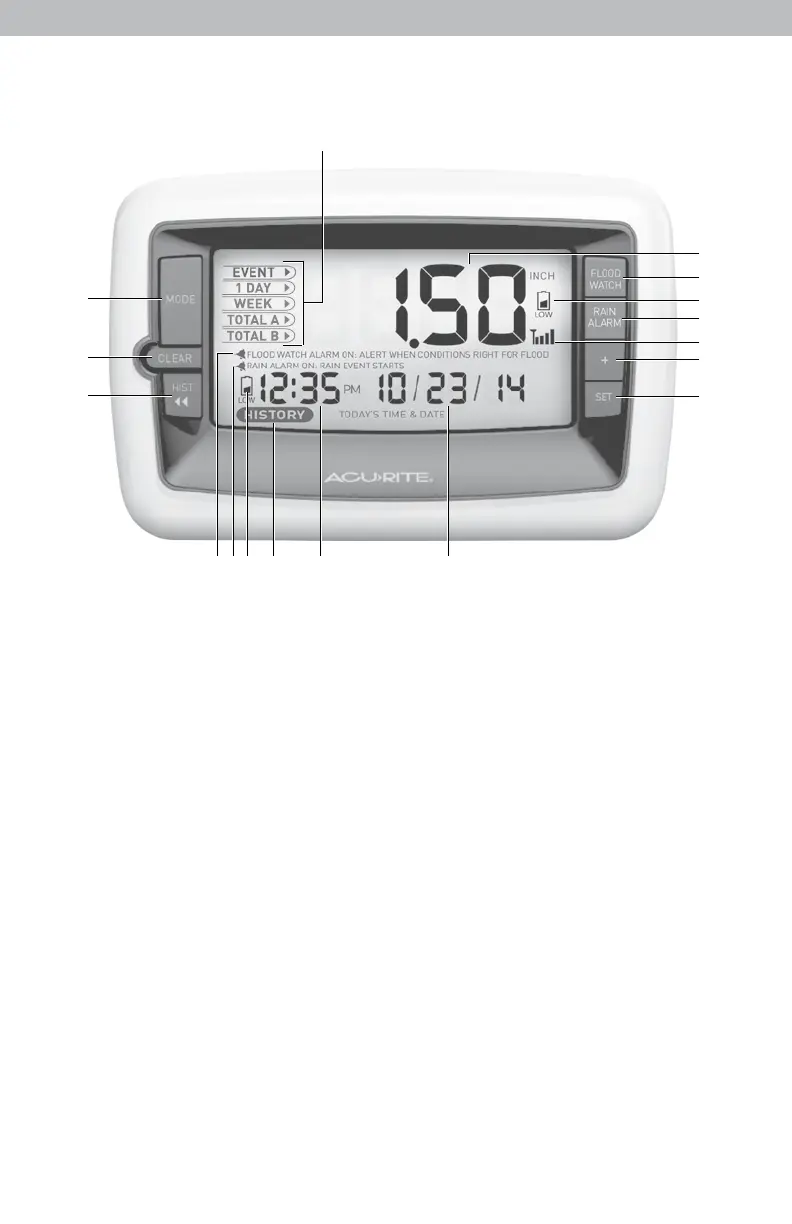
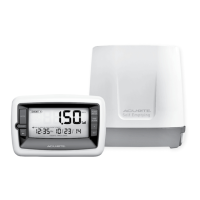
DISPLAY UNIT
1. MODE Button
Toggle between rainfall readings
for EVENT, 1 DAY, WEEK, TOTAL
A or TOTAL B.
2 . CLEAR Button
Clears data being viewed for
current mode (#1).
3. HIST Button
Displays historical data.
4. FLOOD WATCH ALARM Indicator
Indicates conditions are present
that could lead to ooding.
5. RAIN ALARM Indicator
Indicates that a rain event has
begun.
6. Display Low Battery Indicator
7. HISTORY Icon
Indicates historical data is being
viewed.
16
15
14
13
12
11
10
9
8. Time
9. Date
10. SET Button
For setup preferences.
11. ”+” Button
For setup preferences.
12. Rain Collector Signal Strength
13. RAIN ALARM Button
Activates/Deactivates rain alarm.
14. Rain Collector Low Battery Indicator
15. FLOOD WATCH Button
Activates/Deactivates ood watch alarm.
16. Rainfall Total
For current mode selected (#1).
17. Mode
Indicates mode displayed (#1).
3


 To Next Page