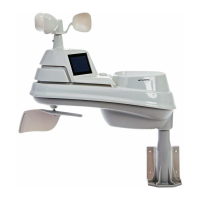
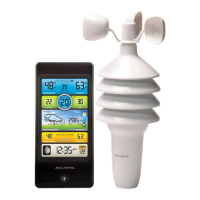
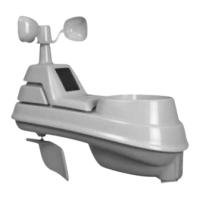
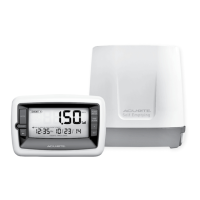
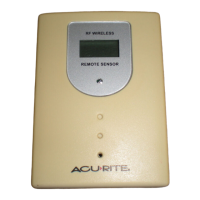
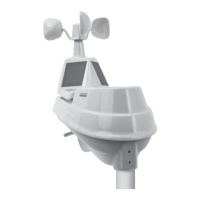
The AcuRite Iris™ (5-in-1) Weather Sensor, model 06014, is a comprehensive outdoor weather monitoring device designed to provide accurate measurements of various environmental conditions. It features a dual solar panel for power and includes a range of sensors to collect data on rainfall, temperature, humidity, wind speed, and wind direction. The sensor is intended for year-round outdoor use and requires proper placement to ensure optimal accuracy and wireless communication with a companion display unit (not included).
Function Description:
The AcuRite Iris sensor is a 5-in-1 weather station that measures:
- Rainfall: Collected by a funnel and measured by an internal tipping bucket mechanism.
- Temperature & Humidity: Internal sensors provide outdoor temperature and humidity readings.
- Wind Speed: Measured by an anemometer.
- Wind Direction: Determined by a wind direction vane.
The dual solar panel converts sunlight into power to run an internal aspirating fan, which draws ambient air into the sensor. This process reduces solar radiation heating, leading to more accurate temperature measurements. The sensor communicates wirelessly with a compatible display unit, transmitting data for real-time monitoring and forecasting.
Important Technical Specifications:
- Temperature Range (Outdoor): -40°F to 158°F (-40°C to 70°C).
- Humidity Range (Outdoor): 1% to 99%.
- Wind Speed: 0 to 99 mph; 0 to 159 kph; 0 to 86 knots.
- Wind Direction Indicators: 16 points.
- Rainfall: Measures 0.01 inches (0.25 mm) and up.
- Wireless Range: 330 ft / 100 m, depending on home construction materials.
- Operating Frequency: 433 MHz.
- Power: Requires 4 x AA alkaline or lithium batteries. Lithium batteries are recommended for temperatures below -4°F / -20°C.
- Data Reporting:
- Wind Speed: 18-second updates.
- Wind Direction: 30-second updates.
- Outdoor Temperature & Humidity: 36-second updates.
Usage Features:
- A-B-C Switch: An ID code switch inside the battery compartment must be set to match the companion display unit (A, B, or C) to ensure synchronization.
- Battery Compartment: Houses 4 AA batteries. Lithium batteries are recommended for cold weather performance.
- Rain Gauge Stabilizer: A plastic tab taped to the bottom of the sensor must be removed before use for the rain gauge to function correctly.
- Mounting: The sensor includes a mounting bracket designed to screw onto wooden posts (2"x4" or larger) or 3/4" steel pipe.
- Installation Height: Mount the sensor at a minimum height of 5 feet (1.5 meters) off the ground in an open area. Higher placement (e.g., 33 feet / 10 meters) is recommended for more accurate wind measurements.
- Solar Cell Orientation: The solar cell should face SOUTH to maximize sun exposure and properly orient wind direction.
- Placement Guidelines for Maximum Accuracy:
- No Obstructions: Choose an open location with no obstructions above or around the sensor.
- Wireless Range: Display and sensor must be within 330 feet (100 meters) of each other. Avoid large metallic items, thick walls, and metal surfaces that may limit wireless communication.
- Prevent Interference: Place units at least 3 feet (0.9 m) away from electronic devices (TV, computer, microwave, radio, etc.).
- Avoid Heat Sources: Position away from heaters, air conditioners, chimneys, exhaust vents, asphalt, and concrete.
- Avoid Humidity Sources: Do not install near pools, spas, or other bodies of water.
- Avoid Sprinkler Heads: Do not install where it will be sprayed by a sprinkler system to prevent water intrusion.
- Wind & Rain Obstructions: Mount in a wide-open area with few structures to ensure accurate wind measurement.
- Rain Gauge Calibration: The rain gauge can be calibrated for improved accuracy. This involves ensuring the sensor is level, using a companion unit to monitor readings, and slowly dripping a measured amount of water (1 cup / 8 oz) into the rain gauge over 20 minutes. Adjustments can be made using calibration screws on the bottom of the sensor.
Maintenance Features:
- Debris Filter: Pre-installed to prevent debris from entering the rain gauge. Regular cleaning of the rain collector funnel and debris screen is recommended.
- Wind Cup Maintenance: Ensure wind cups spin freely. If they hesitate or stop, try lubricating them with graphite powder or spray lubricant.
- Battery Replacement: Replace batteries as needed, especially in cold conditions, where lithium batteries are preferred.
- Troubleshooting: The manual provides solutions for common issues such as no outdoor sensor reception, flashing or dashed outdoor temperature readings, inaccurate forecasts, inaccurate temperature or humidity, and no rainfall readings. Support is available online at www.acurite.com/support.
- Product Registration: Registering the product online at www.acurite.com/product-registration provides 1-year warranty protection.
The AcuRite Iris (5-in-1) Weather Sensor is designed for ease of installation and reliable long-term outdoor use, providing essential weather data for personal monitoring and forecasting.
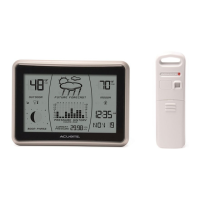
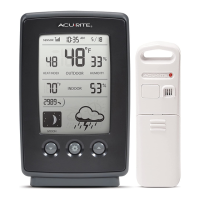
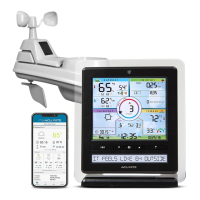
The AcuRite Iris® Mini Display, model 06106, is a compact indoor display unit designed to receive and present weather data from a compatible AcuRite Iris® Weather Sensor (sold separately). This display provides real-time information on outdoor and indoor conditions, along with a personalized weather forecast.
Function Description:
The AcuRite Iris Mini Display serves as the central interface for viewing weather data collected by an AcuRite Iris Weather Sensor. It displays:
- Current Outdoor Temperature & Humidity: Readings from the external sensor.
- Current Wind Direction & Speed: Data from the external sensor.
- Outdoor Sensor Signal Strength & Low Battery Indicator: Status of the connected outdoor sensor.
- Current Rainfall Total: Accumulated rainfall data from the external sensor.
- Current Indoor Temperature: Measured by an internal sensor within the display unit.
- Current Barometric Pressure: With an arrow indicating trending direction (falling, steady, or rising).
- Weather Forecast for Next 12-24 Hours: Generated using self-calibrating technology based on data from the outdoor sensor.
- Time & Date: User-set time and calendar information.
- Display Low Battery Indicator: Alerts when the display unit's batteries are low.
- Freeze Alert Indicator: Notifies when the outdoor temperature is at or below freezing (32°F; 0°C).
Important Technical Specifications:
- Temperature Range (Outdoor): -40°F to 158°F (-40°C to 70°C) (from external sensor).
- Temperature Range (Indoor): 32°F to 122°F (0°C to 50°C).
- Humidity Range (Outdoor): 1% to 99% (from external sensor).
- Wind Speed: 0 to 99 mph; 0 to 159 kph (from external sensor).
- Wind Direction Indications: 16 points (from external sensor).
- Rainfall: 0.01 inches (0.25 mm) and up (from external sensor).
- Wireless Range: 330 ft / 100 m, depending on home construction materials (between display and sensor).
- Operating Frequency: 433 MHz.
- Power: Requires 3 x AA alkaline batteries (required).
- Data Reporting:
- Wind Speed: 18-second updates.
- Direction: 36 seconds.
- Outdoor Temperature & Humidity: 36-second updates.
- Indoor Temperature & Humidity: 60-second updates.
Usage Features:
- A-B-C Switch: Located in the battery compartment, this switch must match the setting on the AcuRite Iris Weather Sensor for proper synchronization.
- Battery Compartment: Holds 3 x AA batteries.
- Integrated Hanger: For easy wall mounting.
- Display Stand: Allows for tabletop use.
- Buttons:
- SET Button: Used to enter setup mode for time, date, and units, and to save adjustments. Also used for calibration and alarm setup.
- ▲ / ▼ Buttons: Used to adjust values during setup and calibration.
- RECORDS Button: Cycles through daily and all-time high/low records for outdoor temperature, humidity, and wind speed maximum. Press and release to clear historical records; press and hold for 10 seconds for a full factory reset.
- Alarm Button: Enters alarm setup mode.
- Set Time, Date & Units: Users can set the clock hour, minute, calendar month, date, year, and choose between U.S. standard (Fahrenheit, mph, inches, inHg) or metric (Celsius, km/h, mm, hPa) units.
- Learning Mode: The display utilizes a self-calibrating forecasting algorithm that analyzes pressure changes over approximately 14 days to determine altitude and provide a personalized forecast. The "LEARNING" icon disappears once calibration is complete.
- Weather Forecast Icons: Displays visual representations of upcoming weather conditions (Stormy & Windy, Snow Likely, Snow/Rain Mix Likely, Rain Likely, Cloudy).
- Barometric Pressure Trend Indicator: An arrow icon shows if the pressure is falling, steady, or rising.
- Rainfall Tracking: Provides historical rainfall data for today, yesterday, past week, past month, and past year.
- High & Low Records: Automatically clears daily high/low records for indoor and outdoor temperature/humidity at midnight.
Maintenance Features:
- Display Care: Clean with a soft, damp cloth. Avoid caustic cleaners, abrasives, dust, dirt, and moisture. Clean ventilation ports regularly with a gentle puff of air.
- Calibration: Outdoor temperature, humidity, indoor temperature, and barometric pressure can be calibrated to improve accuracy. This is accessed by simultaneously pressing the "▲", "SET", and "▼" buttons for 5 seconds. Calibrated values are indicated by a "" icon. Barometric pressure can be set to AUTO or MANUAL mode for calibration.
- Troubleshooting: The manual offers solutions for issues such as no outdoor sensor reception, flashing outdoor temperature, inaccurate forecasts, inaccurate temperature/humidity readings, and display screen not working.
- Customer Support: AcuRite provides support through chat, email, installation videos, instruction manuals, and replacement parts. Product registration is recommended for warranty service.
The AcuRite Iris Mini Display is designed to be user-friendly and provides essential weather insights, making it a valuable tool for monitoring local environmental conditions.


 To Next Page
 General