Acuity Brands | One Lithonia Way Conyers, GA 30012 | Phone: 800.535.2465 | www.acuitycontrols.com | © 2019 Acuity Brands Lighting, Inc. | All rights reserved. | Rev. 11/14/2019
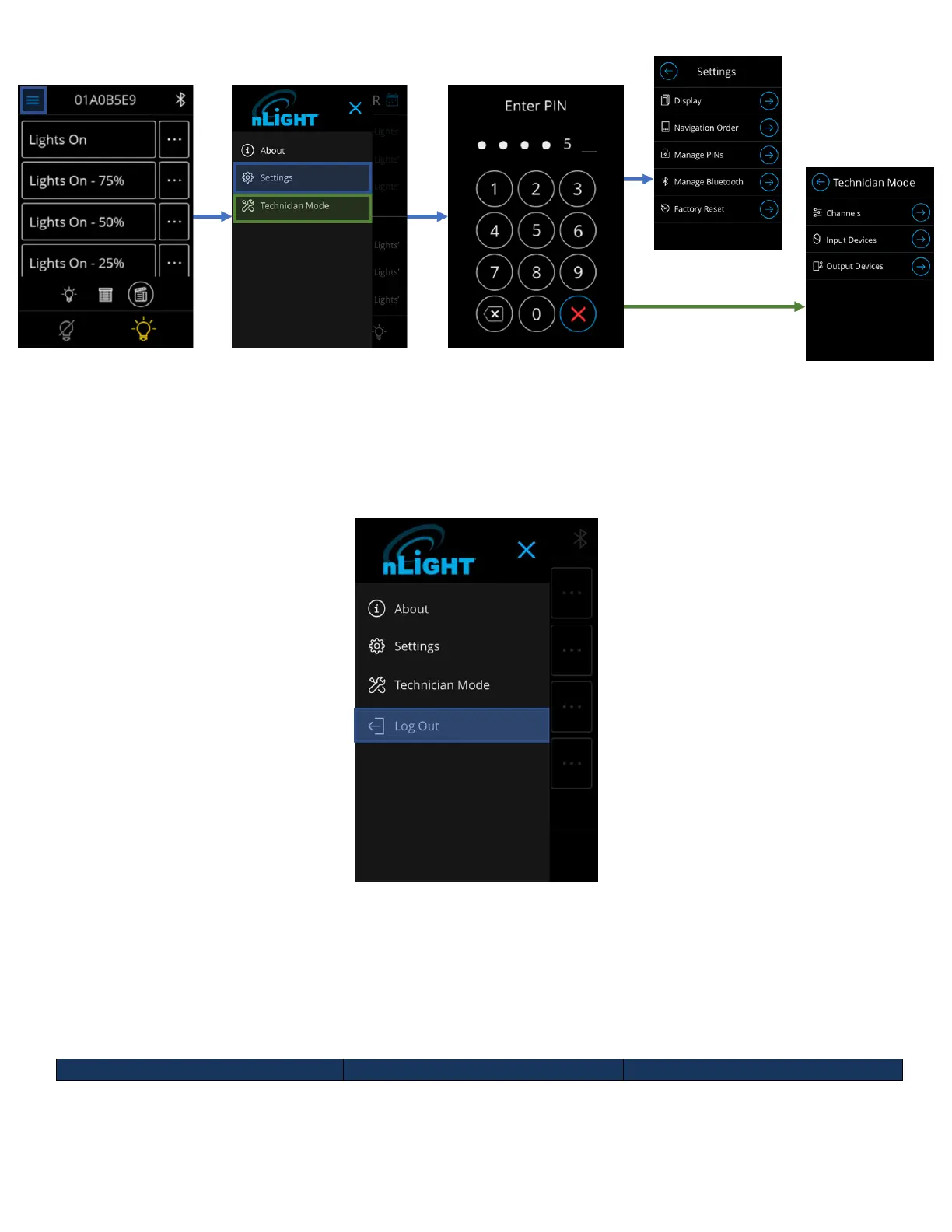
Figure 6 - Administrator login workflow
Upon successful login, administrators will be directed to the screen they selected from the hamburger menu.
Logging out of Administrator
Administrators can log out of the unit by tapping on the “Log out” button in the hamburger menu (See Figure 7).
Figure 7- Log out of Administrator mode
Administrators are also logged out when the unit times out and transitions to the screensaver, or when the screen
shuts off due to inactivity.
Main Dashboard Screens
With its ability to allow control of light channels, shade channels and scenes, the nLight UNITOUCH hosts three
main reorganizable navigation screens accessible to all user levels.



 To Next Page