Acuity Brands | One Lithonia Way Conyers, GA 30012 | Phone: 800.535.2465 | www.acuitycontrols.com | © 2019 Acuity Brands Lighting, Inc. | All rights reserved. | Rev. 11/14/2019
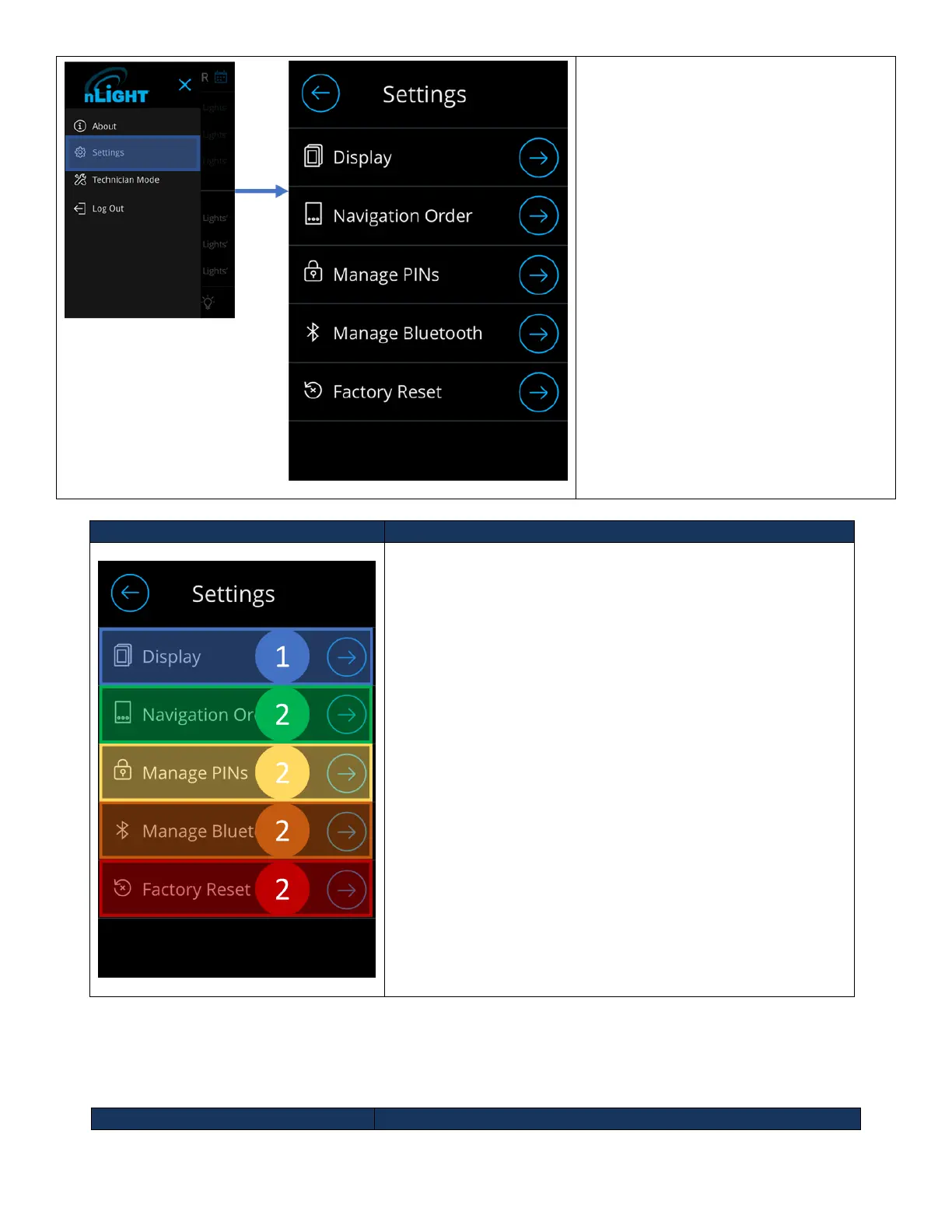
Figure 22 - Settings Screen
The settings screen can be accessed
through the hamburger menu by the
following workflow. From the main
dashboard:
3. Press the hamburger button on the
top left.
a. Sidebar should appear
4. Press the settings button
a. If not already logged in, a
prompt will be made to
enter the administrator
PIN
The following element blocks allow configuration of the
UNITOUCH.
5. Display – Enables device display configurations, from
inactivity timeout behaviors, screen savers, themes, to
device label.
6. Navigation Order – Allows configuration main dashboard
navigation.
7. Manage PINs – Allows configuration of the administrator
and lock-out PINs.
8. Manage Bluetooth - Enables configuration Bluetooth
settings.
9. Factory Reset – Initiates the factory reset process.
Display
The Display section gives users the ability to fully configure the device’s screen behavior on-screen and can be
accessed through the settings screen.



 To Next Page