.,t)))
/\ V
0
-i-, '
~
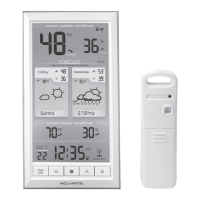
1. Current Outdoor Temperature
Arrow icon indicates the direction
temperature is trending.
2. Outdoor High & Low Temperature
Records
Highest and lowest temperature
recorded since midnight.
3. Current Outdoor Humidity Arrow
icon indicates the direction humidity
is trending.
4. Outdoor Sensor Signal Strength
5. Heat Index/Dew Point
Heat Index calculation displays
when temperature is 80°F (27°C)
or above.
Dew Point calculation displays
when temperature is 79°F (26°C)
or below.
6. Date
7. Button
For alarm setup.
8. and Buttons
For setup preferences and viewing
indoor high & low records.
9. Button
For setup preferences.
10. Button
For momentary backlight and
dimmer settings.
11.
AUTO
Icon
Indicates display is in auto-dimming
brightness mode (see page 8).
12. Moon Phase
13. Clock
14. Current Barometric Pressure
Arrow icon indicates the direction
pressure is trending.
15. 12 to 24 Hour Weather Forecast
Self-calibrating forecasting pulls data
from the outdoor sensor to generate
your personal forecast.
16. Current Indoor Humidity
Arrow icon indicates direction
humidity is trending.
17. Indoor High & Low Temperature
Records
Highest and lowest temperature
recorded since midnight.
18. Current Indoor Temperature
Arrow icon indicates direction
temperature is trending.
5



 To Next Page