SPECIFICATIONS
ProductFacts
Batteries: 5 x "AN' (not included)
(21Lithium Batteries Recommendedin
OutdoorSensorif temperatures are
below-4°F
Measurement Ranges
Outdoor Temperature: -40°F to 158°F
-40°Cto 70°C
Outdoor Humidity: 1%to 99%
Indoor Temperature: 32°F to 122°F
0°Cto 50°C
Indoor Humidity: 1% to 99%
Wireless Range: 330 ft / 1oom MAX
Dependingon home construction materials
MADE IN CHINA
HECHOENCHINA
LimitedOne
YearWarranty
Instructions&
WarrantyEnclosed
Customer Care:
877-221-1252
www.Acurite.com
Patentnumbers:5,978,738;6J076,044;6,59~990;US7,637,141B2
ACURITE®isa registeredtraoemarkofthe l,haneyInstrumentCo.
LakeGeneva,WI
53147
WARNING:THIS PRODUCTCONTAINSA BUTTON-CELLBATTERY.IF SWALLOWED, IT~
COULDCAUSESEVEREINJURY ORDEATHIN JUST2 HOURS.
SEEKMEDICALATTENTIONIMMIDIATELYIF INGESTED.
~
POISON
PLEASEDISPOSEOFOLDORDEFECTIVEBATTERIESIN AN ENVIRONMENTALLYSAFE
WAYANDIN ACCORDANCEWITHYOURLOCALLAWSAND REGULATIONS.
BATTERYSAFETY:Cleanthebatterycontactsandalsothoseofthedevicepriortobatteryinstallation.Removebatteriesfromequipmentwhichisnot
tobeusedforanextendedperiodoflime.Followthepolarity(+/·)diagraminthebatterycompartment.Promptlyremovedeadbatteriesfromthe
device.Disposeofusedbatteriesproperly.Onlybatteriesofthesameorequivalenttypeasrecommendedaretobeused.DONOTincinerateused
batteries.DONOTdisposeofbatteriesinfire,asbatteriesmayexplodeorleak.DONOTmixoldandnewbatteriesortypesofbatteries
(alkaline/standard).00NOTuserechargeablebatteries.00NOTrechargenon-rechargeablebatteries.00NOTshort-circuitthesupplyterminals.
12
CALIBRATION
If you find that the temperature and/or humidity is slightly off, this
weather device allows for calibration. The forecast may be
calibrated as well. To calibrate the weather station, you must enter
into the calibration mode.
CalibrationMode
To access the calibration mode, press AND HOLD the "A" and "T"
buttons together for at least 5 seconds. After 20 seconds of inactivity,
the display will save your adjustments and automatically exit
calibration mode and return to normal operation.
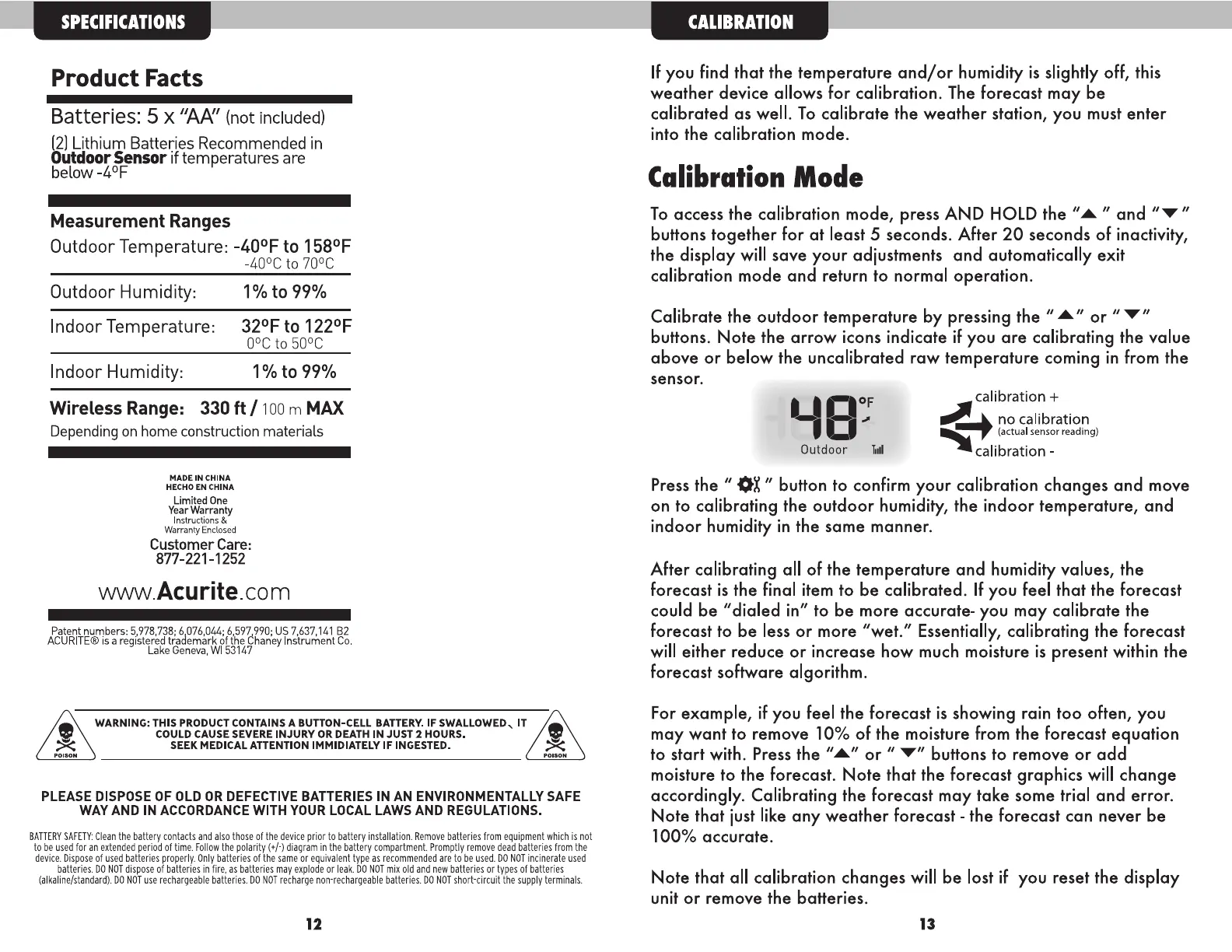
Calibrate the outdoor temperature by pressing the
"A" or "...,."
buttons. Note the arrow icons indicate if you are calibrating the value
above or below the uncalibrated raw temperature coming in from the
sensor.
Outdoor .~
calibration +
~
►
no calibration
~
(actual sensor reading)
calibration -
Press the " OX" button to confirm your calibration changes and move
on to calibrating the outdoor humidity, the indoor temperature, and
indoor humidity in the same manner.
After calibrating all of the temperature and humidity values, the
forecast is the final item to be calibrated. If you feel that the forecast
could be "dialed in" to be more accurate- you may calibrate the
forecast to be less or more "wet." Essentially, calibrating the forecast
will either reduce or increase how much moisture is present within the
forecast software algorithm.
For example, if you feel the forecast is showing rain too often, you
may want to remove 10% of the moisture from the forecast equation
to start with. Press the
"A" or "T" buttons to remove or add
moisture to the forecast. Note that the forecast graphics will change
accordingly. Calibrating the forecast may take some trial and error.
Note that just like any weather forecast - the forecast can never be
100% accurate.
Note that all calibration changes will be lost if you reset the display
unit or remove the batteries.
13


 To Previous Page
 Loading...