9
Acurus MUSE Immersive Processor USER GUIDE
Revision 20190227
Document 1000905
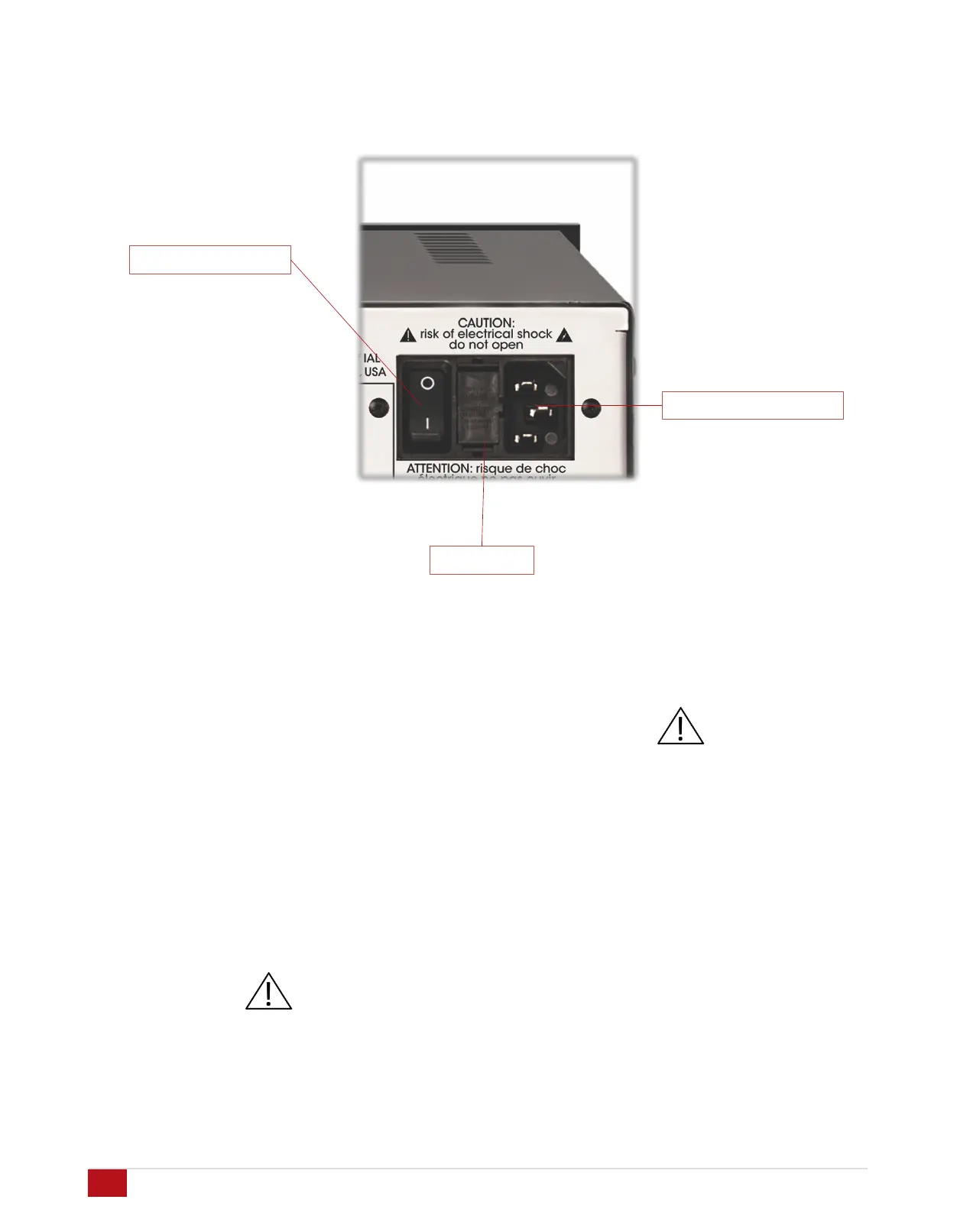
Master Power Switch: To the back right of the MUSE is a
combined master power on/off switch, main AC in fuse
drawer, and AC mains inlet. The master power switch in
the off position puts the MUSE in a state of zero current
draw, however, in most installations, this power switch will
remain in the on position and the power on/standby control
on the front panel or through network control should be
used. The master power switch can be used to perform a
system restart. Note that settings are maintained in non-
volatile memory even with the master power switch off.
Note also that a system restart can be performed through
the settings menu without using the Master Power Switch.
Mains fuse drawer: Below the master power switch is the
mains fuse drawer. Press the tabs on the sides of the
drawer to open it and access the fuse(s) inside.
IMPORTANT NOTE: Replace the mains fuse with the
exact fuse rating called out on the product label
located on the bottom of the MUSE housing.
Main AC cord inlet: Below the fuse drawer is the main AC
cord inlet. Ensure the AC cord is inserted securely in this
socket.
IMPORTANT NOTE: Use only the AC cord included
with the MUSE and do not tamper with or alter the
ground plug.
Fuse drawer
Master Power Switch
Power cord connection


 To Next Page