18 D3V MANUAL [ENGLISH] 19D3V MANUAL [ENGLISH]
6. ROOM COMPENSATION EQ
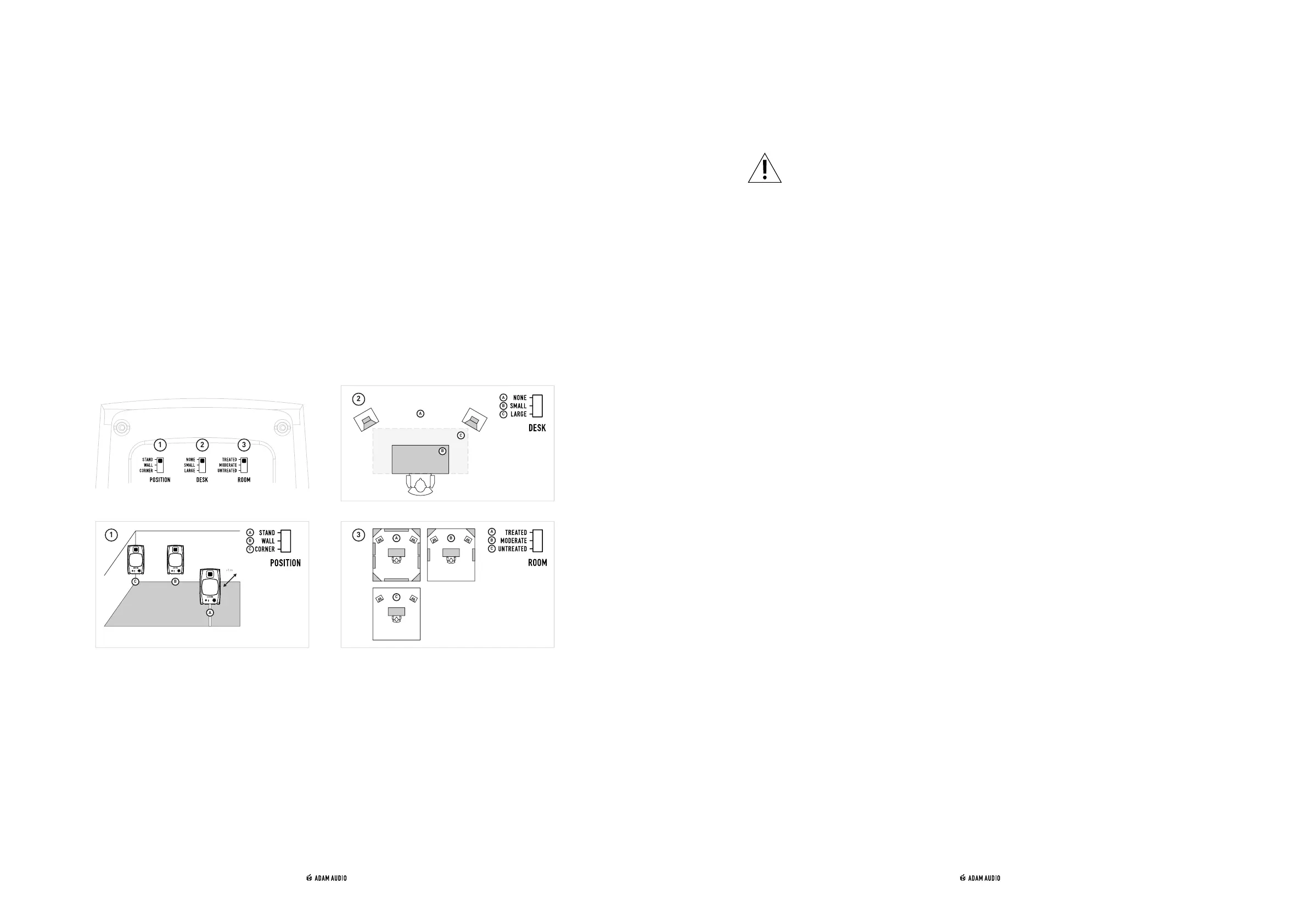
The acoustic experience at your listening position is predominantly driven by factors such as:
① The position of the loudspeakers in the room
② The size of your desk
③ Whether the room is acoustically treated with absorbing and reflecting materials.
Located on the back panel of the left loudspeaker, the room compensation EQ controls allow
you to adjust the frequency response of the DV3 according to your listening environment.
To achieve the best possible audio reproduction, move the switches to the positions which
most accurately describe the location of the loudspeakers in the room and the acoustics of
the room itself.
A
B
C
1 2 3
1
>1 m
C B
A
詳しいマニュアル は、下 記にて:
查看完整的用户手册,请访问:
查看完整的用戶手冊,請訪問:
7. USE
a) Firmware update
IMPORTANT: Make sure to never cut the power or data connection to and from your D3V
and computer while a firmware update is in progress!
Firmware updates can become necessary to improve and/or enhance the functionality of
your D3V.
Preparing the firmware update:
→ Make sure your D3V is connected to the power supply block, but do NOT connect the
power supply block with the mains cable to the power outlet.
→ Connect your D3V to a computer using the included USB-C to USB-C cable. Use the
included USB-C to USB-A adapter, if required.
→ Download the “D3V Firmware updater” which you can find here after registration of
your D3V: www.adam-audio.com/my-adam/
→ Close all other applications or windows which may be open
→ Run the “D3V Firmware updater”.
Running the firmware update:
→ Press and hold the front panel knob. Keep it pressed in until instructed.
→ While pressing the front panel knob, connect the mains cable of the power supply
block to the power outlet.
→ Keep the front panel knob pushed until the D3V is booted into firmware upgrade
mode, indicated by the constant purple pulsing of the ADAM Audio logo LED. At this
stage the knob can be released.
→ If a firmware update is available, “D3V Firmware updater” will offer to update your
loudspeaker's firmware.
→ Install the update.
→ Successfully updated firmware is indicated by three green flashes of the ADAM
Audio logo LED, followed by an automatic reboot of the D3V.
b) Maintenance
→ Switch off your loudspeakers and disconnect from the AC mains power
before cleaning.
→ Liquids should not be used to clean the loudspeaker.
→ Only use a clean dry lint free cloth to clean the cabinet.
→ Do not touch the drivers or passive radiators.


 To Next Page