CLEARPASS Full-Body Security Screening System
OPERATION
MANUAL
Identification
ADN190.00.00.000 OM2
Revision
1
Date
02.2022
Page
41 of 52
When using an Operator’s AWS without Operator’s Stand
Enable the Scanner and the Operator’s AWS following the sequence below:
1) Ensure the System is connected to the mains.
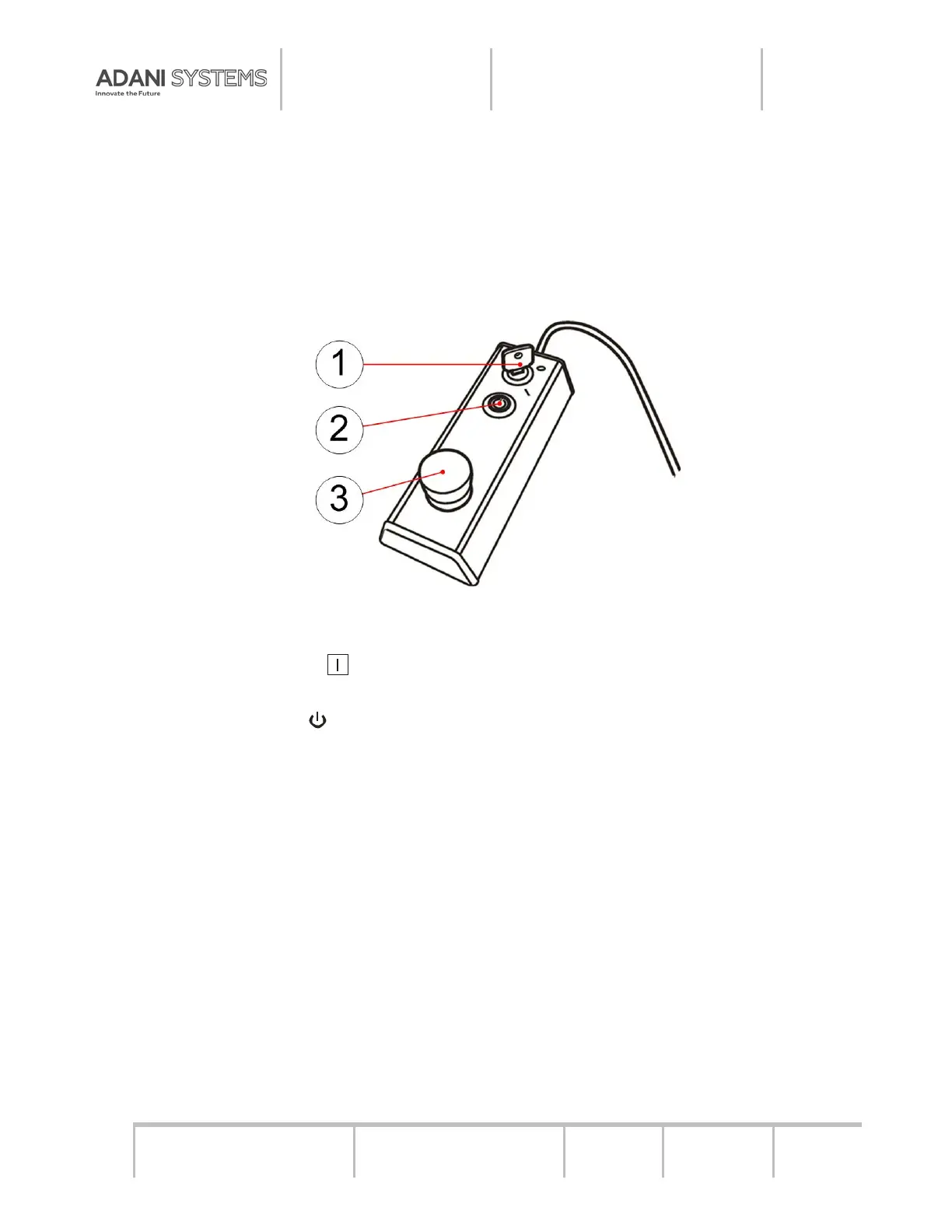
2) Insert the key 1 (see Figure 4.2) in the “0-l” switch on the control box and turn it clockwise
until it stops. Press the LED indicator push button 2 to enable the System (see Figure 4.1). The
indicator turns green then.
1 – Key; 2 – LED Indicator Push-Button; 3 – Emergency Stop Button
Figure 4.2 – Control Box
3) Press and hold the button on the UPS which is part of the Operator’s AWS until you
hear an audio signal.
4) Press the Power button on the system unit of the Operator’s AWS.
5) To enter the operating system, select the OPERATOR tab and enter the password.
After enabling the AWS computer and entering the operating system, the operator’s pro-
gram will start automatically.
6) Warm up the X-ray generator in case it has not been used for a long time and the
“WARM UP NEEDED” message appears in the Operator’s program. Perform the warm up
procedure following the Control Software Complex Operator's Manual.


 To Next Page