102
the lawn so that the blades do not hit
them.
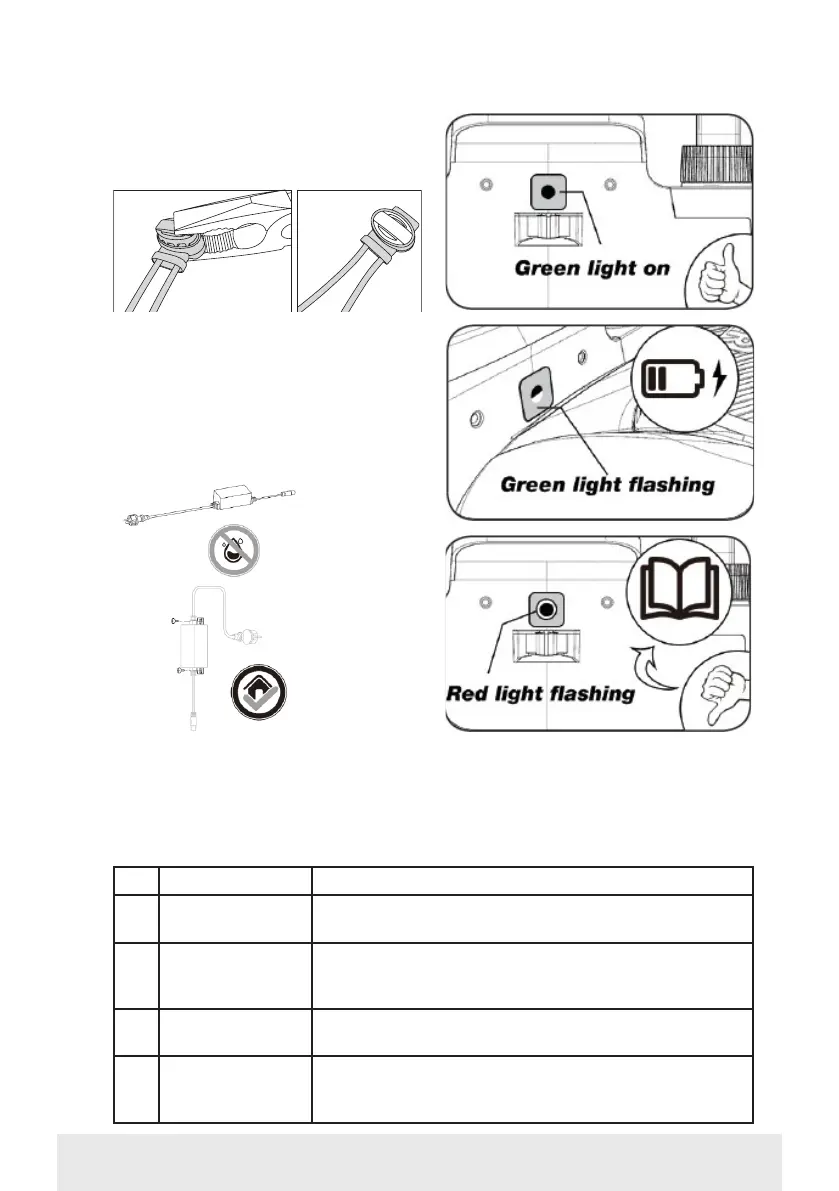
2 x sleeve joints are included
POWERING THE CHARGING STATION
You can now connect the 230V power
supply to the charging station.
Make sure that the charger is not placed
directly on the ground and that it is kept
dry, for example by hanging it up.
A small LED will now light. If the LED
lights green, everything is OK and there
is a connection to the boundary wire.
If there is no light from the LED, first
check that the 230V power supply is
connected correctly and switched on. If
the LED does not light constantly or if it
flashes green, and if there is no fault in
LED DESCRIPTION
1 Green light The boundary wire is correctly installed and the robot
is fully charged.
2 No light There is no power. Check that the power supply is cor-
rectly mounted on the charging station and plugged
into an outlet.
3 Flashing green
light
The robotic mower is charging
4 Flashing red light The boundary wire is not correctly installed in the red/
black connector or there is a break somewhere on the
boundary wire. Check any cable joints.


 To Next Page