112
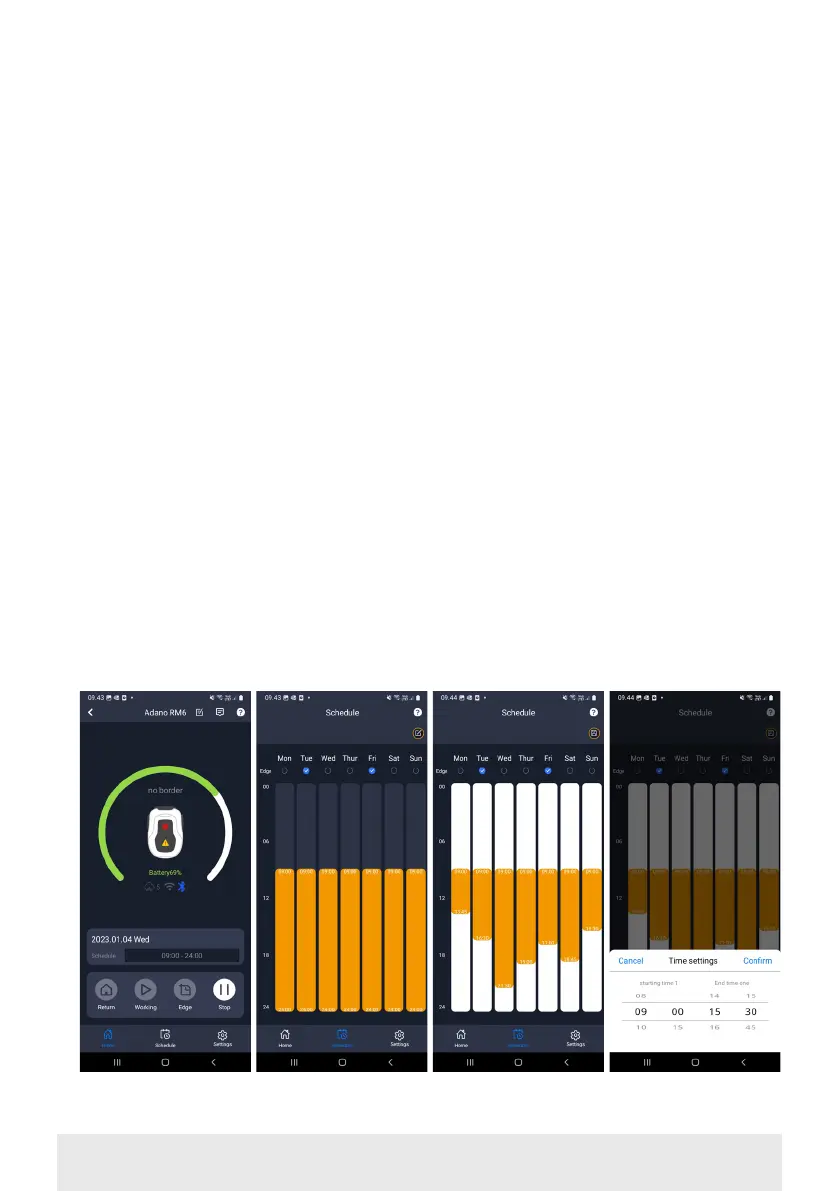
time by pressing ‘Edit’ and holding
your finger down on the orange area
and then swiping up or down.
• Press ‘Save’ when the schedule is
complete.
If you have a large lawn, the robot
needs to run more often than if the
lawn is smaller. If your lawn is close
to the robot's maximum capacity (600
m2), it will probably need to run every
day for longer periods. The layout of the
lawn also has an impact on how much
the robot has to run to keep the grass
down. A single square lawn without ob-
stacles is faster to cut than a lawn with
narrow passages and many obstacles,
as the robot needs more time to stop
and change direction.
It is recommended that you try it out
and see the result. The robot should
not drive more than necessary to avoid
tracks in the lawn. During the growing
season and when it rains a lot, it needs
to be run more often. In dry periods it
should run less.
In some periods, the grass is damp at
the start and end of the day. Afternoon
is typically the best time.
Home screen Schedule
overview
Set edge trim-
ming
Set time


 To Next Page