53
and enter the password used for the desired account, highlight Sign In and
press OK.
Edit A User Account
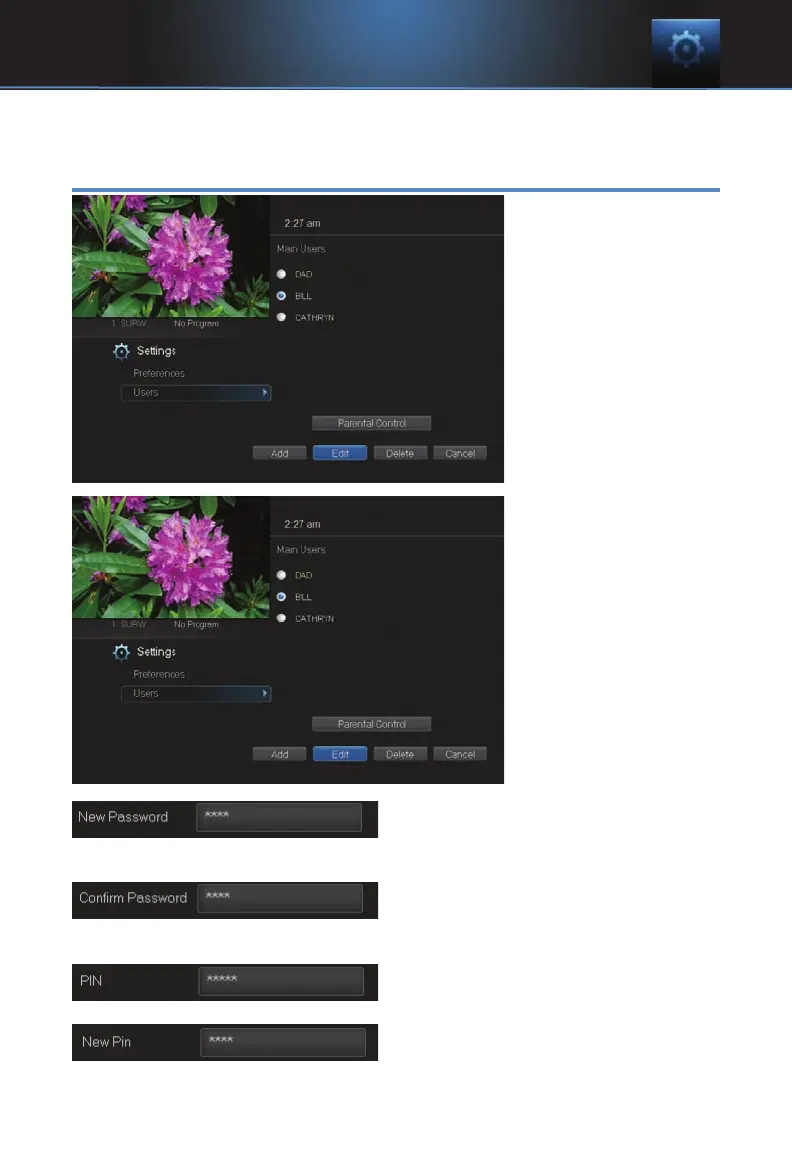
To edit a user account,
highlight the user
account and press
OK, then highlight the
Edit button and
press OK.
Note: The master
account is the first
account listed and
is shown in yellow
rather than white.
Using the number pad
enter the current
password for this
account.
Now highlight New Password to
change the password. Use the
number pad on your remote to enter a numeric password.
Highlight Confirm Password to re-
enter the password. Use the number
pad on your remote to exactly re-enter the password.
Highlight PIN and enter the account’s
existing PIN.
Highlight New PIN and enter a new
PIN for this account.
10 Settings



 To Next Page