14
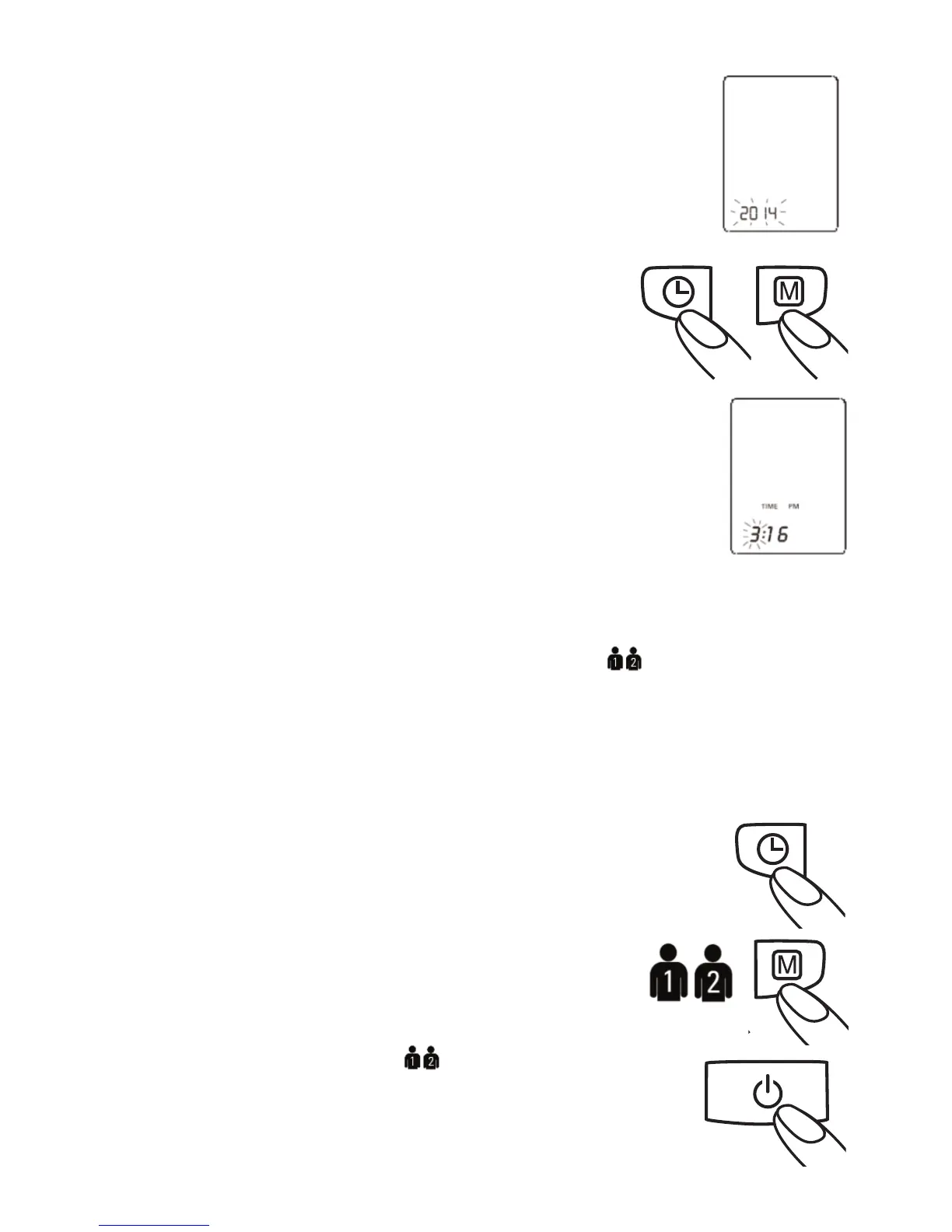
To set the date, begin with the year. The 4 characters1.
(2014) on the screen will blink. You can change the year
by pressing the «MEMORY» button. To confirm and set
the year, press the «TIME» button.
The device will automatically advance to the month. 2.
To change the month, use the «MEMORY»
button. To confirm and set the month, press
the «TIME» button.
To set the day, hour, and minutes, use the same3.
steps. Push the «MEMORY» button to change the
display value. Press the «TIME» button to confirm
and set the value.
Once you have set the minutes and pressed the «TIME» button,4.
the date and time are set and the time is displayed.
NOTE
If you want to change date and time, press and hold the «TIME» button•
down for approx. 5 seconds until the user icon flashes. Press the
«TIME» button again, and then you can enter the new values as
described above.
A single press of the «MEMORY» button or «TIME» button advances•
one operation.
Holding the button down speeds up the procedure.•
5.5. Select the User
This blood pressure monitor is designed to store
99 measurements for each of two users. Before
taking a measurement, be certain that the correct
user has been selected.
With the unit off, press and hold the «TIME»a)
button until the user icon starts blinking.
Press the «MEMORY» button to toggle between users.b)
Press the «ON/OFF» button to make your selection.c)






 To Next Page