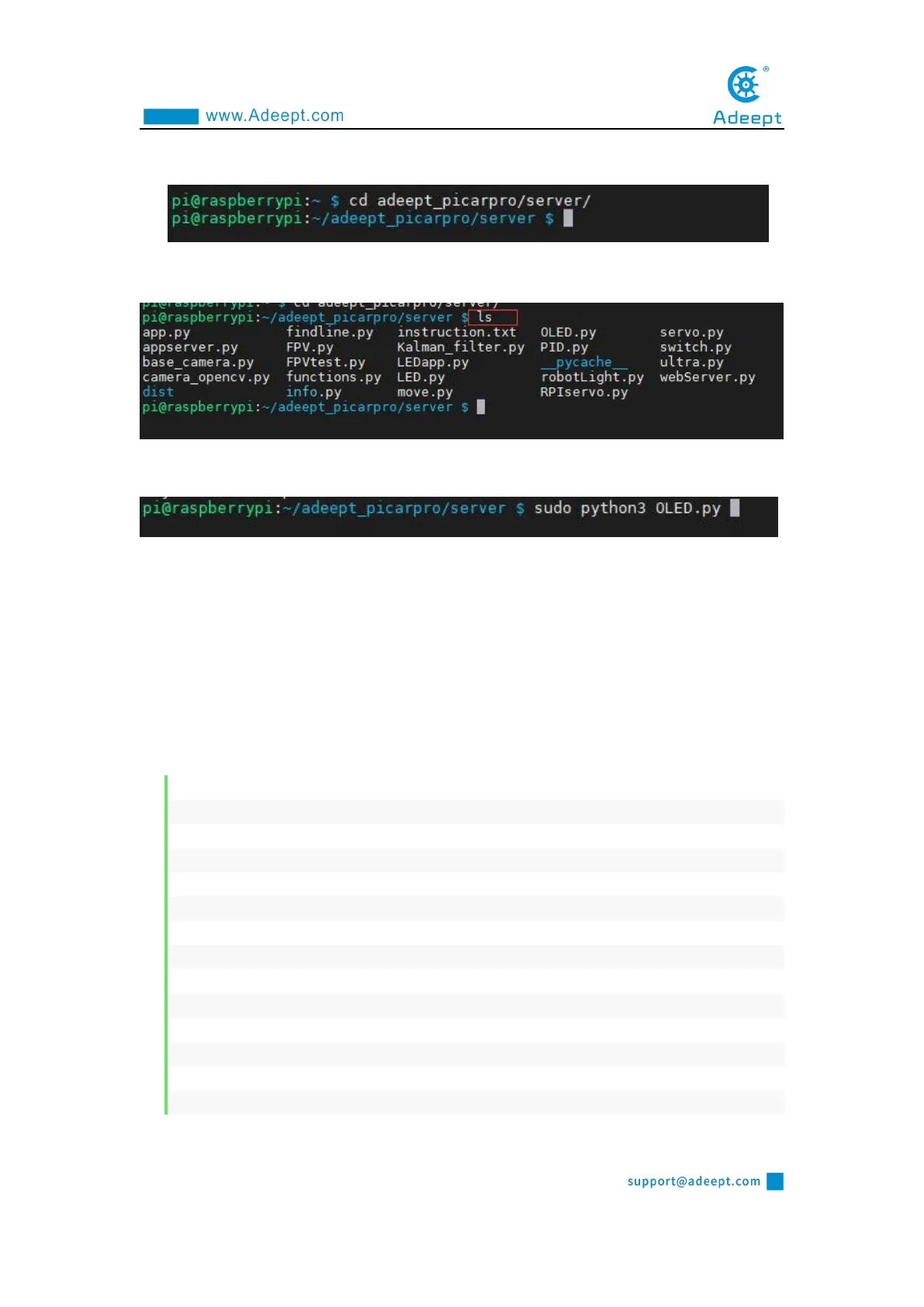
located:
cd adeept_picarpro/server/
3. View the contents of the current directory file:
ls
4. Enter the command and press Enter to run the program:
sudo python3 OLED.py
5. After running the program successfully, you will observe that the word
"GEWBOT.COM" will be displayed on the OLED screen.
6. When you want to terminate the running program, you can press the shortcut key
"Ctrl + C" on the keyboard.
6.4.2 The main code program of this lesson
For the complete code, please refer to the file OLED.py.
1. from luma.core.interface.serial import i2c
2. from luma.core.render import canvas
3. from luma.oled.device import ssd1306
4. import time
5.
6. serial = i2c(port=1, address=0x3C)
7. device = ssd1306(serial, rotate=0)
8.
9. text_1 = 'GEWBOT.COM' # Define the text displayed on the OLED screen, up to 6 lines.
10. text_2 = 'IP:CONNECTING'
11. text_3 = '<ARM> OR <PT> MODE'
12. text_4 = 'MPU6050 DETECTING'
13. text_5 = 'FUNCTION OFF'
14. text_6 = 'Message:None'



 To Next Page