Industrial Electronic Devices
ADFweb.com Srl – IT31010 – Mareno – Treviso INFO: www.adfweb.com Phone +39.0438.30.91.31
UPDATE DEVICE:
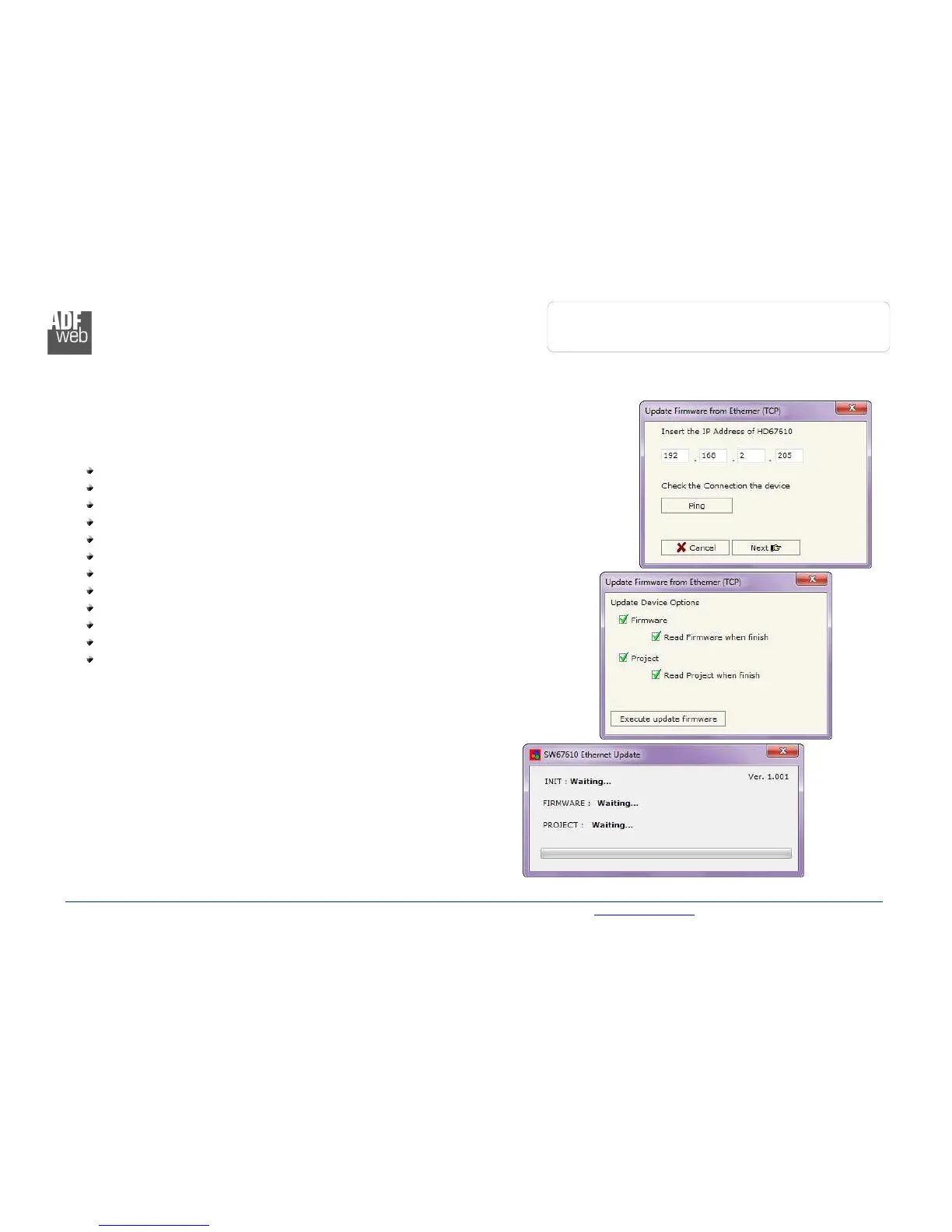
By pressing the “Update Device” button it is possible to load the created Configuration into the
device; and also the Firmware, if is necessary.
If you don’t know the actual IP address of the device you have to use this procedure:
Turn off the Device;
Put Dip2 of ‘Dip-Switch A’ at ON position;
Turn on the device
Connect the Ethernet cable;
Insert the IP “192.168.2.205”;
Press the “Ping” button, must appear “Device Found!”;
Press the “Next” button;
Select which operations you want to do;
Press the “Execute update firmware” button to start the upload;
When all the operations are “OK” turn off the Device;
Put Dip2 of ‘Dip-Switch A’ at OFF position;
Turn on the device.
At this point the configuration/firmware on the device is correctly updated.
Figure 6: “Update device” windows



 To Next Page