Master-Slave Configuration:
This function will allows you to link units together to run in a Master-
Slave mode. In Master-Slave operation one unit will act as the con-
trolling unit and the others will react to the controlling units built-in
programs. Any unit can act as a Master or as a Slave however, only
one unit can be programmed to act as the “Master.”
Master-Slave Connections and Settings:
1. Daisy chain your units via the XLR connector on the rear of the
unit. Use standard XLR data cables to link your units together.
Remember that the Male XLR connector is the input and the
Female XLR connector is the ouput. The first unit in the chain
(master) will use the female XLR connector only. The last unit in
the chain will use the male XLR connector only.
2. Set the “Master” unit to your desired mode of operation.
3. Connect the rst “Slave” unit to the “Master.”
4. On the “Slave” unit press the MODE button until “SLAv” is dis-
played. The “Slave” unit will now follow the “Master”.
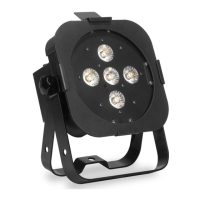
5P Hex Master-Slave Configuration
With this feature you can connect the xtures to one another
using the I.E.C input and output sockets. The quantity that can
be connected is 8 xtures maximum for 120V and 21 xtures
maximum for 240V. After the maximum xtures has been reached
you will need to use a new power outlet. They must be the same
xtures. DO NOT mix xtures.
5P Hex Power Cord Daisy Chain
5P Hex Operating Instructions
the xture will go into when the DMX signal is lost. You can also set this
as the operating mode you would like the unit to return to when power
is applied.
1. Press the MODE button until the DMX address is displayed. Press
the ENTER button until either “Soun”, “HOLd”, or “blC” is dis-
played.
2. Use the UP or DOWN buttons to nd the mode you want incase
of power loss or DMX loss.
• “blC” (Blackout) - If the DMX signal is lost or interrupted, the unit will
automatically go into stand by mode.
• “HOLd” (Last State) - If the DMX signal is lost or interrupted, the x-
ture will stay in the last DMX set up. If power is applied and this mode
is set, the unit will automatically go into the last DMX set up.
• “Soun” (Sound Active) - If the DMX signal is lost or interrupted, the
unit will automatically go into sound active mode.
3. Find your desired setting and press ENTER. Your setting will be
saved automatically.
ADJ Products, LLC - www.adj.com - 5P Hex User Manual Page 11ADJ Products, LLC - www.adj.com - 5P Hex User Manual Page 10



 To Next Page