DMX Operator Controls and Functions
ADJ Products, LLC - www.adj.com - DMX Operator User Manual Page 7
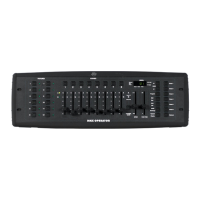
1. FIXTURE BUTTONS - Used to Select any or all of 12 fixtures. This is what selects which
DMX channels go to the fixtures.
See addressing of fixtures on page 9 for more information
2. SCENE BUTTONS - Used to store Scenes in program mode or playback your scenes in
playback mode
3. LCD DISPLAY - Displays values and settings depending on the chosen function.
4. BANK BUTTONS ( OR )- Selects which Bank you want to use. (there are 30 selectable
banks total.)
5. CHASE - Used to select chases (1-6).
6. PROGRAM - Used to activate program mode. Display blinks when activated.
7. MIDI / REC - Used to control MIDI operation or to Record each step for Scene and
Chases.
8. AUTO/DEL- Select AUTO speed in chase mode or Deletes Scenes and or chases.
9. AUDIO / BANK COPY- Used to trigger sound activation in Chase mode or to copy a bank
of scenes from one to another in Program Mode.
10. BLACKOUT - Disables or enables all channel outputs.
11. TAP SYNC / DISPLAY - In Auto Chase mode used to change rate of chase. Also used to
change LCD Display in Manual Chase.
12. FADE TIME SLIDER - Used to adjust the FADE TIME. Fade Time is the amount of time it
takes the DMX Operator to completely change from one scene to another.
For example; if the fade time slider is set to 0 (zero) a scene change will be instant. If the
slider is set to ‘30s’ it will take the DMX Operator 30 seconds to complete the change
from one scene to the next.
13. SPEED SLIDER - Used to adjust the rate of chase speed in Auto Mode.
14. PAGE SELECT - Used to switch between PAGE A (1-8) & PAGE B (9-16) channel banks.
15. FADERS (1-8) - Used to adjust the channel/values from 0% to 100%.


 To Next Page