DMX SET UP
DMX-512: DMX is short for Digital Multiplex. This is a universal protocol used as a form of commu-
nication between intelligent xtures and controllers. A DMX controller sends DMX data instructions
from the controller to the xture. DMX data is sent as serial data that travels from xture to xture
via the DATA “IN” and DATA “OUT” XLR terminals located on all DMX xtures (most controllers only
have a DATA “OUT” terminal).
DMX Linking: DMX is a language allowing all makes and models of dierent manufacturers to be
linked together and operate from a single controller, as long as all xtures and the controller are DMX
compliant. To ensure proper DMX data transmission, try to use the shortest cable path possible
when linking several DMX xtures. The order in which xtures are connected in a DMX line does not
inuence the DMX addressing. For example, a xture assigned a DMX address of 1 may be placed
anywhere in a DMX line: at the beginning, at the end, or anywhere in the middle. When a xture is
assigned a DMX address of 1, the DMX controller knows to send DATA assigned to address 1 to that
unit, no matter where it is located in the DMX chain.
Data Cable (DMX Cable) Requirements (For DMX Operation): The Focus Prole can be controlled
via DMX-512 protocol. The DMX address is set on the front panel of the xture. Your unit and your
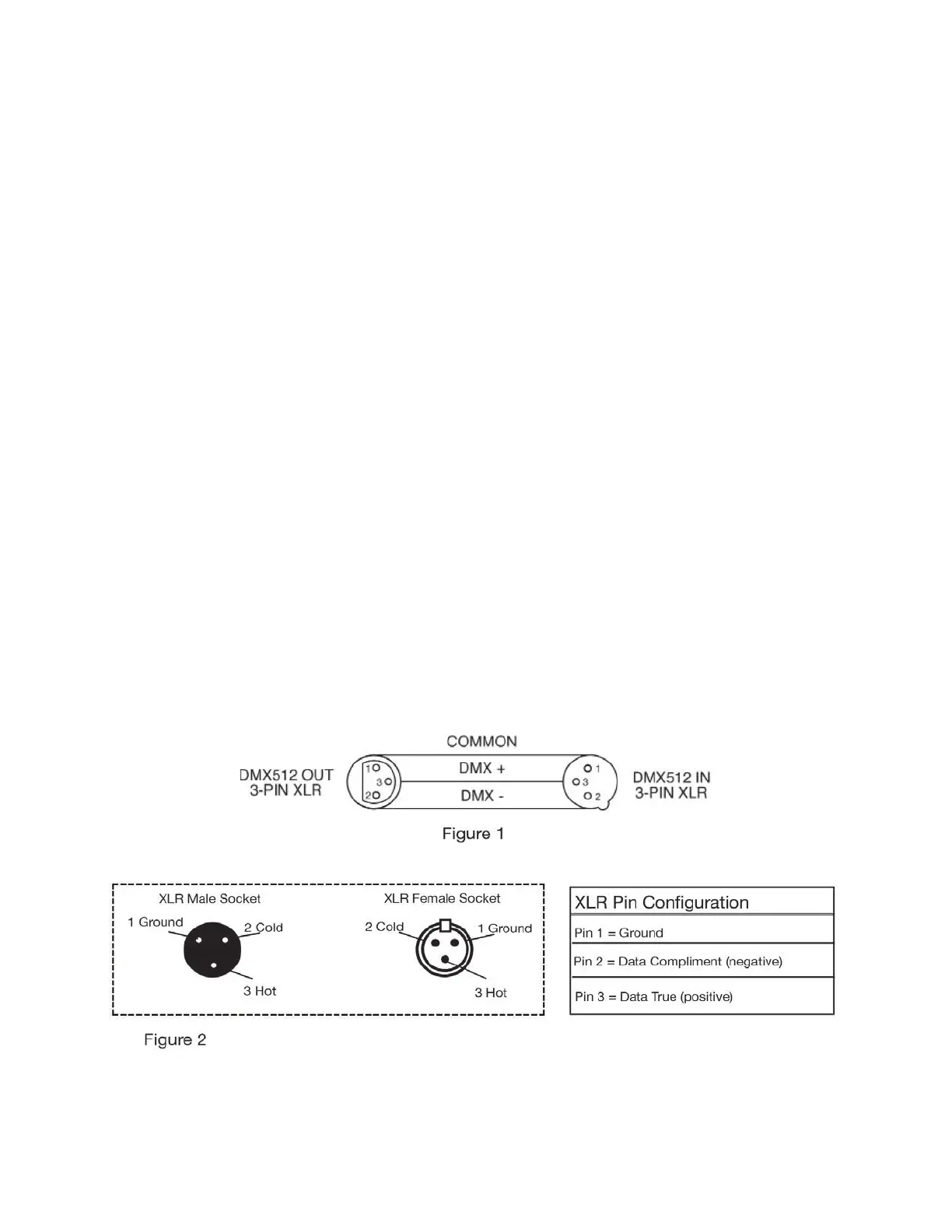
DMX controller require a standard 3-pin XLR connector for data input and data output. We recom-
mend Accu-Cable DMX cables. If you are making your own cables, be sure to use standard 110-120
Ohm shielded cable (This cable may be purchased at almost all pro lighting stores). Your cables
should be made with a male XLR connector at one end and a female XLR connector on the other.
Also remember that DMX cable must be daisy chained and cannot be split.
Notice: Be sure to follow gures 1 and 2 when making your own cables. Do not use the ground lug
on the XLR connector. Do not connect the cable’s shield conductor to the ground lug or allow the
shield conductor to come in contact with the XLR’s outer casing. Grounding the shield could cause a
short circuit and may result in erratic behavior.
9






 To Next Page