20
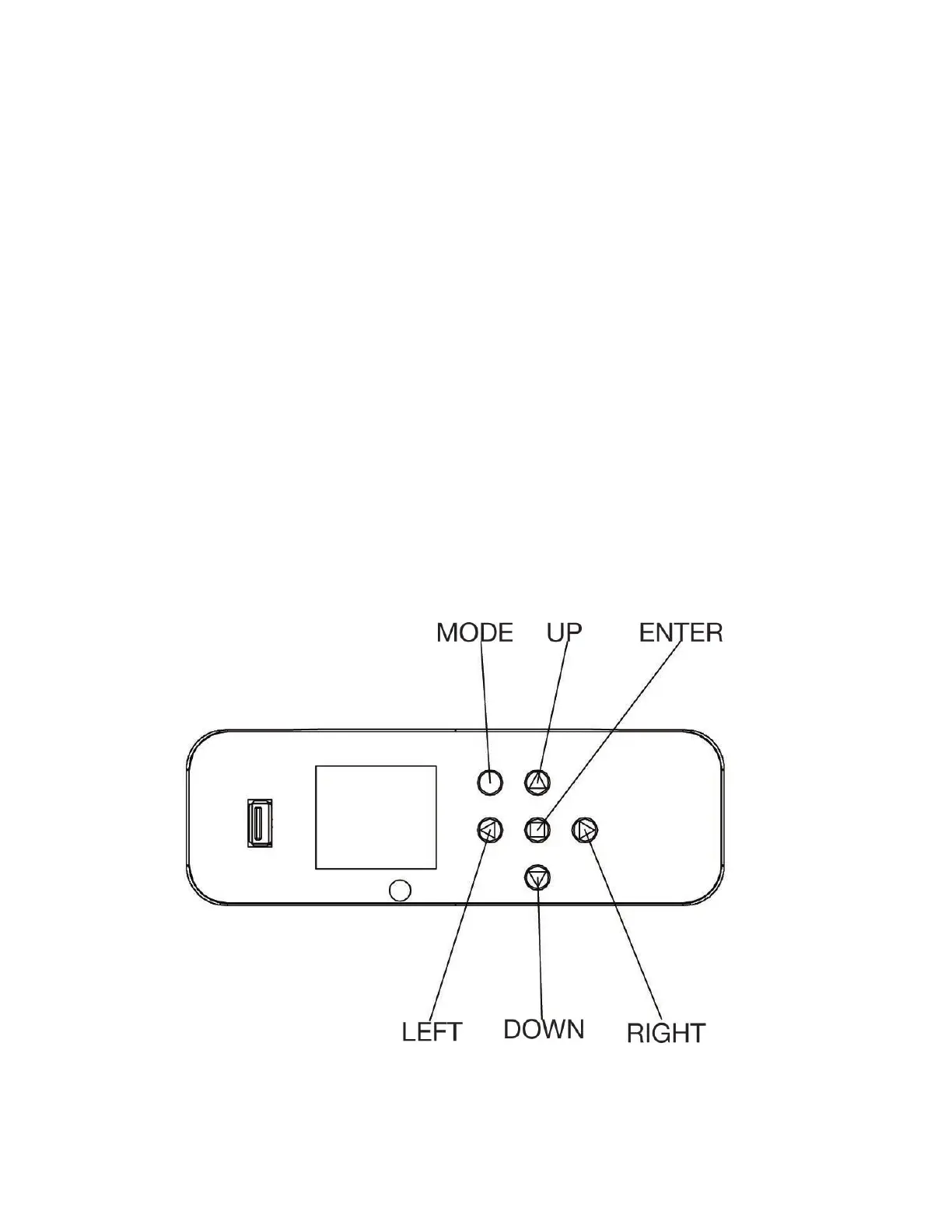
This fixture includes an easy to navigate control panel display, from which all necessary settings and
adjustments can be made. During normal operation, pressing the MODE button once will access
the fixture’s main menu. Once in the main menu, the UP and DOWN buttons can be used to navi-
gate through the different functions. Press the ENTER button to select the option displayed on the
screen, and use the LEFT and RIGHT buttons to adjust the settings for the selected option. Press
the ENTER button once more to confirm the setting. Press the MODE button at any time to return to
the main menu without making any adjustments.
The fixture also includes an internal battery that allows users to operate the screen and control panel
even when the fixture is not plugged in. To access the system menu when the fixture is running on
internal battery power, press and hold the MODE button to illuminate the display screen until the
DMX address is displayed, then navigate to the desired system menu.
Please note that the battery is only capable of powering the screen and control panel, and that the
fixture is NOT capable of illuminating while on battery power.
The screen display can be quickly inverted without navigating through the system menu. To do so,
simply press the RIGHT button once to invert the display, and press the RIGHT button again to undo
the display inversion.
CONTROL PANEL





 To Next Page