ADJ Products, LLC - www.adj.com - Boom Box FX2 User Manual Page 3
Unpacking: Thank you for purchasing the Boom Box FX2 by ADJ Products, LLC. Every Boom Box
FX2 has been thoroughly tested and has been shipped in perfect operating condition. Carefully check
the shipping carton for damage that may have occurred during shipping. If the carton appears to
be damaged, carefully inspect your xture for any damage and be sure all equipment necessary to
operate the unit has arrived intact. In the event damage has been found or parts are missing, please
contact our toll free customer support number for fur-ther instructions. Please do not return this unit
to your dealer without contacting customer support rst.
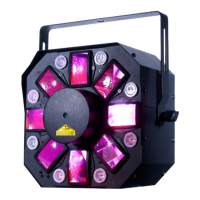
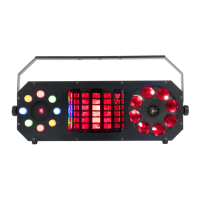
Introduction: The Boom Box FX2 is a DMX intelligent LED moon-ower, strobe, & laser xture. The
Boom Box FX2 has 2 DMX chan-nel modes, a 3 channel mode and 19 channel mode. The xture can
operate in as a stand alone xture or in a Master/Slave set up. The Boom Box FX2 has three operating
modes; sound active, show mode, and DMX Control. For best results use fog or special eects smoke
to enhance the beams projections.
Customer Support: ADJ Products, LLC provides a toll free cus-tomer support line, to provide help
and to answer any question should you encounter problems during your set up or initial operation. You
may also visit us on the web at www.adj.com for any comments or suggestions. Service Hours are
Monday through Friday 8:00 a.m. to 4:30 p.m. Pacic Standard Time.
Voice: (800) 322-6337
Fax: (323) 582-2941
E-mail: support@adj.com
Warning! To prevent or reduce the risk of electrical shock or re, do not expose this unit to rain or
moisture.
Caution! This may cause eye damage. Avoid looking directly into the light source. Use sensible pre-
caution.
Boom Box FX2 General Information


 To Next Page