page 13
8.
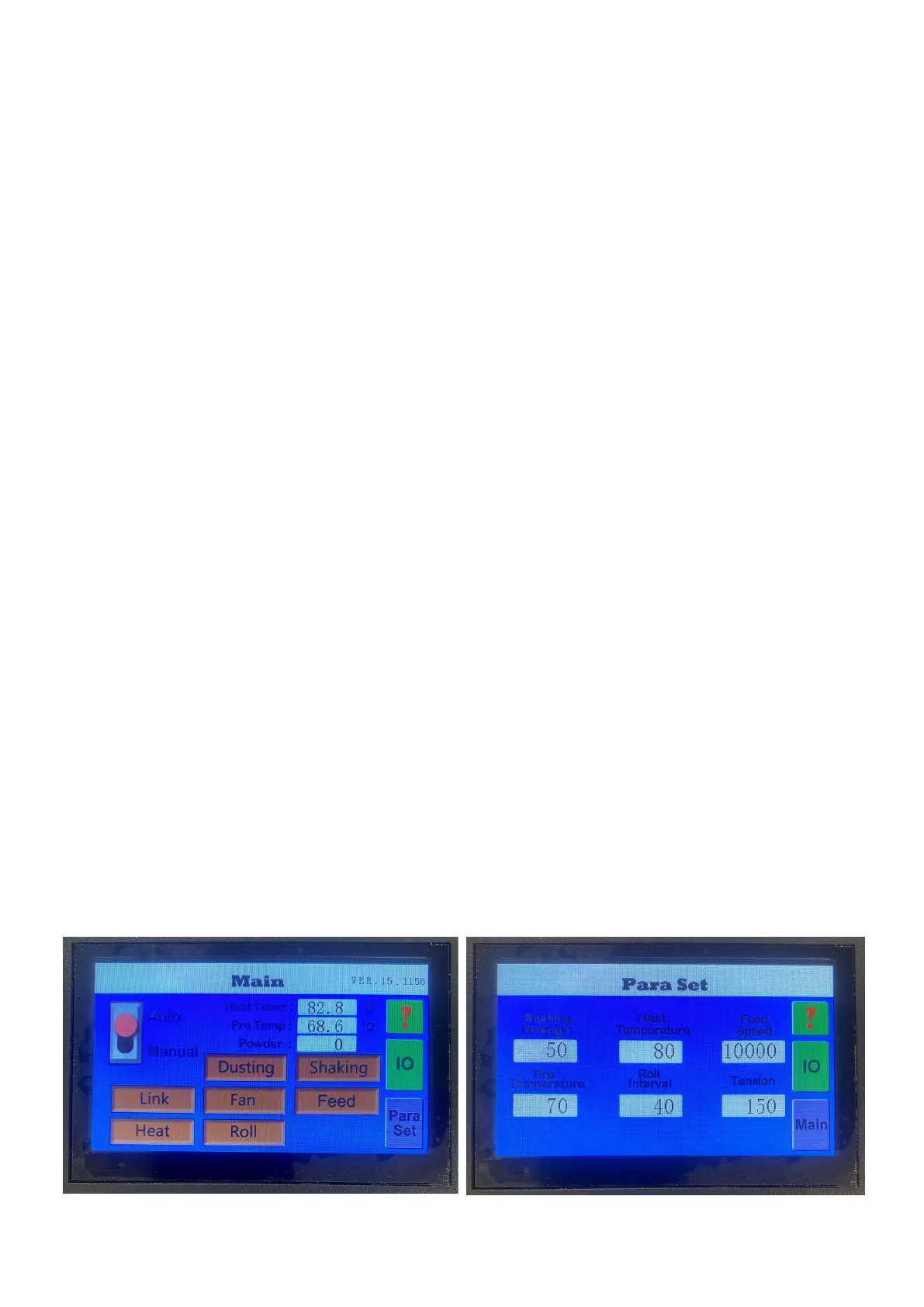
MAIN LAYOUTCONTROL PANEL
Auto: Used to start automatic mode (automatic production)
Manual: used to enter manual mode (manual operation)
Heat Temp: Dispays current oven temperature
Pre Temp: Displays current preheat plate heating temperature
Powder:
Displays current powder on film, measured by the powder weight sensor
Dusting:
Click to toggle the dusting function on/off
Shaking: Click to toggle the shaker function on/off
Link:
Fan: Turns the suction function fans on/off
Feed: Starts/stops rotation of the mesh belt
Heat: Starts/stops the heating cycle
Roll: Turns the film take up on/off
IO: Click to enter the monitoring page
Paraset: Click to enter the parameter setting page
Para set
Shaking Strength: Click to input powder shaking intensity
Heat Temperature: Click to input oven heating temperature
Feed Speed: Click to input speed of the mesh belt
Pre Temperature:
Click to input the temperature of the preheating plate
Used for powdering and curing the final prints from a print job.
Once activated the front media sensor is disabled and the remaining film will be
taken up.
Main menu
?:
Click to enter the help menu
Roll Interval Sets how often the suction roller rotates in link mode
Tension:
Sets the tension at the film take up roller



 To Next Page