115
USING ADOBE AUDITION
Mixing multitrack sessions
Last updated 2/16/2012
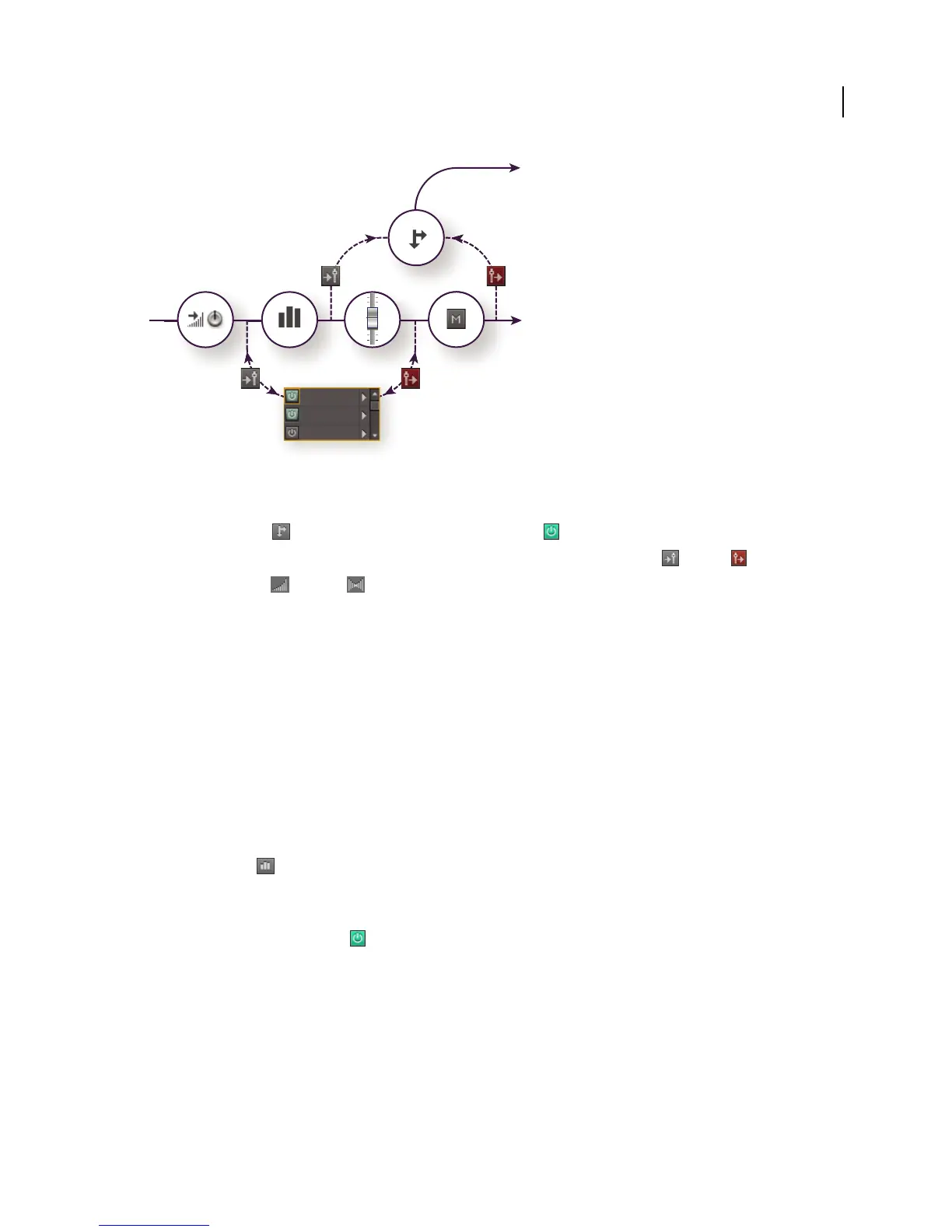
Pre- and post-fader effect and send routing for each track
A. Input B. EQ C. Track volume D. Track mute E. Send F. Effects Rack
1 In the Sends area of the Mixer, click the send Power button .
2 Click the Pre-Fader/Post-Fader button to place the send either before track volume or after .
3 Set send Volume and Pan .
4 From the Send pop-up menu, select a bus.
For more information, see “Insert effects before or after sends and EQ” on page 64.
More Help topics
“Routing audio to buses, sends, and the Master track” on page 112
“Set track output volume” on page 110
“Pan tracks in stereo” on page 110
Equalize tracks
For each track, the Multitrack Editor provides a parametric equalizer.
❖ In the EQ area of the Editor or Mixer panel, do any of the following:
• Double-click the graph to access detailed controls in the Track EQ window. (See “Parametric Equalizer effect”
on page 82.)
• Click the EQ Power button to compare audio with and without equalization.
More Help topics
“Use effect presets” on page 61
ABCD
F
E



 To Next Page