59
Last updated 2/16/2012
Chapter 6: Applying effects
Effects controls
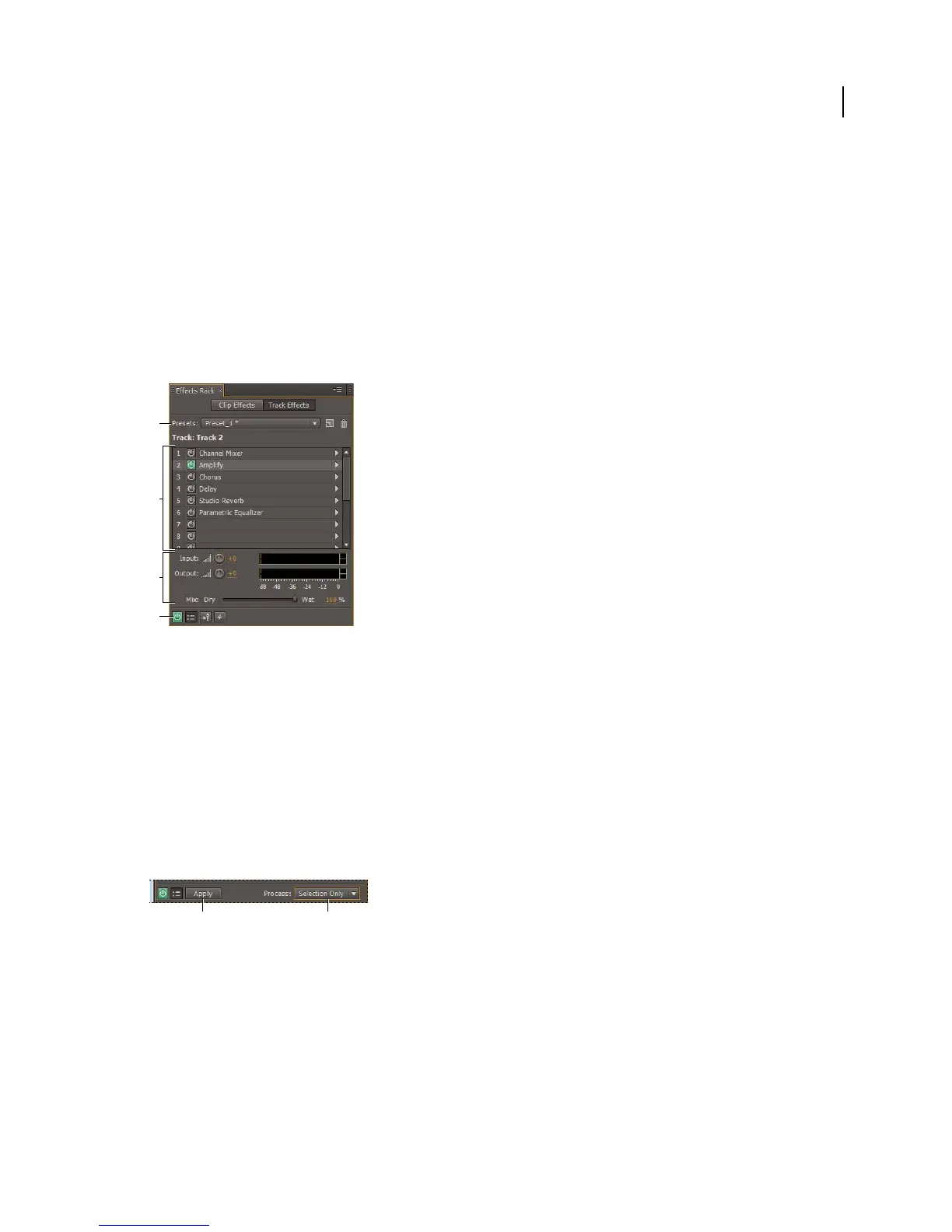
Effects Rack overview
The Effects Rack lets you insert, edit, and reorder up to 16 effects, optimize mix levels, and store favorite presets. Most
rack controls appear in both the Waveform and Multitrack editors.
Controls shared by the Waveform and Multitrack editors
A. Rack Preset controls B. Effect slots C. Level controls D. Main Power button
More Help topics
“Apply groups of effects in the Waveform Editor” on page 62
“Apply effects to clips or tracks” on page 63
“Comparing the Waveform and Multitrack editors” on page 8
Controls unique to the Waveform Editor
In the Waveform Editor, the Effects Rack provides a Process menu that that lets you modify a selection or the entire
file, and an Apply button that permanently applies effects.
Controls unique to the Waveform Editor
A. Apply button permanently applies effects B. Process menu lets you modify selection or entire file
Controls unique to the Multitrack Editor
The Effects Rack provides Pre-render Track and FX Pre/Post-Fader buttons that you use to optimize and route effects.
Each clip and track has its own Effects Rack, which is saved with the session.
Note: Buses and the Master track lack a Pre-render option because processing effects from all source tracks would reduce
performance.
A
C
B
D
AB



 To Next Page