4
Physical Details
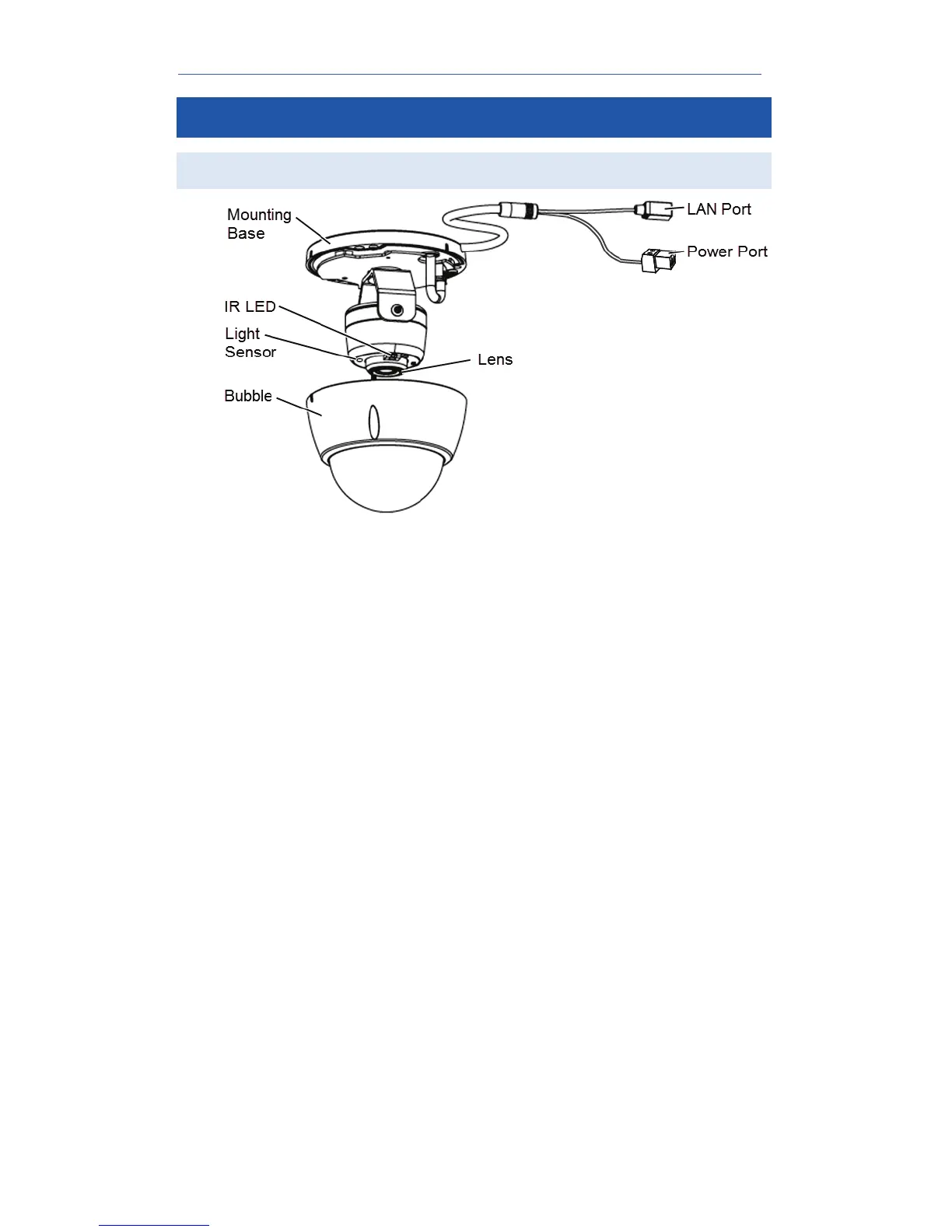
Components
Figure 1: Camera Components
These are used to provide illumination for night time
viewing. Ensure that the two IR LEDs are not
obstructed beneath the transparent dome bubble.
This is a hardware sensor to detect lux. Ensure that
the light sensor is not obstructed beneath the
transparent dome bubble.
No physical adjustment is required for the lens.
Ensure that the lens cover remains clean.
Use a standard Ethernet cable (not included) to
connect the LAN port of the supplied cable to the
Pulse gateway.
Note:
• Plugging in the Ethernet cable will disable
the wireless interface. Only one interface
can be active at any time.
• The Ethernet cable should only be
connected or disconnected when the
camera is powered OFF. Attaching or
detaching the Ethernet cable while the
camera is powered on does NOT switch the
interface between wired and wireless.
Insert the supplied terminal block, which has one end
the power cable (not supplied) connected to it and
the other end to the power adapter.


 To Next Page