Warranty: ADTRAN will replace or repair this product within the warranty period if it does not
meet its published specifications or fails while in service. Warranty information can
be found online at www.adtran.com/warranty
.
©2015 ADTRAN, Inc. All Rights Reserved.
*612877GONT-22B*
3. Install two #8 Pan Head screws (1” or greater in length)
approximately 5” apart. Use the two key holes on the back of ONT
as location marks. Leave approximately 1/4” protruding from the
mounting surface.
4. Slide the ONT over the Pan Head screws and exert a small amount
of downward pressure to ensure that the top of the slots are resting
on the shafts of the pan head screws.
Connect POTS, Indoor ONT
If POTS cables are not available, use the following procedure to create the
POTS cables:
1. Trim the insulation for the subscriber POTS cables.
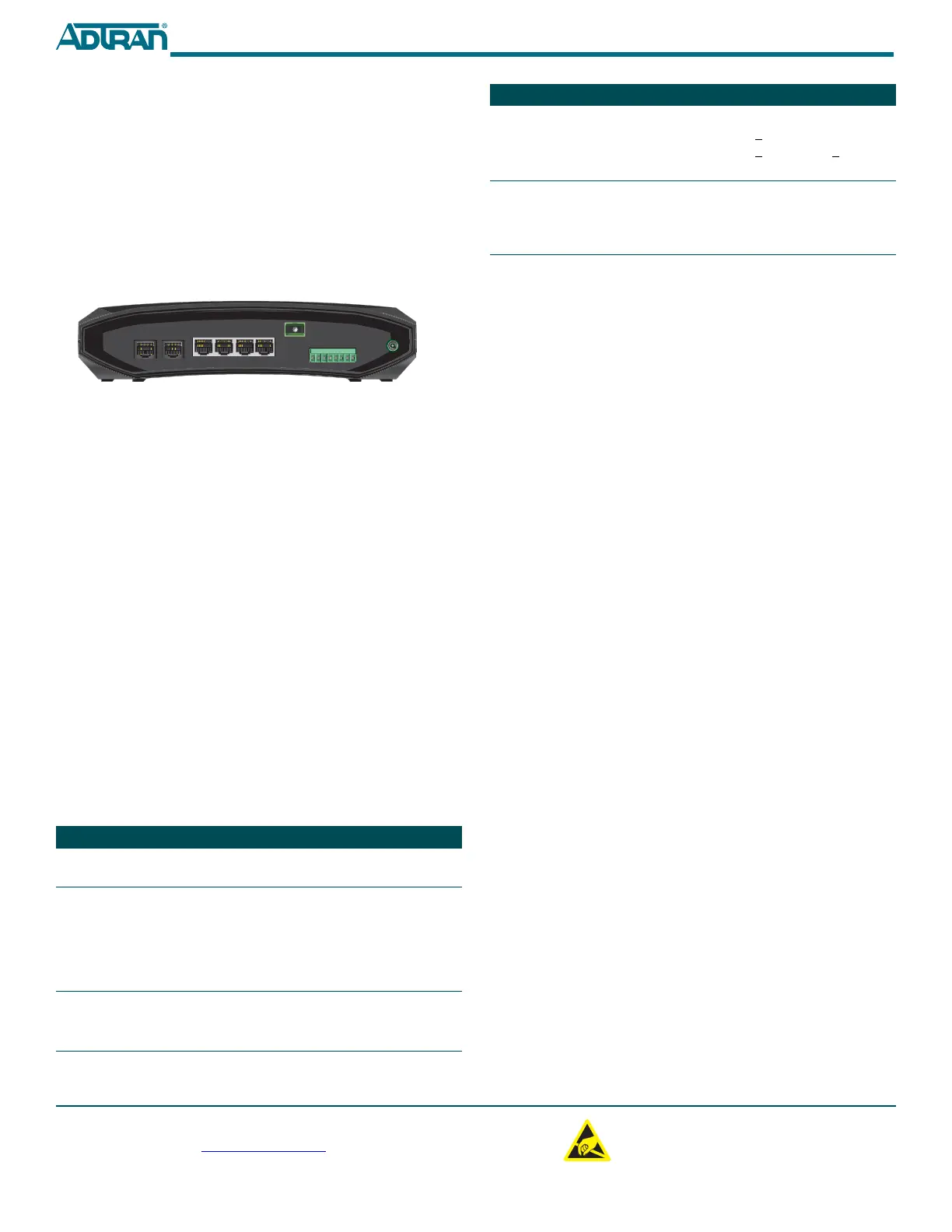
Figure 6. Indoor ONT Rear Panel
2. Connect the twisted pair Tip (green) and Ring (Red) to the RJ-11
connector using an RJ-11 Crimper.
3. Refer to Figure 6 and insert the RJ-11 connector in the appropriate
PHONE 1 or PHONE 2 jack.
Connect Ethernet, Indoor ONT
The SFU ONT supports four 1 Gigabit (10/100/1000Base-T) connections.
Use CAT 5 or 6 rated cables. Clean and connect the fiber optic cable to the
NET connection located on the rear of the ONT housing.
Connect RF Video, Indoor ONT
Connect a standard male F-type connector coaxial cable to the connection
labeled RF. Refer to the Total Access 300 Series Single Family Unit ONT
Installation and Maintenance Guide (P/N 612877GONT-5) for information
on RF power levels.
Connect External Power Supply, Indoor ONT
Refer to the Total Access 300 Series SFU ONT Installation and Maintenance
Guide (P/N 612877GONT-5) for details.
LED STATUS
The LED table in the next column provides the LED status for both
Outdoor and Indoor ONTs.
Label Status Description
POWER
Off
Green
No power
Power is On
NETWORK
STATUS
Off
Green
Yellow
Red
ONT does not detect light from OLT
OLT has activated the ONT
OLT is discovering and ranging the
ONT
OLT has discovered but not activated
ONT
POTS 1 - 2
2
Off
Green
Green Flashing
Administratively Shut Down
Off Hook
Ringing
PHONE 1
PHONE 2
NET
1
23
ETHERNET
4
RF
LOW BAT
BAT MIS
REP BAT
ON BAT
SIG RET
12V RET
+12V
OPERATIONAL SPECIFICATIONS
Refer to the Total Access 300 Series SFU ONT Installation and Maintenance
Guide (P/N 612877GONT-5) for a list of all specifications for both the
Indoor and Outdoor ONT.
■ Voltage Range: 12VDCnominal
♦ Minimum Voltage: 10V
♦ Maximum Voltage: 13.9V
■ Power Consumption:
♦ Total Access 324: 560mA
♦ Total Access 334: 810mA
♦ Total Access 351: 700mA
♦ Total Access 352: 785mA
♦ Total Access 361: 585mA
♦ Total Access 362: 600mA
♦ Total Access 362R: 833mA
♦ Total Access 364: 875mA
■ Weight: 13 Pounds (NID, cabling and Electronics Module combined)
■ Optical
♦ TX min power: 0.5 dBm
♦ TX max power: 5.0 dBm
♦ RSSI max sensitivity: -27 dBm
♦ RX overload: -8 dBm
♦ TX wavelength: 1310 nm typical
♦ RX wavelength: 1490 nm typical
MAINTENANCE
Neither of the Indoor nor Outdoor ONT requires routine hardware
maintenance for normal operation. ADTRAN does not recommend that
repairs be attempted in the field. Repair services may be obtained by
returning the defective unit to ADTRAN. Refer to the warranty for further
information. Field support for software is provided through upgrade
facilities.
SAFETY AND REGULATORY COMPLIANCE
For Safety and Regulatory Compliance Notice information specific to an
individual ONT referred to in this Job Aid, refer to the Total Access 300
Series Single Family Unit ONT Installation and User Guide (P/N
612877GONT-5) for that part number reference.
HPNA
(Total Access
352 only)
Off
Green
Yellow
Red
No Link
Line Rate is > 160 Mbps
Line Rate is > 96 Mbps but < 160 Mbps
Line Rate is < 96 Mbps
ETH 1 - 4
2
Off
Green
Yellow Flashing
Link is down: no activity or Adminis-
tratively Shut Down
10/100/1000 Link is up
TX or RX activity
Label Status Description
C A U T I O N
!
SUBJECT TO ELECTROSTATIC DAMAGE
OR DECREASE IN RELIABILITY.
HANDLING PRECAUTIONS REQUIRED.
ADTRAN CUSTOMER CARE:
From within the U.S. 1.800.726.8663
From outside the U.S. +1 256.963.8716
PRICING AND AVAILABILITY 1.800.827.0807








 To Previous Page