ETHERNET/IP EXPLICIT MESSAGING
SMD23E2 and SMD24E2 User’s Manual
ADVANCED MICRO CONTROLS INC.
116
5.3 Add the Message Instructions to your Ladder Logic (continued)
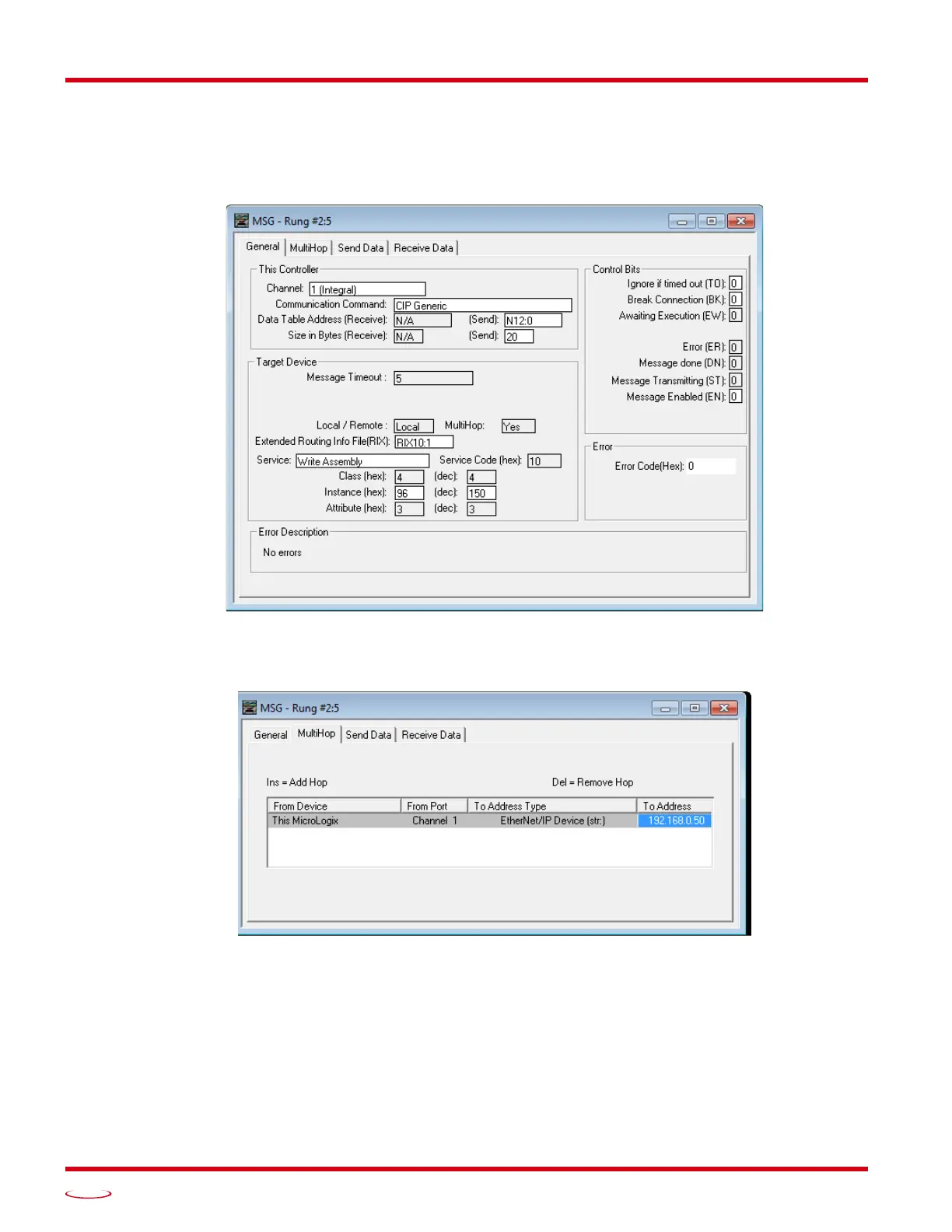
The figure below show a typical configuration for Message Instructions being used to write data to the
SMD23E2 or SMD24E2. Please note that the Data Table Address (Send) field may be different in your appli
-
cation.
Figure T5.4 Write Message Instruction Setup Screen
Click on the MultiHop tab on the top of the window. As shown in figure T5.5, enter the IP address of the
SMD23E2 or SMD24E2 and press Enter.
Figure T5.5 Message Instruction MultiHop Settings
After you are finished adding both the read and write message instructions to your program, save and down-
load the program to the PLC.



 To Next Page