21PCI/ PCI Express-Communication User Manual
Chapter 2 Hardware Configuration
2.3.3.5 Enable mode selection
You set the Enable mode using two, four or eight position DIP switches, one for each
port. If the switches are set to "AUTO", the driver automatically senses the direction
of the data flow and switches the direction of transmission. No handshaking is neces-
sary.
If DIP switches are set to “On”, the driver is always enabled, and always in high or
low status. The user must select a mode before beginning RS- 422 applications.
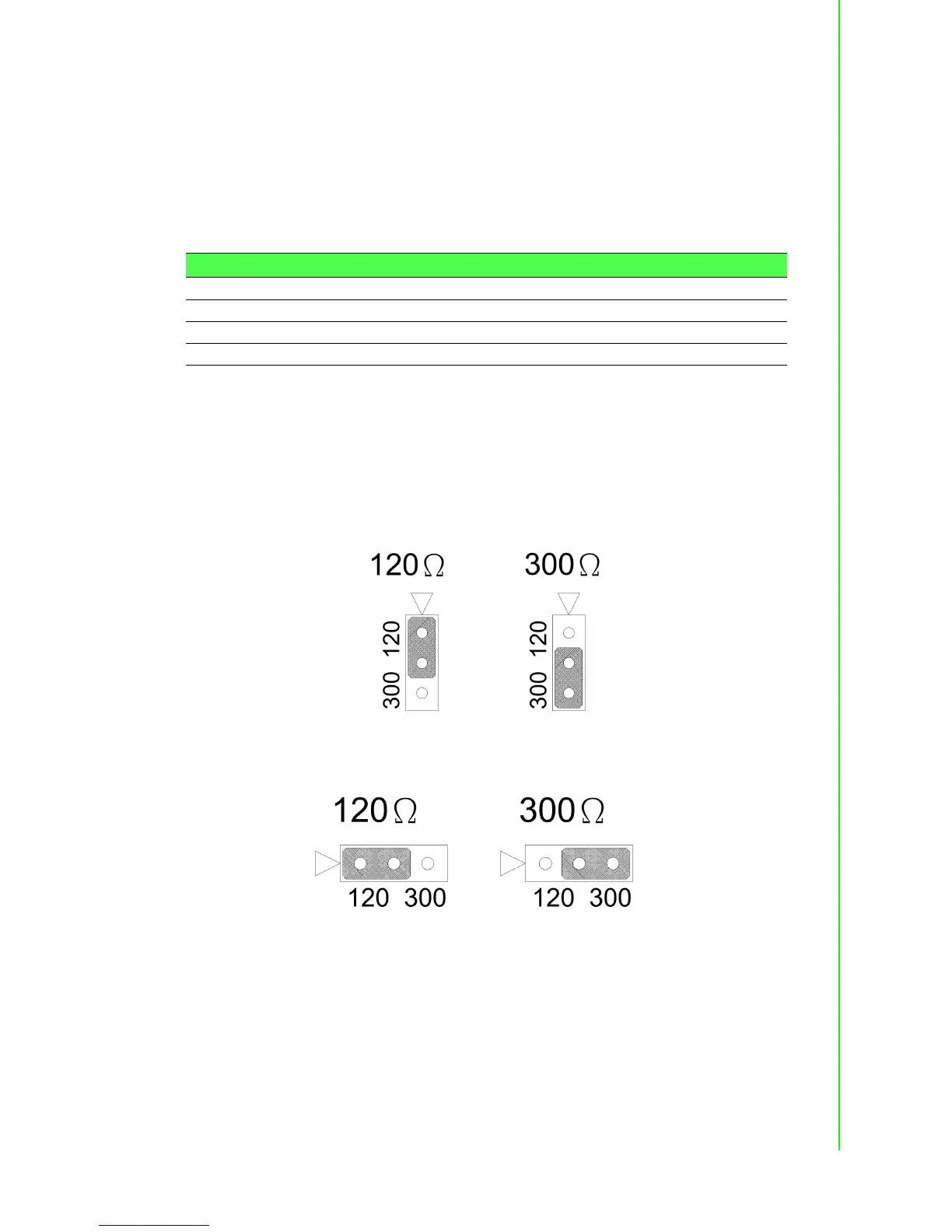
2.3.3.6 Terminator setup (for PCI-1601/1602/1612/1622)
You can install terminator resistors if necessary to match impedance. Each signal line
(Tx, Rx) has a separate resistor.
Especially in fields with serious electric noise, installing terminal resistors is helpful to
stabilize communications. Make sure that both sides of the RS-485 communication
ports are installed on BUS. See details in Chapter 5.2.2 and 5.2.3.
Figure 2.22 Resistor Selection (for PCI-1612/1622 series)
Figure 2.23 Resistor Selection (for PCI-1602 and PCIe-1622 series)
Table 2.2: Enable Mode Selection
Mode Switch Position
RS-485 AUTO
RS-422_Master ON
MS-422_Slave AUTO


 To Next Page