PCI/ PCI Express-Communication User Manual 18
2.3.2.1 PCI-1603
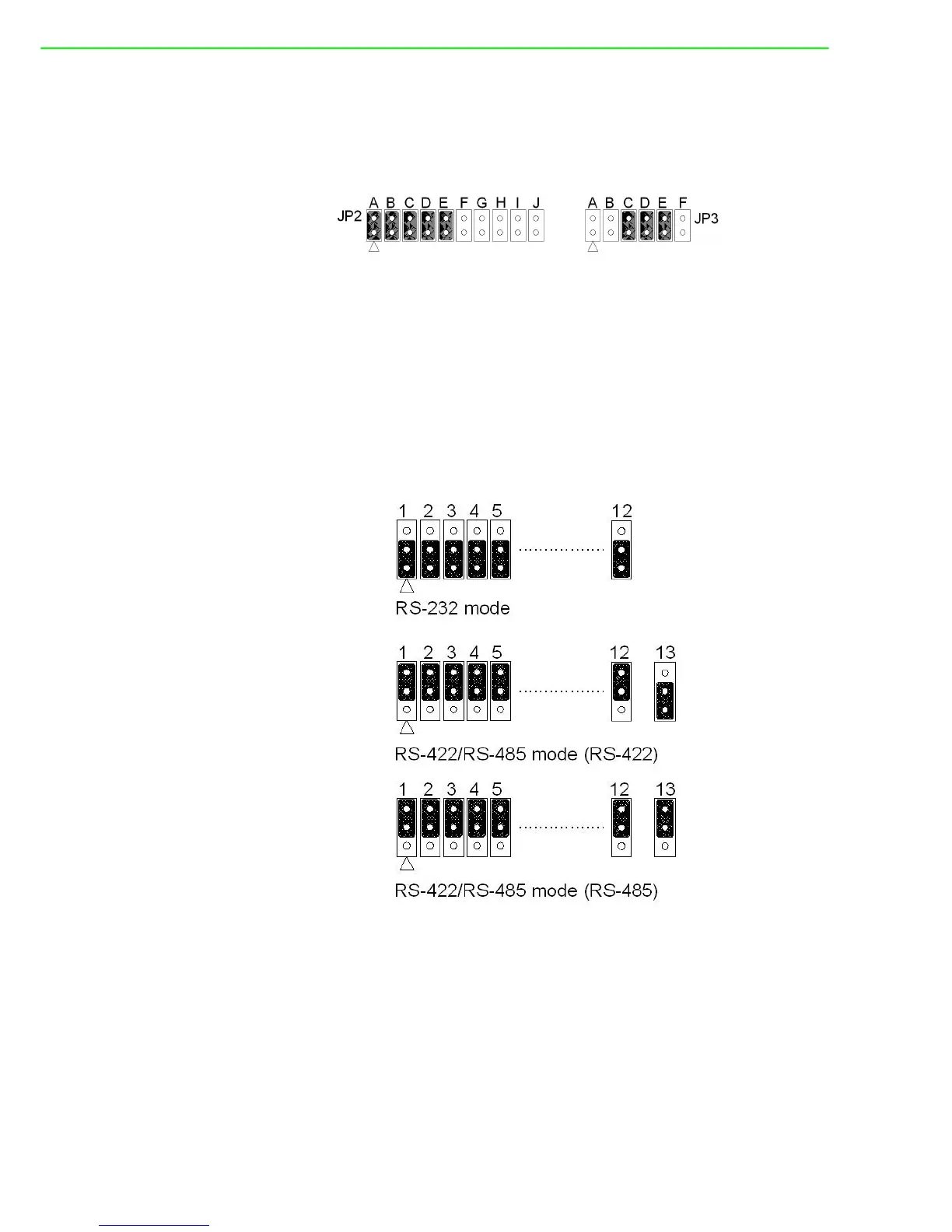
The board will be shipped in the RS-232 mode, passive Rx and active Tx. On the
10*2 pin jumper groups (JP2 & JP4)— A, B, C, D and E are set to RS-232 transmis-
sion mode. On the 6*2 pin jumper groups (JP3 & JP5)—C, D and E are set to passive
Rx and active Tx. They are the card default settings.
Figure 2.14 PCI-1603 Default Settings
2.3.3 Mode Selection by Jumper/DIP Settings
2.3.3.1 RS-232/422/485 Selection (for PCI-1612A/B/C)
(RS-232 Selection compatible for PCI-1610A/B/C)
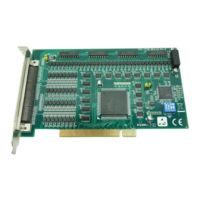
Should you wish to configure the PCI-1612A/B/C to operate in the RS-232 mode, the
bottom two pins of the 12*3 pin jumper should be connected. For RS-422/ RS-485
mode selection, the upper two pins of the 12*3 pin jumper should be connected, and
two pins of the 13th pin jumper should be connected for only PCI-1612A/B cases, as
shown below.
Figure 2.15 PCI-1612 Series RS-232/422/485 Selection


 To Next Page