PCI/ PCI Express-Communication User Manual 20
Then decide which mode the Tx and Rx will operate in. The options are active or pas-
sive. In the active mode, the Tx or Rx will generate the current requirement for data
transfer over the link. In the passive mode, the current is generated by the card at the
other end of the link.
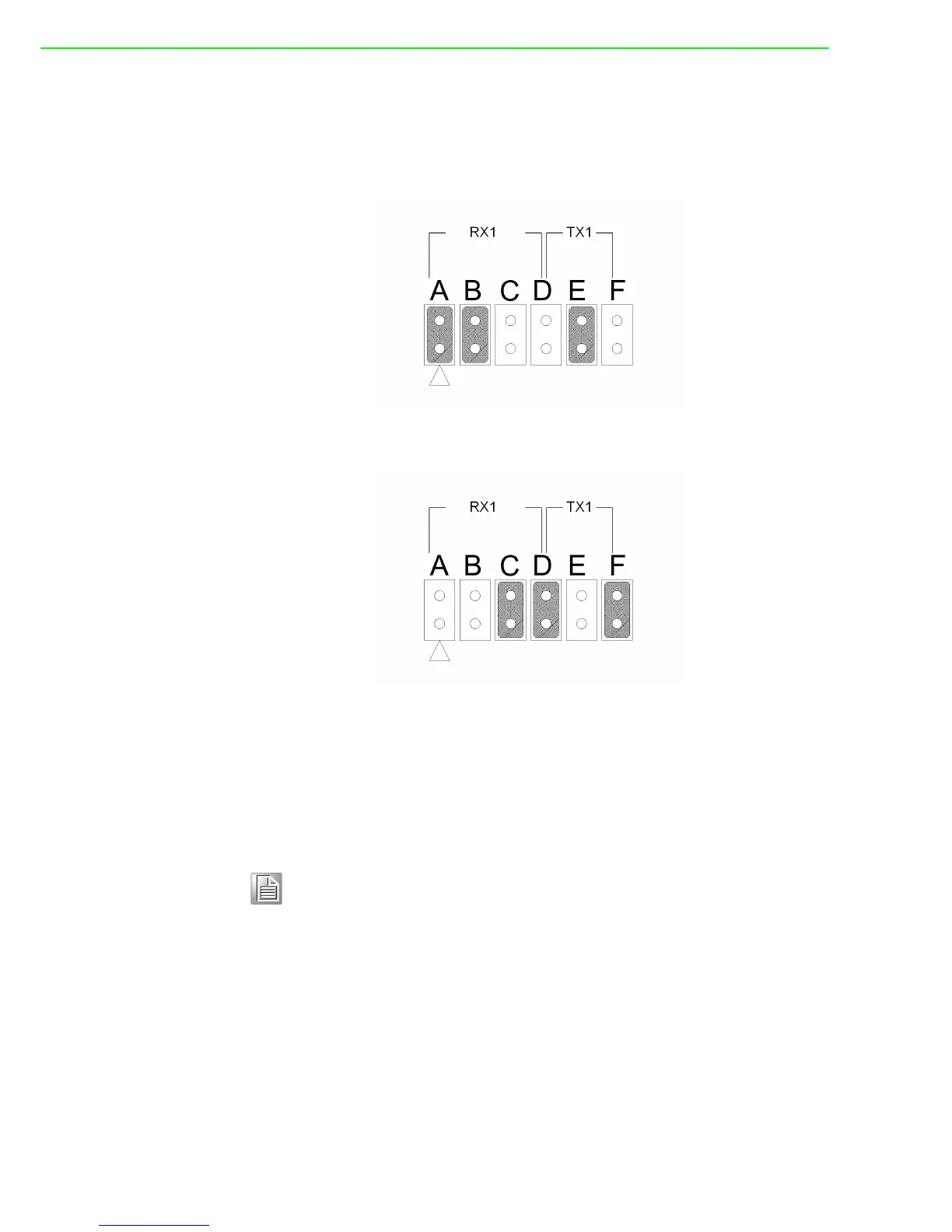
A and B are set to be active Rx, and E is set to be active Tx.
Figure 2.20 Active Mode Jumper Setting
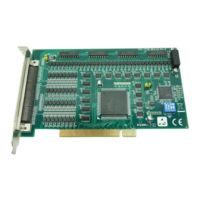
C and D are set to be passive Rx, and F is set to be passive Tx.
Figure 2.21 Passive Mode Jumper Setting
You may configure both Tx and Rx on one port to operate in the same mode, or you
can configure each Tx and Rx on one port to operate in different modes.
If you set PCI-1603 to the current-loop mode, plug the card to your device and turn
on the device, both LEDs Rx1 and Rx2 on top corner of PCI-1603 board are lighten,
indicating that current-loop mode is enabled!
Note! When either channel is configured in the RS-232 mode, the two associ-
ated Tx/Rx active/passive jumpers will be inoperable.


 To Next Page