6.3 How to set: Assisted Cooking
Every dish in this submenu has a recommended function and temperature. You can adjust the
time and the temperature.
For some of the dishes you can also cook with:
• Weight Automatic
• Food Sensor
The degree to which a dish is cooked:
• Rare or Less
• Medium
• Well done or More
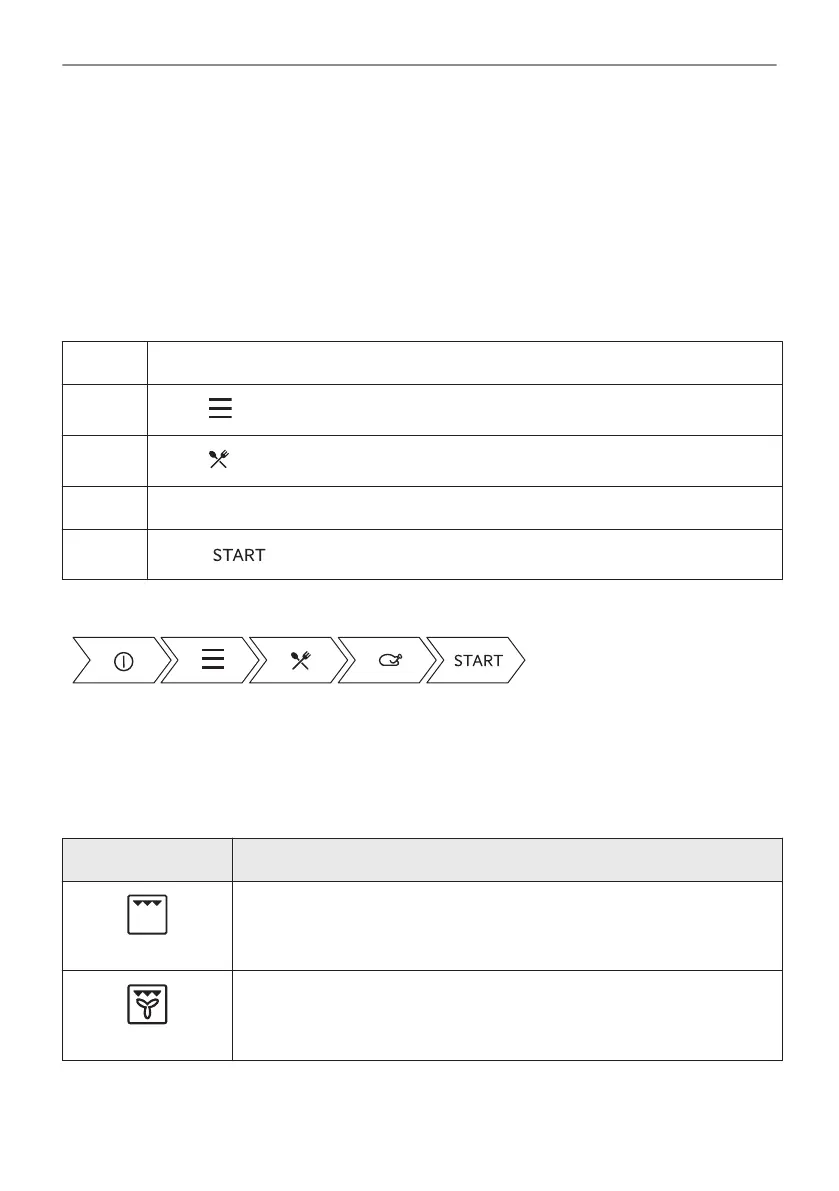
Step 1 Turn on the oven.
Step 2
Press: .
Step 3
Press: . Enter: Assisted Cooking.
Step 4 Choose a dish or a food type.
Step 5
Press: .
Take a shortcut!
6.4 Heating functions
STANDARD
Heating function Application
Grill
To grill thin pieces of food and to toast bread.
Turbo Grilling
To roast large meat joints or poultry with bones on one shelf position. To
make gratins and to brown.
65/240
DAILY USE



 To Next Page