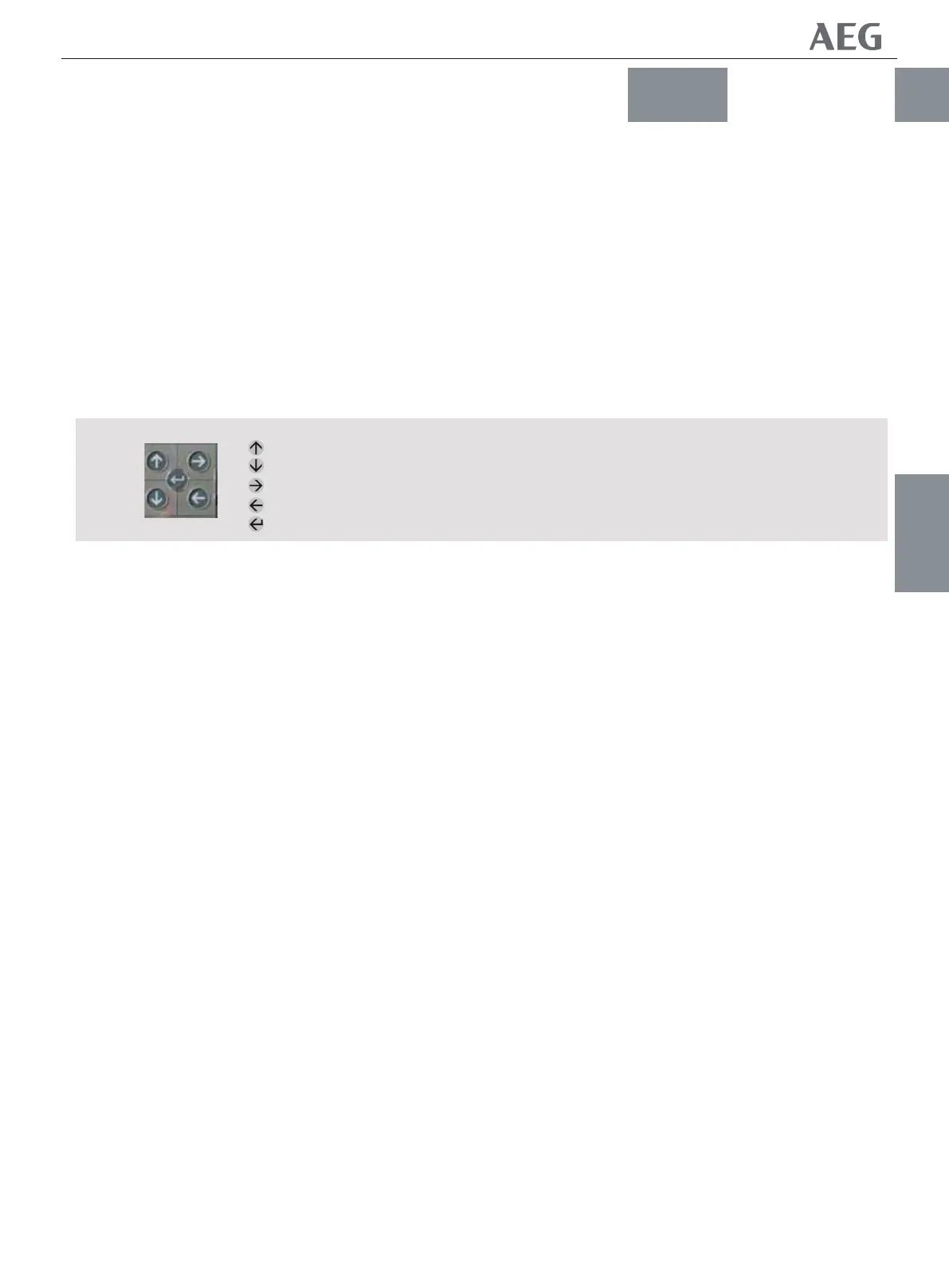
Mpro Trip Units have four operaƟng modes: Setup, Meter,
Status and Events. These are accessed through the Įve keys on
the Trip Unit front.
SETUP Mode programming must be performed with the raƟng
plug installed. This procedure apply to all trip unit types.
The SETUP procedures should only be repeated if the trip unit or
the protecƟon characterisƟcs are changed, requiring diīerent
set points and Ɵmedelays.
All trip units provide long Ɵme over current protecƟon, long
Ɵme delay, and some form of short circuit current protecƟon
when installed in circuit breakers. All other funcƟons are
opƟonal.
If a speciĮc set of trip unit funcƟons, such as relaying or short
Ɵme over-current protecƟon is not installed that funcƟon will
not appear on the trip unit display. Ignore setup mode
instrucƟons
for such funcƟons.
The trip unit must be powered by one of the indicated four
methods during SETUP. (see par. 2.1.9)
-- Press UP or DOWN unƟl the SETUP mode is selected.
-- Press RIGHT or LEFT to access the funcƟons in the SETUP
mode.
-- Press ENTER to save desired values.
-- Press RIGHT to advance to the next funcƟon.
1. Press UP or DOWN to select SETUP.
2. Press LEFT or RIGHT to select the desired protecƟon to
change.
3. Press UP or DOWN to change values. The values will start
Ňashing.
4. Press ENTER to store the value into the memory. The
displayed value stops Ňashing and the save icon appears on the
top of the LCD. This indicates that the value has been stored in
memory and is acƟve.
5. ConĮrm seƫngs on the trip unit aŌer making changes by
exiƟng and re-entering SETUP mode and rechecking each
changed seƫng.
2.2 ֡ፕ
2.2.1!֡ፕఇ๕
2.2.2 SETUPDŽยዃDžఇ๕
Nqspۉጱྃഗᆶ! 5! ዖ֡ፕఇ๕ǖยዃĂᅏĂጒༀ
ࢅ๚ăᅜ๑ᆩۉጱྃഗኟ௬ฉڦ! 6! ߲Ӏႜ
֡ፕă
..!VQDŽၠฉDžǖၠฉࡐۯሺຕኵă
..!EPXODŽၠူDžǖၠူࡐۯၭຕኵă
..!SJHIUDŽၠᆸDžǖူᅃࠀీူᅃᄻă
..!MFGUDŽၠፑDžǖฉᅃࠀీฉᅃᄻă
..!FOUFSDŽඓۨDžǖԍ٪ยዃڟ٪ئഗዐă
TFUVQDŽยዃDžఇ๕ՊײՂႷሞҾጎᆶܮ֭ۨཀྵڦཉူ
ႜăײႾᆩᇀᆶ႙ࡽڦۉጱྃഗă
TFUVQDŽยዃDžײႾৈሞۉጱྃഗԍࢺ༬ኙ߀ՎLj
Ⴔᄲփཞڦยዃۅࢅ้ჽ้ዘްሏႜă
Ҿጎሞୟഗዐ้Ljᆶۉጱྃഗۼᆶ้ࡗۉୁ
ԍࢺĂ้ჽ้ࢅևݴႚ๕ڦ܌ୟۉୁԍࢺࠀీăഄ
ᆶࠀీྺၜă
සࡕுᆶҾጎ༬ۨڦۉጱྃഗࠀీDŽසۉഗ܌้ࡗ
ۉୁԍࢺDžLjሶࠀీփࣷ၄ሞۉጱྃഗ၂๖ೡฉă
൩ࢮኄၵࠀీڦยዃఇ๕ຫă
TFUVQDŽยዃDžLjՂႷཚࡗᅜူ! 5! ዖݛ݆ኮᅃഔۯ
ۉጱྃഗăDŽ֖!3/2/:!বDž
..! Ӏူ! VQDŽၠฉDž! EPXODŽၠူDžLjڟዐ!
TFUVQDŽยዃDžఇ๕ă
..! Ӏူ! SJHIUDŽၠᆸDž!MFGUDŽၠፑDžሞTFUVQ
DŽยዃDžఇ๕ዐስࠀీă
..!Ӏူ!FOUFSDŽඓණDžԍ٪Ⴔڦኵă
..!Ӏူ!SJHIUDŽၠᆸDžገڟူᅃࠀీă
2/! Ӏူ! VQDŽၠฉDž! EPXODŽၠူDžስTFUVQ
DŽยዃDžă
3/! Ӏူ! MFGUDŽၠፑDž! SJHIUDŽၠᆸDžስၙᄲ߸
߀ڦԍࢺă
4/!Ӏူ!VQDŽၠฉDž!EPXODŽၠူDž߸߀ຕኵăຕኵ
๔ۯă
5/! Ӏူ! FOUFSDŽඓණDžຕኵ٪ئڟ٪ئഗዐă၂
๖ڦኵཕኹۯLjԍ٪Ք၄ሞ!MDE!ฉ܋ăኄ๖ຕ
ኵᅙ٪ئڟ٪ئഗዐᅙഔᆩă
6/! ႜ߸߀ࢫLjཽժዘႎ! TFUVQDŽยዃDžఇ๕Lj
ްࢃ߲߳߸߀ڦยዃLjܸٗඓණۉጱྃഗฉڦยዃă
2.2.2.1!ยዃۅ٪ئ
TRIP UNIT
ཌቄڇᇮ
֡ፕ
2.2
2.2-01
2.2 OPERATION
2.2.1 OPERATING MODES
2.2.2 SETUP MODE
2.2.2.1 Entering Set points into Memory
-- UP: Scroll up or increment value
-- DOWN: Scroll down or decrement value
-- RIGHT: Next funcƟon or next page
-- LEFT: Previous funcƟon or previous page
-- ENTER: Save or set in to memory
!3/6!
ၠฉ
ၠူ
ၠᆸDŽူᅃ߲Dž
ၠፑDŽฉᅃ߲Dž
ඓණDŽԍ٪Dž
Fig 2.2 Key pad
Up
Down
Right (Next)
LeŌ (Previous)
Enter (Save)
NF1:ဣଚگუഘୟഗ


 To Next Page