20
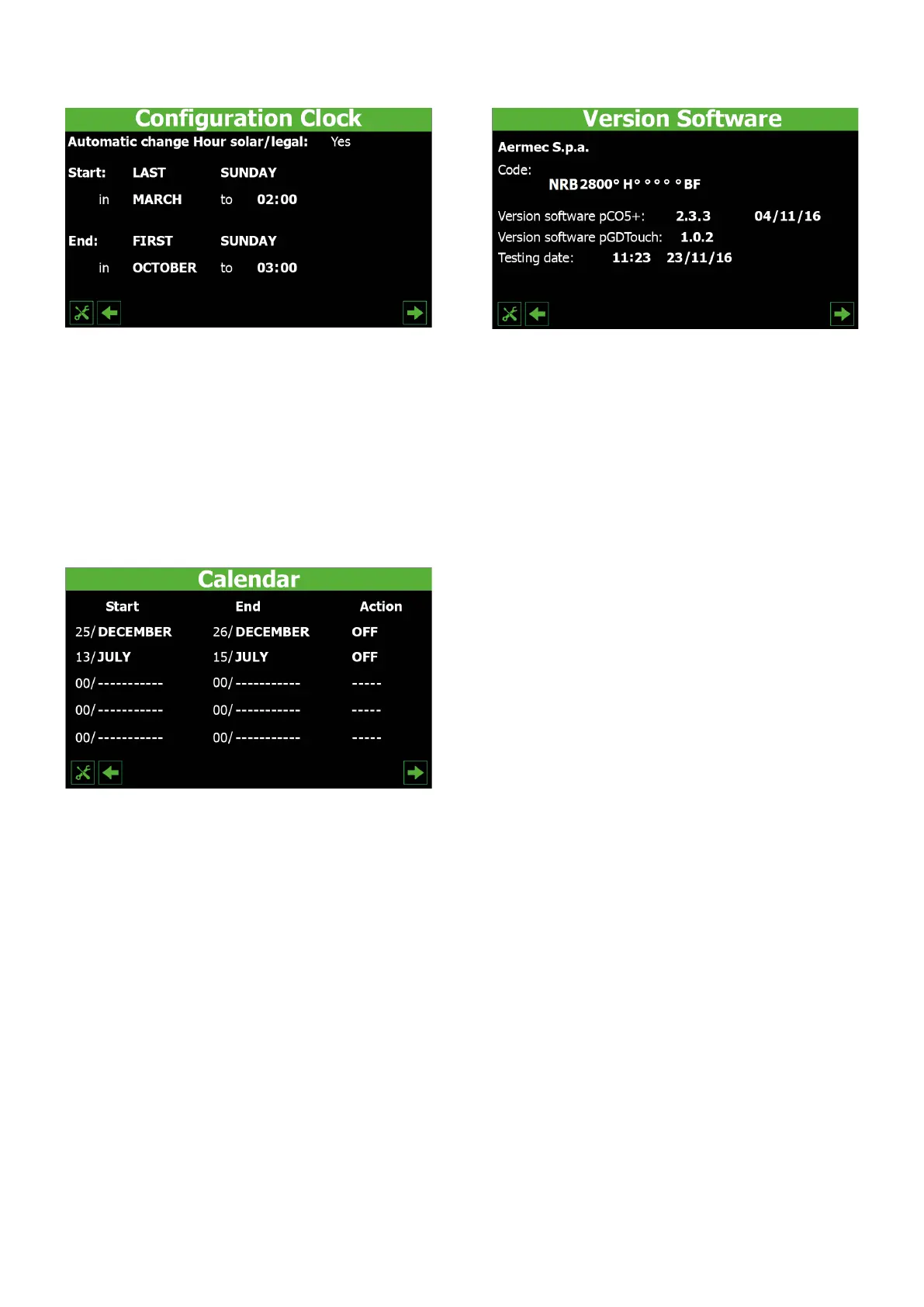
7.15 CONFIGURING THE AUTOMATIC GMT/DAYLIGHT
SAVING TIME CHANGEOVER
— Choose whether to activate the automatic changeover between GMT and Day-
light Saving Time (YES = enable automatic changeover; NO = disable automatic
changeover)
— Used to select on which day (of the month) to switch to Daylight Saving Time
— Used to select on which day (of the week) to switch to Daylight Saving Time
— Used to select in which month to switch to Daylight Saving Time
— Used to select at what time to switch to Daylight Saving Time
— Used to select on which day (of the month) to switch to GMT
— Used to select on which day (of the week) to switch to GMT
— Used to select in which month to switch to GMT
— Used to select at what time to switch to GMT
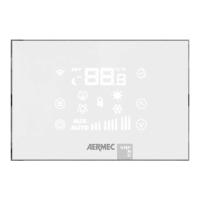
7.16 CONFIGURING THE CALENDAR
— Indicates the period 1 start date
— Indicates the period 1 end date
— Used to select the action for period 1 (OFF = unit disabled; WEEKENDS AND
HOLIDAYS = "WEEKENDS AND HOLIDAYS" band enabled)
— Indicates the period 2 start date
— Indicates the period 2 end date
— Used to select the action for period 2 (OFF = unit disabled; WEEKENDS AND
HOLIDAYS = "WEEKENDS AND HOLIDAYS" band enabled)
— Indicates the period 3 start date
— Indicates the period 3 end date
— Used to select the action for period 3 (OFF = unit disabled; WEEKENDS AND
HOLIDAYS = "WEEKENDS AND HOLIDAYS" band enabled)
— Indicates the period 4 start date
— Indicates the period 4 end date
— Used to select the action for period 4 (OFF = unit disabled; WEEKENDS AND
HOLIDAYS = "WEEKENDS AND HOLIDAYS" band enabled)
— Indicates the period 5 start date
— Indicates the period 5 end date
— Used to select the action for period 5 (OFF = unit disabled; WEEKENDS AND
HOLIDAYS = "WEEKENDS AND HOLIDAYS" band enabled)
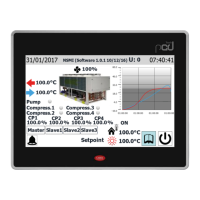
7.17 SOFTWARE VERSION INFORMATION ABOUT THE
SYSTEM
— Indicates the code that identies the unit
— Indicates the current software version for the pCO5 card
— Indicates the date of the pCO5 software
— Indicates the software version of the C-Touch panel
— Indicates the date and time of the unit test (performed in the factory)


 To Next Page