Need help?
Do you have a question about the AERMEC Turbocor C-Touch and is the answer not in the manual?
Describes essential user operations like switching unit ON/OFF, mode selection, setpoint adjustment, and language.
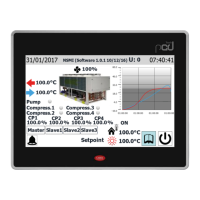
Details how to use the touchscreen display for unit command and control, managing information and parameters.
Explains basic operations for navigating menus, entering menus, scrolling between pages, and returning to the home page.
Describes how to enter numerical values for parameters using the on-screen keypad, including min/max limits.
Explains how to select parameter values from a dropdown list of options presented on the screen.
Details the main monitor screen for TBX, TBA, and TBG units, explaining displayed parameters and status indicators.
Details the main monitor screen for WTX and WTG units, explaining displayed parameters and status indicators.
Details the main monitor screen for WMX, WMG, and TW110 units, explaining displayed parameters and status indicators.
Describes the display for the Freecooling monitor on TBA/TBG units, detailing input temperatures and parameters.
Provides detailed information on compressor status, parameters, and control modes displayed on the compressor page.
Details the electronic valve page, showing its status, liquid level, setpoints, and digital input statuses.
Describes the evaporator page, detailing water temperatures, setpoints, differential, and pump statuses.
Details the condenser page, showing temperatures, pressures, setpoints, and operational statuses.
Details the main page of the ON/OFF menu for unit control, including status indicators and operating mode selection.
Explains how to set daily time periods for unit operation, including start/stop times and associated actions (ON/OFF, SET1/SET2).
Describes the function to copy time programs from one day to another within the Time Periods page.
Shows currently active alarms, their numbers, codes, and descriptions, with options to reset.
Details the alarms log, including historical alarm data, timestamps, and recorded operating parameters at the time of the alarm.
Provides a comprehensive list of alarm codes, descriptions, and their reset types (Auto, Manual, Semi-automatic).
Displays values read by transducers and probes connected to analogue inputs on TBX units.
Displays values read by transducers and probes connected to analogue inputs on WTX/WTG units.
Displays values read by transducers and probes connected to analogue inputs on WMX/WMG units.
Displays values read by transducers and probes connected to analogue inputs on TW110 units.
Shows the statuses of digital inputs available on the unit board for TBX models.
Shows the statuses of digital inputs available on the unit board for WTX/WTG models.
Shows the statuses of digital inputs available on the unit board for WMX/WMG/TW110 models.
Indicates the statuses of available digital outputs for TBX units (On=green, Off=grey).
Indicates the statuses of available digital outputs for WTX/WTG units (On=green, Off=grey).
Indicates the statuses of available digital outputs for WMX/WMG units (On=green, Off=grey).
Indicates the statuses of available digital outputs for TW110 units (On=green, Off=grey).
Shows percentage values of analog outputs for TBX unit boards.
Shows percentage values of analog outputs for WTX, WMX, WMG, WTG, and TW110 unit boards.
Displays real-time graphs of evaporator inlet/outlet temperature probes and explains graph navigation controls.
Explains how to set and adjust the system timer on the pCO5+ board and the touch display board.
Details how to access the installer menu using the default password '0000' and its security implications.
Presents the submenu selection page within the installer menu, listing available configuration categories.
Explains how to select the system language for the user interface, offering options like English, Italian, and Russian.
Shows how to display software versions for the pCO5+ board, touch screen, and turbocor compressors board.
Details how to select the cooling adjustment logic (fixed setpoint, proportional, or proportional+integral) based on probes.
Explains how to select the heating adjustment logic for heat pumps, based on probes and differential settings.
Describes how to set the climatic curve for cooling in air/water units, relating external temperature to setpoint compensation.
Explains how to set a potential power request limit for the thermostat to prevent alarms or control consumptions.
Details settings for system side pumps, including the number of pumps, compressor ON/OFF delays, and pump swap logic.
Covers additional pump settings like delay on changeover, swap frequency, and antifreeze function activation.
Shows the work hours for pumps, fans, and compressors, along with compressor start-up counts.
Provides details on compressor rotation forcing, time for rotation, and maximum hour counter status.
Explains how to change the default installer menu password (0000) for security and future access.
Details settings for Building Management System (BMS) integration, including address, protocol, speed, and ON/OFF control.
Configures multifunction analogue inputs (U7) for TBX, WTX, WTG units, defining function, input type, and digital input logic.
Configures multifunction analogue inputs (U3) for TW110, WMX, WMG units, defining function, input type, and digital input logic.
Manages the signal logic for multifunction inputs, defining functions (None, Power Limit, Setpoint) and percentage values.
Allows setting the unit of measurement for the system (°C/bar or °F/psi), requiring the unit to be off for changes.
Enables or disables the low load function, configuring auto restart and force off parameters for compressor operation.
Enables or disables the Freecooling function, showing power estimations and temperature differences.
Sets parameters for Freecooling operation, including delta ON/OFF delays, max fan speed, and smoothing time.
Configures Freecooling fan speed mode, regulation type, and integral time for optimal operation.
Manages fan speed during Freecooling with compressors, setting regulation, initial fan speed, and speed increase/decrease.
Configures chiller protection thresholds based on external temperature, including pulse times for pumps and heaters.
Sets fan protection parameters, including snow protection thresholds, pulse times, and fan enabling/disabling.
Sets the logic for digital inputs ID1 (remote off/on) and ID3 (setpoint 2/flowswitch), defining their behavior.
Sets the logic for digital output NO8 (alarm), defining whether CLOSED or OPEN indicates an active alarm.
Configures Master/Slave unit management, including installation type, start-up power limits, and power step distribution.
Determines whether the ON/OFF key is present in the system layout page or if only the machine status is displayed.
Provides important notes and procedures for connecting two Master/Slave units, including pLAN addressing and wiring.
 General
| Resolution | 800 x 480 pixels |
|---|---|
| Display Size | 7 inch |
| Communication Protocol | Modbus RTU |
| Operating Temperature | 0°C to 50°C (32°F to 122°F) |
| Storage Temperature | -20°C to 70°C (-4°F to 158°F) |


 To Next Page