Need help?
Do you have a question about the AERMEC TCP and is the answer not in the manual?
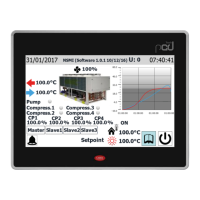
Displays system status, date, time, online units, selected mode, setpoint, and ON/OFF status.
Allows navigation to FUNCTION, PARAMETERS, INFO, E-CLEAR, and GENERAL menus.
Displays error messages for invalid commands and requires user acknowledgment.
Explains automatic screen turn-off and the setting for constant backlight.
Manages unit power states and its status memory after voltage failures.
Covers settings for operating mode, electric heating, anti-freezing, and timers.
Details how to initiate, monitor, and stop manual defrosting cycles for selected units.
Covers resetting unit parameters and accessing field/factory commissioning menus.
Configuration of entering and leaving water temperatures for cooling and heating.
Sets ambient and water temperature limits for energy saving modes.
Displays current operating status, parameters, and error records for selected units.
Lists and describes various error codes related to unit components and operations.
Accesses alarm history and information on bar code functionality.
Procedure for clearing unit errors and releasing units after specific failures.
Configuration for key tone, backlight, system clock, language, and program information.
 General
| Category | Control Panel |
|---|---|
| Manufacturer | AERMEC |
| Model | TCP |
| Display | LCD |
| Input Voltage | 24 Vac |
| Communication Protocol | Modbus |
| Operating Temperature | 0°C to +50°C |


 To Next Page