13
5 OPERATION INSTRUCTIONS
5.1 ON/OFF
Press “ ” button to turn on the unit. Press “ ” button again to turn o the unit.
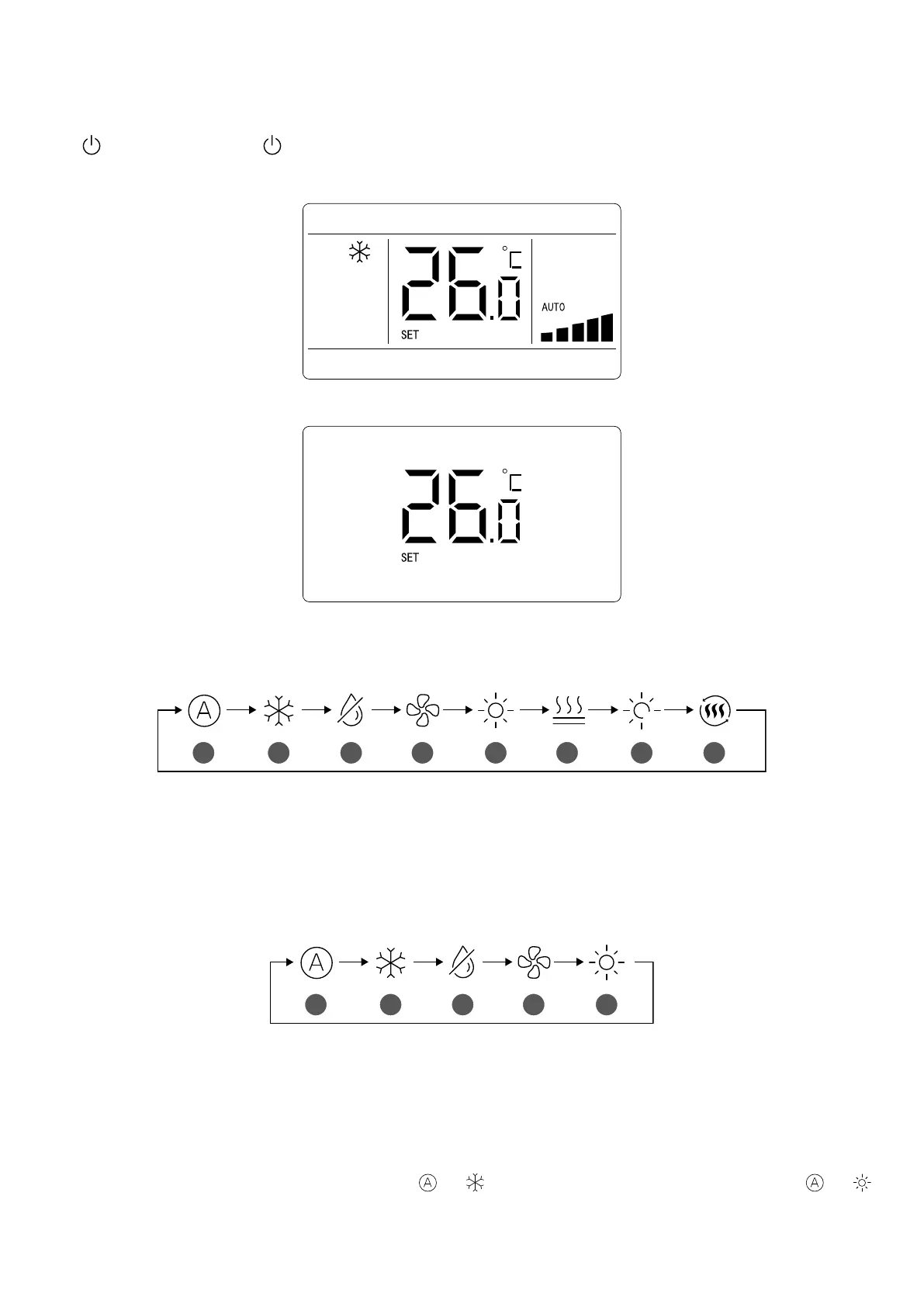
The interfaces of “ON/OFF” status are shown in Fig. 5.1 and 5.2.
Fig. 5.1: Interface of ON status
Fig. 5.2 Interface of OFF status
5.2 MODE SETTING
Under On status, pressing “MODE” button can set mode circularly as:
A Auto
B Cooling
C De-Humidication
D Ventilation
E Heating
F FUNCTION NOT AVAILABLE
G FUNCTION NOT AVAILABLE
H FUNCTION NOT AVAILABLE
3 D
A
B
C
D E F
G
H
Or:
A Auto
B Cooling
C De-Humidication
D Ventilation
E Heating
A
B
C
D E
NOTE:
1. The available modes are dierent for dierent models, the wired controller will automatically select mode setting range according to the model of indoor unit.
2. Under Auto mode, if the indoor unit is running under Cooling, the icons “
” and “ ” will light up; if the indoor unit is running under Heating, the icons “ ” and “
” will light up.



 To Next Page