17
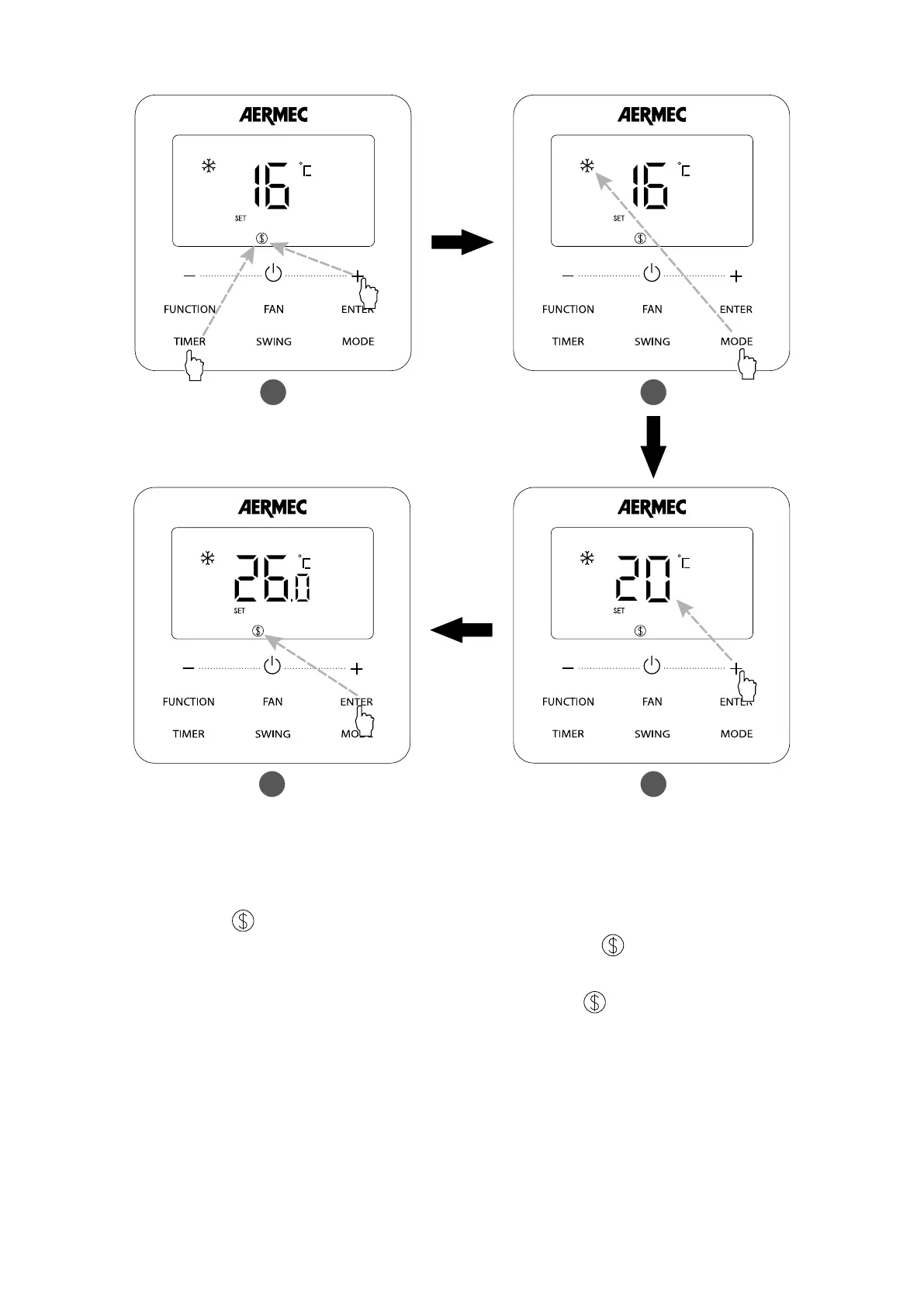
Fig. 5.4 shows how to set Save function for Cooling:
Fig. 5.4: Energy Saving Function Setting for cooling
1 Press TIMER and “+” buttons for 5 seconds and set Energy-Saving function in OFF status
2 Press MODE button and select Cooling or Dry mode
3 Press “+” or “-” button to adjust the minimum temperature
4 Press Enter button to activate Energy-Saving function
1 2
4 3
Start up Energy-Saving function for Heating: When the unit is o, simultaneously press “TIMER” and “+” buttons for 5s, the buzzer will give out a sound and then unit will en-
ter into Energy-Saving setting mode. “
” icon is blinking. Mode icon is on. Press “MODE” button to switch to Heating mode. Press “+” or “-” button to adjust the temperature
limit for Save function. Press “ENTER” button to start up Save function. After starting up save function, it will display “
” icon for all modes under on and o status.
Cancel Energy-Saving function: When the unit is o, press “TIMER” and “+” buttons for 5s to enter into save setting, press “ENTER” button to cancel Save function of all modes.
NOTE: When the Save function is turned on and then set temperature exceeds the limit value for Save function, “
” icon blinks three times and then buzzer will give out two
sounds successively.



 To Next Page