14
Saving Test Results
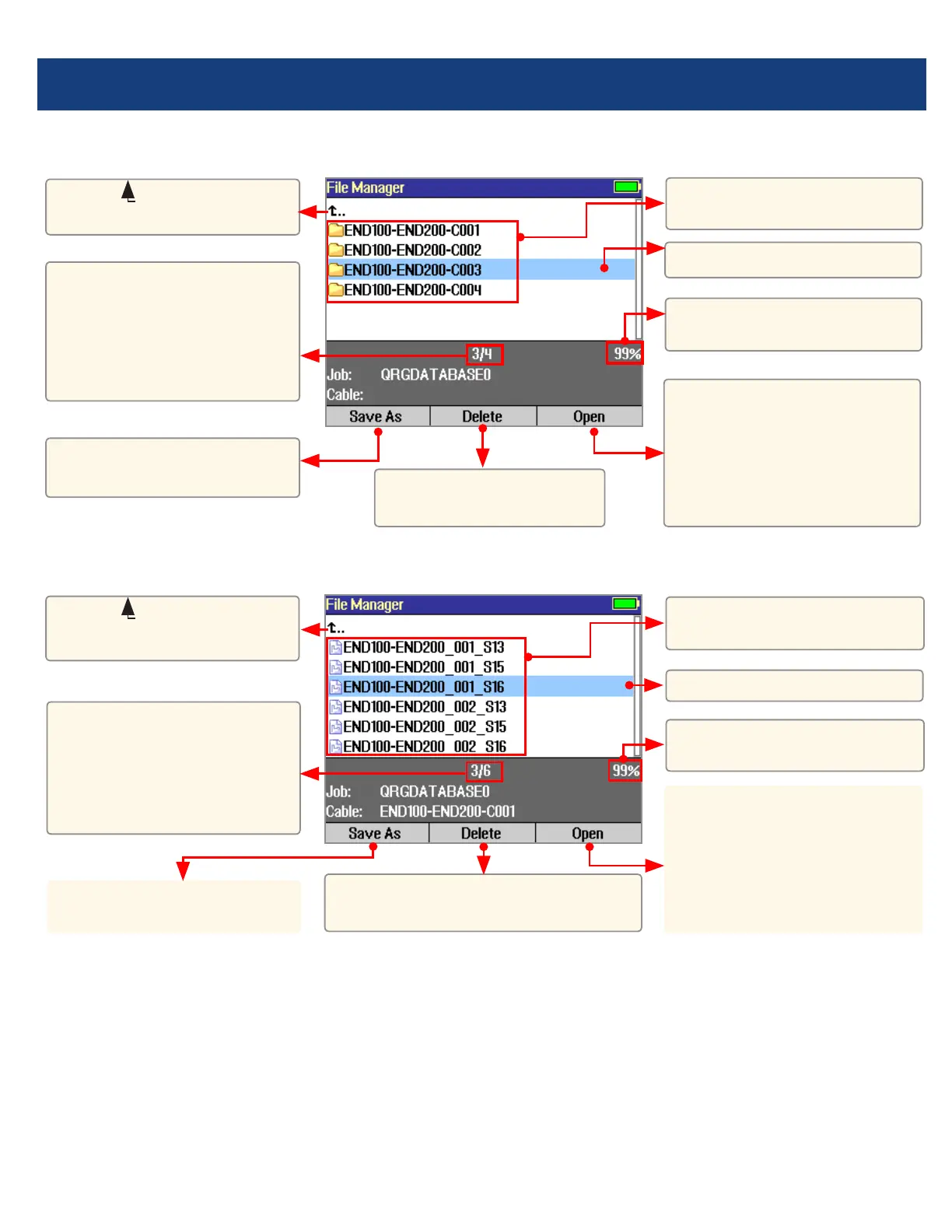
File Manager - Cables Page
File Manager - Results Page
Press to open the
highlighted cable (which
becomes the current cable)
and see a list of trace (.SOR)
and OPM (.ATD) les stored
for this cable.
List of saved Cables
(folders).
List of saved results (OTDR
.SOR and OPM .ATD les).
Highlighted Cable folder.
Highlighted trace.
Free space (internal
memory).
Free space
(internal memory).
Press to open the
highlighted trace or OPM
result. Opening the selected
trace le will open traces for
all wavelengths having the
same ber number.
Select ( ..) to return to
Jobs page.
Select ( ..) to return to
Cables page.
Press to display the Save
As page.
Press to display the Save
As page.
This eld shows X/Y:
X = number of the
highlighted cable
Y = total number of cables
in the current job.
This eld shows X/Y:
X = number of the
highlighted results le
Y = total number of results
les in the current cable.
Press to delete the
highlighted Cable folder
Press to delete the highlighted
trace or OPM results le.



 To Next Page