OPERATOR’S MANUAL
14
SFA-32
OPERATING YOUR MONITOR
Once your monitor is configured, you may choose to work from one of the
screens on the previous page.
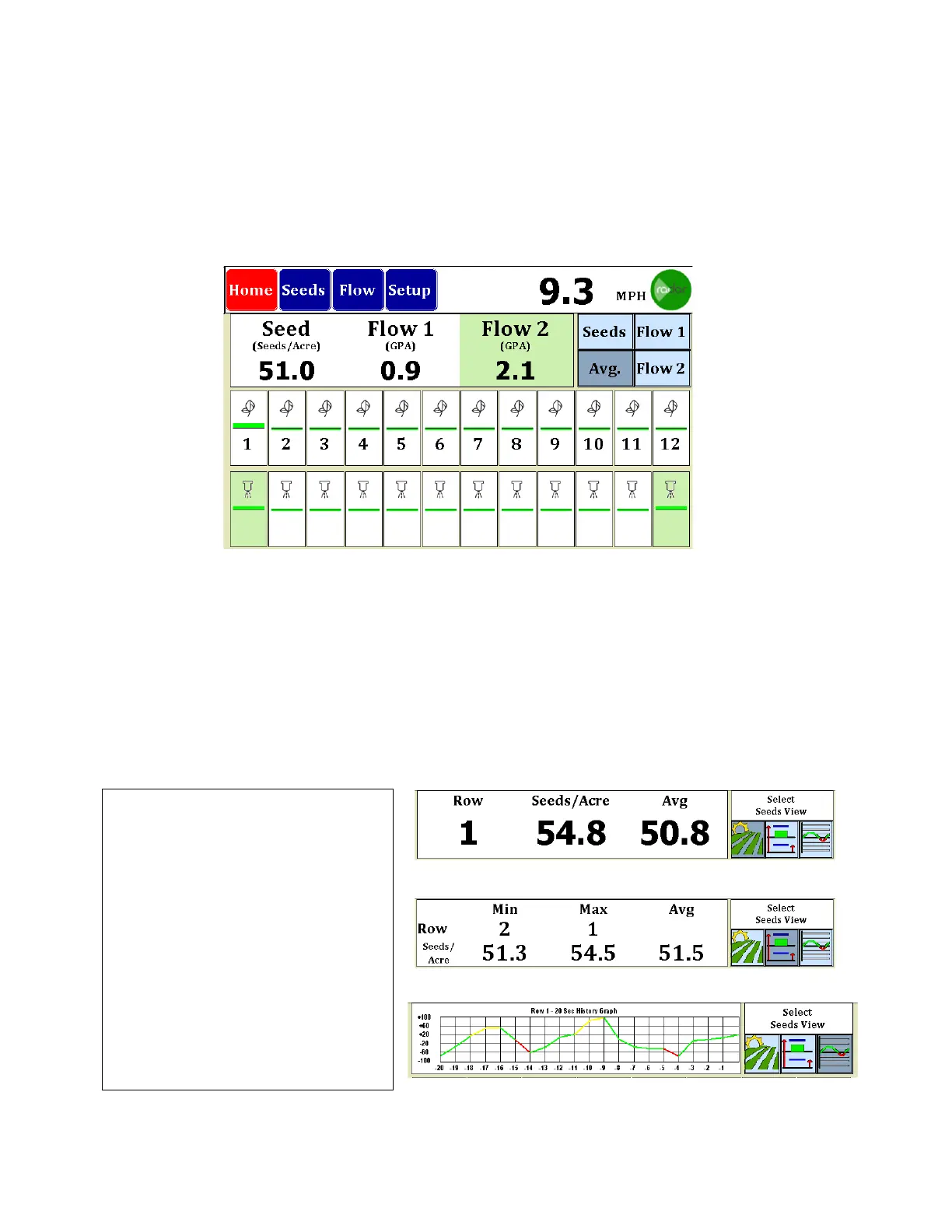
Getting around the Home Screen….
The three buttons at the top left select the screen. Here we are looking at the Home or
Bar Graph Screen. Seeds and Flow bring up the appropriate Dash View while Setup
takes you back to the setup mode. Speed is displayed to the right and the indicator
showing the type of speed input is displayed. Above figure showing Radar or External
GPS input.
Next, you will find the Information Box and the View Selection buttons. Shown above is
a monitor set for Seed and Flow with two rates. The Avg. View button is selected
showing the Average of each of the applications, Seeds, Flow 1 and Flow 2.
By selecting Seeds, Flow 1 or Flow
2, you bring up a menu box shown
at the right end of the screen.
Shown at right are the three types
of screens you may see for any
product.
The first selection gives the option
of selecting a row and parking on
it. The second shows Min-Max-Avg
for the product and the last shows
a 20 second moving line graph
history of a selected row.



 To Next Page