OPERATOR’S MANUAL
16
SFA-32
THE DASH SCREEN - SEEDS
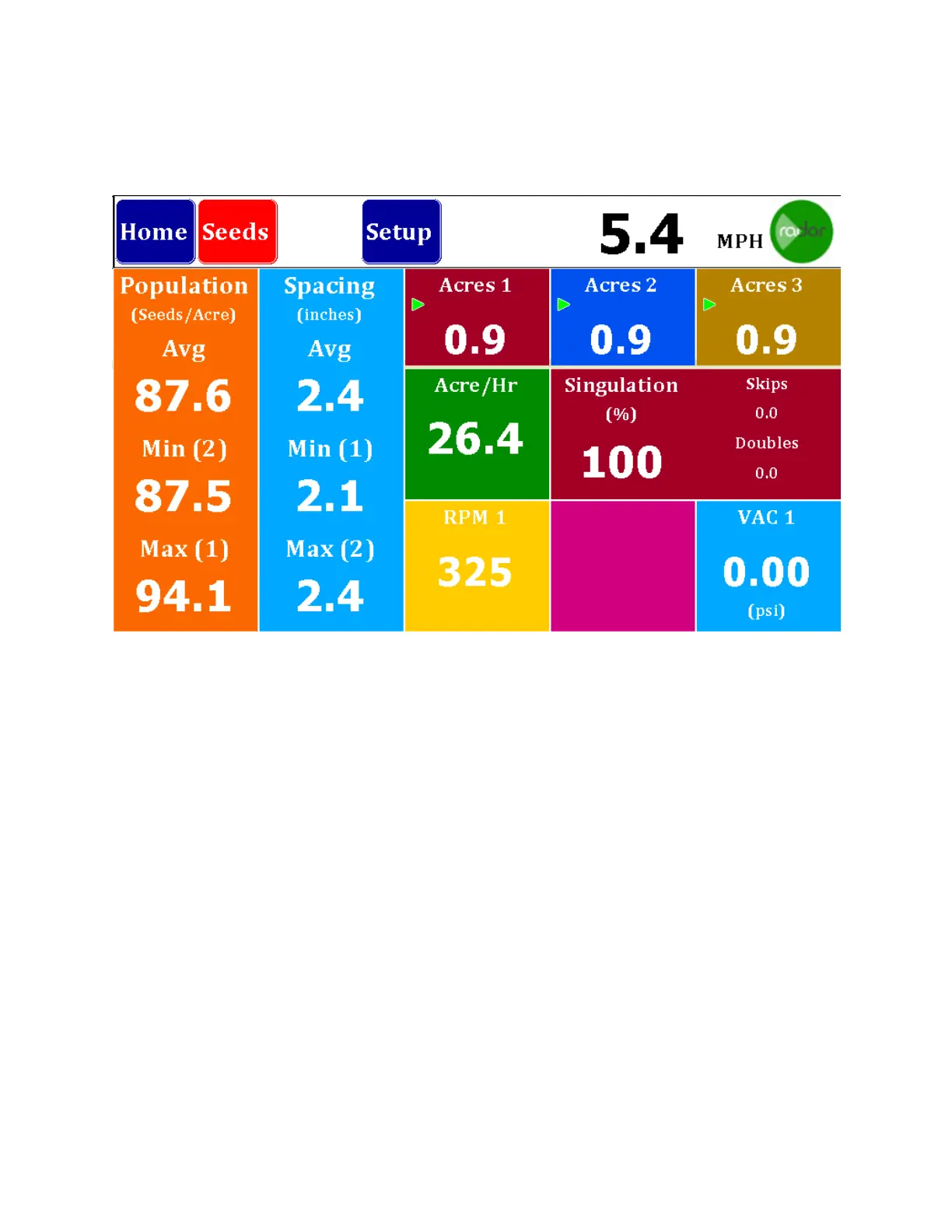
The Seeds Dash Screen gives a quick overview of the operation. Shown at left is
Population in Seeds/Acre with the Average, the Minimum (Row Number) and Maximum
(Row Number).
Next is Spacing in inches with Average, Minimum (Row Number) and Maximum (Row
Number).
Across the top you will find the acre counters. There are three acre counter memories
in the system and they may be started, stopped or reset by holding the button down for
three seconds to bring up a Start/Stop and Reset button.
On the center right is the Acre/Hr. reading and the Singulation screen showing skips and
doubles.
The bottom row right is for accessories. If you have RPM sensors, they will show and
sequence through as many as you have. (Limit alarms may be set for these). Also
shown is VAC and that too will sequence through as many Vacuum sensors as you
have up to three. (Limit alarms may be set here as well).



 To Next Page