3.4Firmwareupgrade
In order to facilitate users to upgrade the firmware version of TRACER MINI and bring to
customers more perfect experience, TRACER MINI provides the hardware interface for firmware
upgrade and the corresponding client software.
UpgradePreparation
AgilexCAN debugging moduleX 1
Micro USB cableX 1
TRACER MINI chassisX 1
A computer (WINDOWS OS (Operating System))X 1
UpgradeProcess
1.Plug in the USBTOCAN module on the computer, and then open the
AgxCandoUpgradeToolV1.3_boxed.exesoftware (the sequence cannot be wrong, first open the
software and then plug in the module, the device will not be recognized).
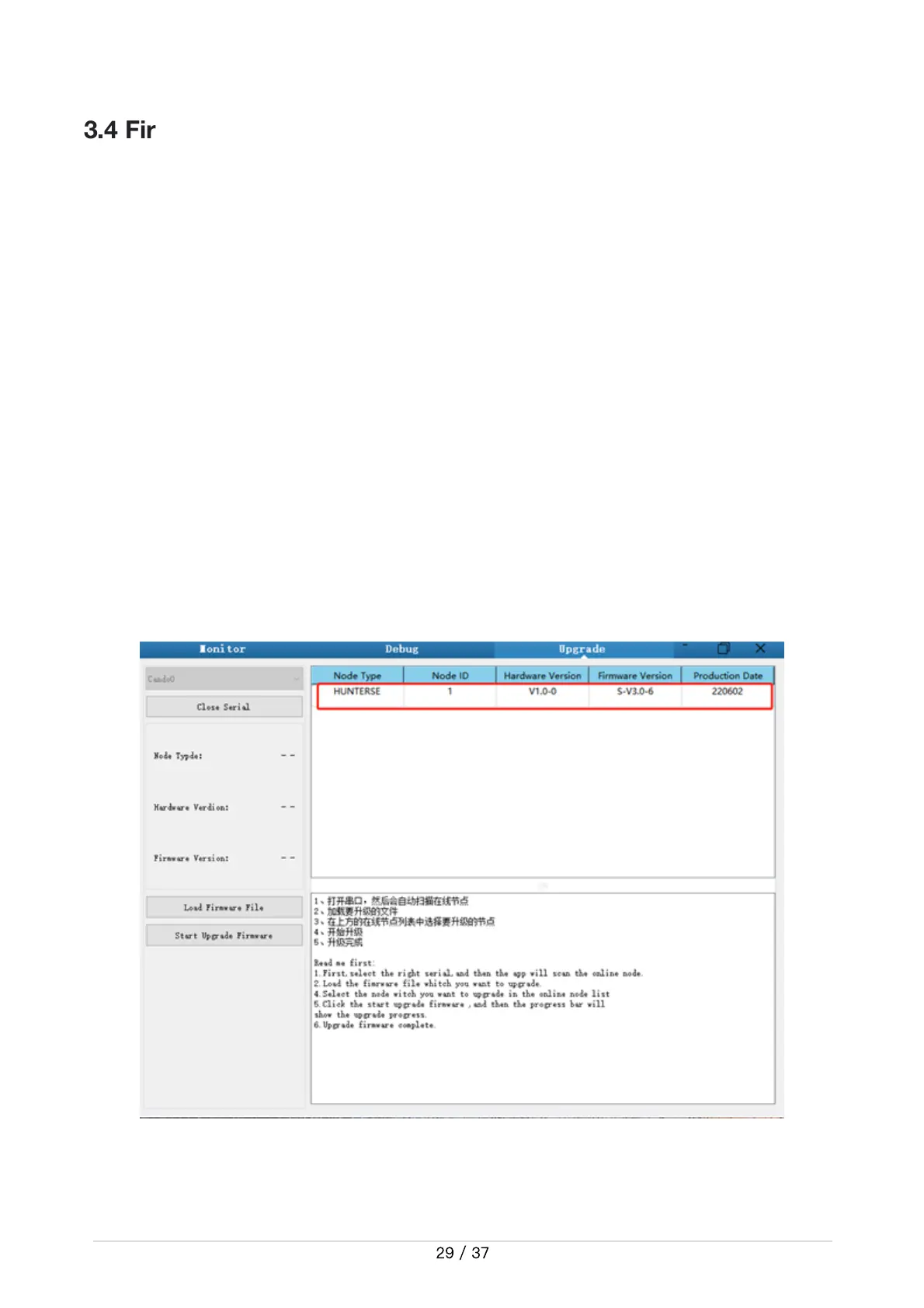
2.Click the Open Serialbutton, and then press the power button on the car body. If the connection
is successful, the version information of the main control will be recognized, as shown in the figure.
3.Click the Load Firmware Filebutton to load the firmware to be upgraded. If the loading is
successful, the firmware information will be obtained, as shown in the figure
●
●
●
●


 To Next Page