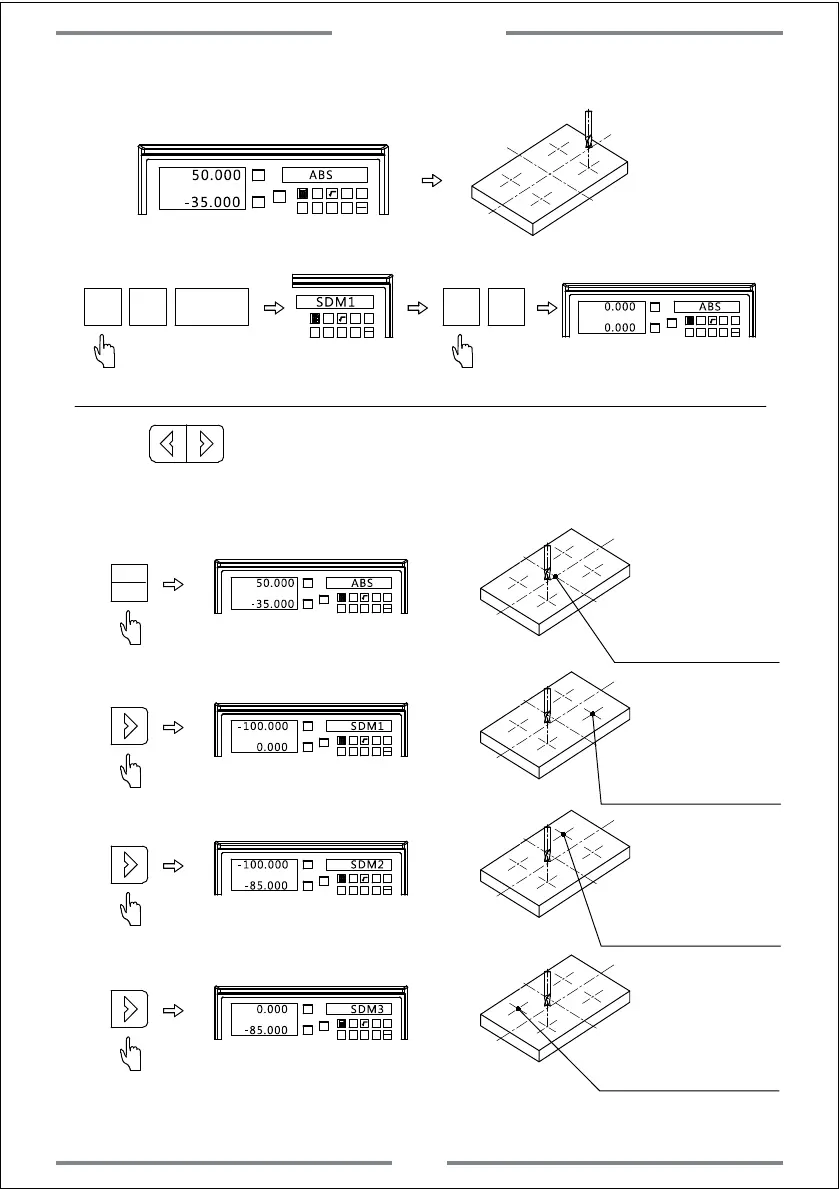
Step 2, Set the first machining point.(Same operation to the following point)
Move the table to be X=50,Y=-35
X0
Y0
X
1 32
-
+
CLS Arc
sin
TOOL
50.000
ABS
-35.000
SDM
1
NT
1 32
-
+
CLS Arc
sin
TOOL
SDM1
Enter SDM1
X0 Y0
X0
Y0
X
1 32
-
+
CLS Arc
sin
TOOL
0.000 ABS
0.000
Zero
Complete the set
of first point
Same operation to SDM2,SDM3,SDM4
Press to check whether the SDM coordinate is correct.
X0
Y0
X
1 32
-
+
CLS Arc
sin
TOOL
50.000 ABS
-35.000
(checking SDM4 coordinate value basing ABS,SDM1,SDM2,SDM3)
Enter ABS coordinate
The coordinate value
of SDM4 is basing ABS
X0
Y0
X
1 32
-
+
CLS Arc
sin
TOOL
-100.000 SDM1
0.000
Enter SDM1
The coordinate value
of SDM4 is basing SDM1
X0
Y0
X
1 32
-
+
CLS Arc
sin
TOOL
SDM2
-85.000
Enter SDM2
The coordinate value
of SDM4 is basing SDM2
X0
Y0
X
1 32
-
+
CLS Arc
sin
TOOL
0.000 SDM3
-85.000
Enter SDM3
The coordinate value
of SDM4 is basing SDM3
-100.000
ABS
INC
Basic Function
19



 To Next Page