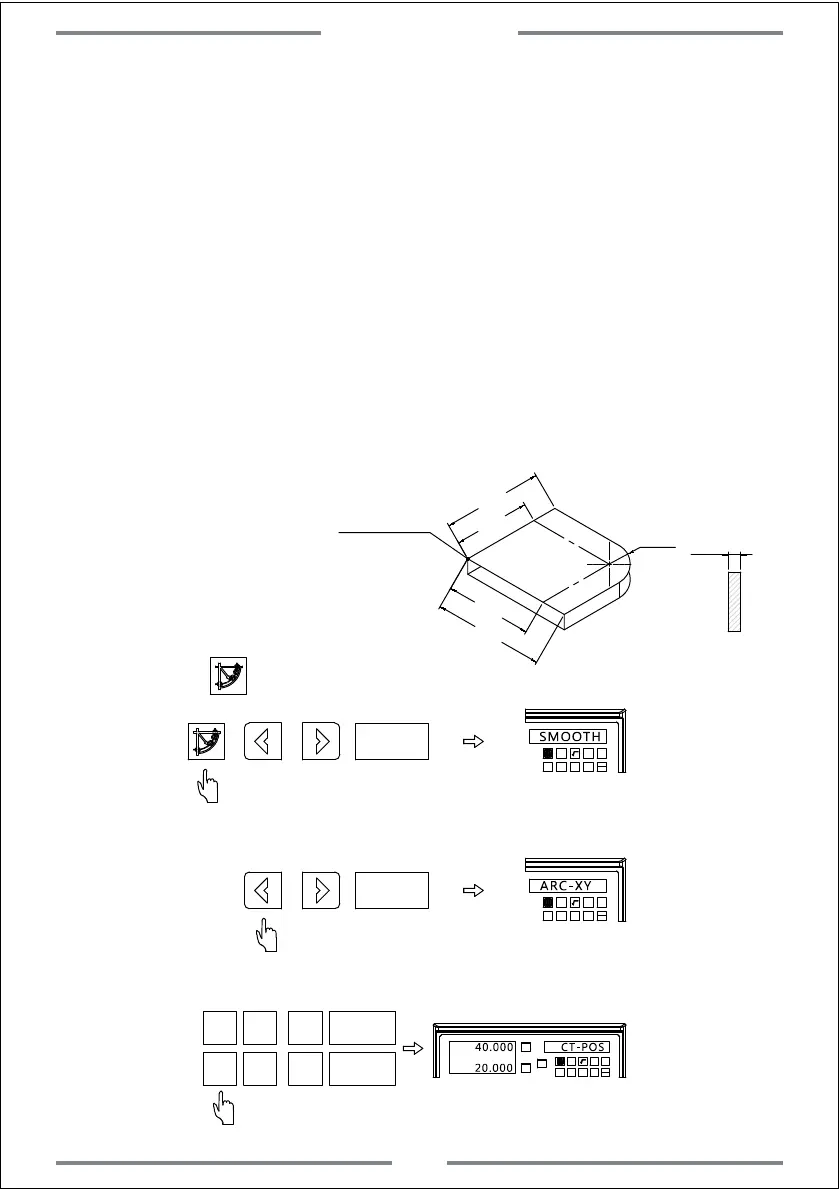
Example: Machining the arc
shown as the right figure.
Machining Steps
1. Locate the zero point of work-piece and zero the value of DRO
2. Enter R function and select smooth R(SMOOTH)
3. Select the plane(ARC-XY,ARC-XZ,ARC-YZ)
4. Input the circle center coordinate(CT-POS)
5. Input the arc radius(R)
6. Input the tool diameter(TL-DIA)
7. Input maximum cutting amount(MAX-CUT)
8. Input the arc starting angle(ST-ANG)
9. Input the arc end angle(ED-ANG)
10. Select the arc machining plane to be RAD+RL or RAD-RL
(Convex or Concave)
∅6
Tool
Step 1: Locate the zero point of
work-piece and zero the value of DRO.
Step 2: Press to enter R function and select smooth R
T
1 32
-
+
CLS Arc
sin
TOOL
SMOOTH
Step 3: Select the machining pane as XY(2 axis DRO contains only XY plane)
T
1
32
-
+
CLS Arc
sin
TOOL
ARC-XY
Step 4: Input the circle center coordinate
X
0
T
Y
0
T
X0
Y0
X
1 32
-
+
CLS
Arc
sin
TOOL
40.000 CT-POS
20.000
4
2
R20
Machining point
40
20
40
60
Special Function
28



 To Next Page