5 | AC Series - Quick Start Guide
Creating Schedules
Schedules can be created for Doors, Floors, Inputs, Outputs, and Users. Schedules are used to control which users have access to
particular areas and when.
To create a schedule, navigate to Scheduling, Schedules.
Door Schedule: Grants or restricts access to a door based on the set time.
Floor Schedule: Grants or restricts access to a oor based on the set time.
Input Schedule: Enables or disables an input based on a set time.
Output Schedule: Enables or disables an output based on a set time.
User Schedule: Grants or restricts access to specied users based on the set time.
Note: When creating Access Privilege Groups, the User Schedule will be used to restrict access to users. Access Privilege Groups
are covered on page nine of this document.
Click the tab the corresponds to the type of schedule to be created, then click
+Add
.
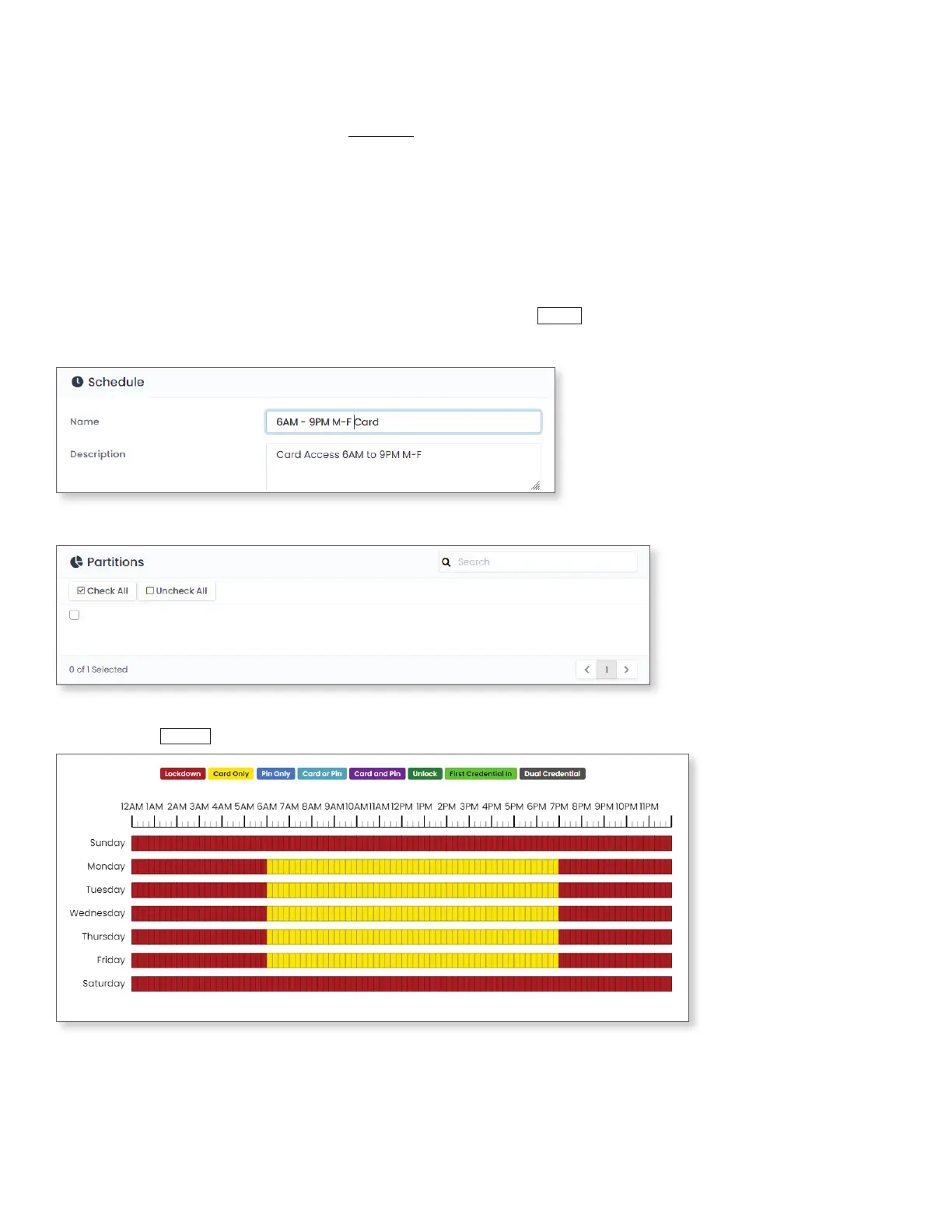
Give the schedule a Name and a detailed Description.
Select the Partition(s) the schedule will used for.
Partition Name
Select the access to schedule. Click and drag the mouse over the date and time access is being set for. Once the schedule is
congured, click
+Save
.





 To Next Page