VF, DHT, AES Series Manual |
Refrigerated Air Dryer User Manual
15
SECTION 5: CONTROLLERS (AES SERIES)
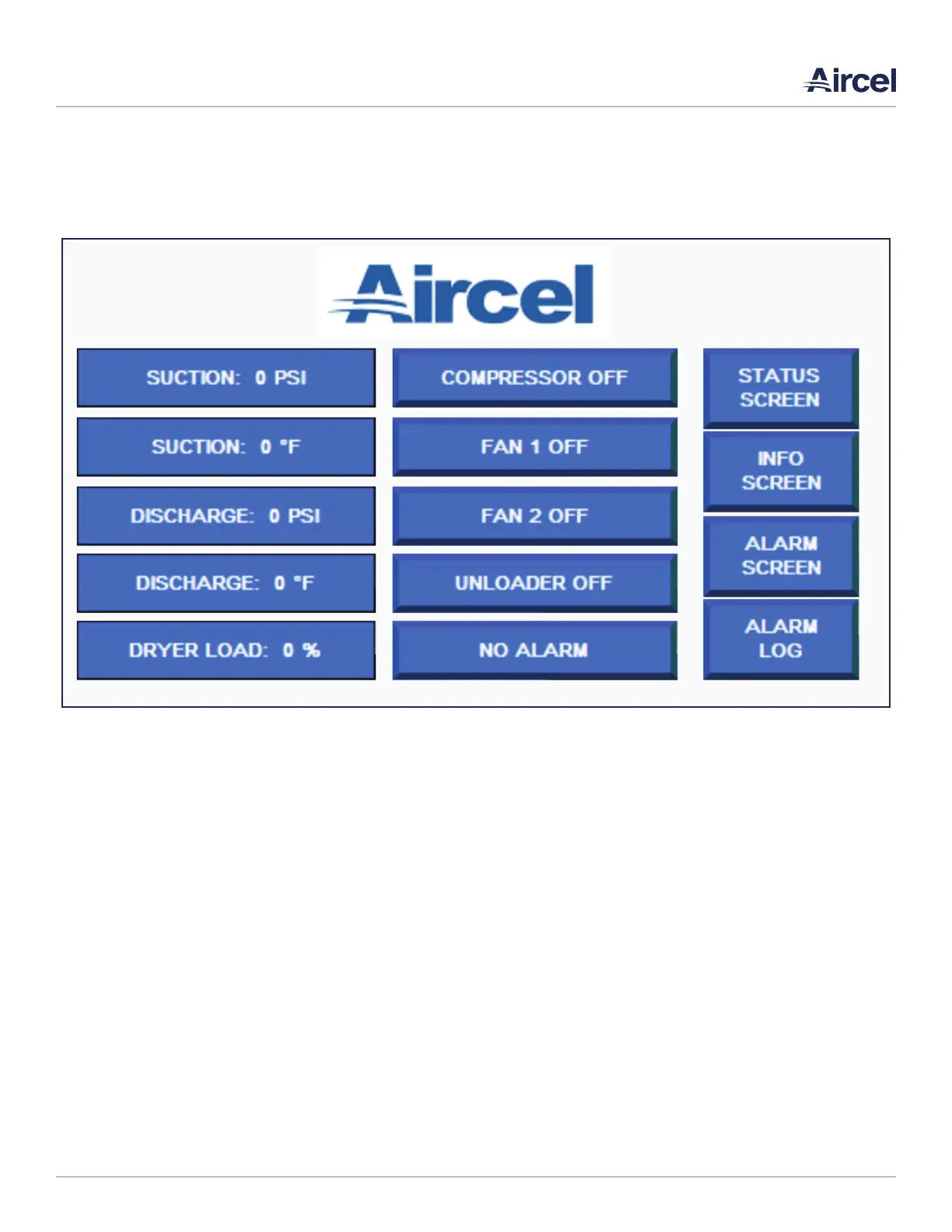
5.1 Home Screen
The main screen allows the user to view critical operating
conditions of the unit: suction and discharge pressures.
suction and discharge temperatures, dryer load, compressor
off/on status, fans off/on status, unloader off/on status as
well as navigation to the other screens. The functions are as
follows:
• STATUS SCREEN: Navigates to the status screen
• INFO SCREEN: Navigates to the info screen
• ALARM SCREEN: Navigates to the alarm status screen
• ALARM LOG: Navigates to the alarm log screen
• SUCTION PSI: Shows the suction pressure of the unit
• SUCTION °F: Shows the suction temperature of the unit
• DISCHARGE PSI: Shows the discharge pressure of the unit
• DISCHARGE °F: Shows the discharge temperature of the
unit
• DRYER LOAD %: Shows the percentage of the dryer load
• COMPRESSOR OFF/ON: Indicates whether the compressor
is off or on. Green indicates ON.
• FAN 1 OFF/ON: Indicates whether fan 1 is off or on. Green
indicates ON.
• FAN 2 OFF/ON: Indicates whether fan 2 is off or on. Green
indicates OFF.
• UNLOADER OFF/ON: Indicates whether the unloader is off
or on. Green indicates ON.
• NO ALARM: Displays the alarm indication. When NO
ALARM is indicated, the unit is in working order. When
an alarm is active, the indication will be red and will
read COMMON ALARM. To see which alarms are active,
navigate to the ALARM SCREEN. To view when the alarm
occurred, navigate to the ALARM LOG.
FIGURE 5-1: Home Screen



 To Next Page