24
Setting up AC Control
5.6.4 AC Detail Settings
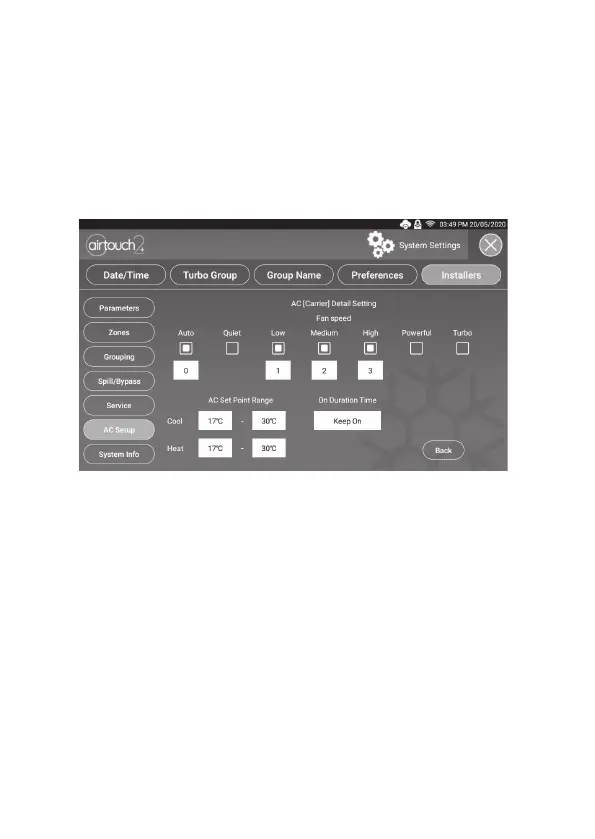
The detail settings will have the exibility to set AC set point ranges and to
congure fan speed options for various AC models and brands.
5.6.3 Choose AC Control Thermistor
AC control temperature can be measured from AC (its wall controller or return
air sensor) or the AirTouch 2+ console sensor. When there are two consoles
installed in the system, the AC control sensor can be AC, Touchpad1, Touchpad2
or average of the two touchpad sensors.
Please check the commissioning notes for each model and ensure the AC unit is
enabled for remote temperature sensor control. Otherwise, the selected console
sensor will not be used for AC control as expected even though the console of
AirTouch 2+ will show the measured temperature from the console sensor.
5.6.5 Congure AC Fan Speed Options
AirTouch 2+ can automatically recognise the total fan speed options from the
indoor unit in most cases. In rare cases, the installer may need to manually set the
fan speed options to match the actual fan speed options of the AC unit. First tick
the fan speed names and then change the fan speed matching number.
As in the image above, the Low fan speed number may be changed to 1, Medium
to 2, High to 3 and Powerful to 4.
5.6.6 On Duration Time
This setting is to enable AC On duration time. When it’s set to a given time
(1-8 hours), the AC unit will be on for that period of time since it’s turned on
and then turn o automatically.


 To Next Page