EasyManua.ls Logo

AirTrack S2 - LED and Beeper Indications

AirTrack S2
40 pages
Print Icon
To Next Page IconTo Next Page
To Previous Page IconTo Previous Page
Loading...
Quick Reference
Guide
23
LED and Beeper
Indications
Contaminants
Spray/rain
Dust/particulates
IEC
529-IP42
(IP52 S2 model
only)
ESD
Level
16
KV
Reg
u
l
ator
y
Electrical
Safety
UL 60950, CSA C22.2 No. 60950, IEC
60950
EMI/RFI
North America (FCC)
:
Part 15 Class B; Canada
(
IC)
: ICES-
003 Class B; Russia
(
EAC); European Union
EMC
Directive;
VCCI-Japan; Korean KCC;
Taiwan EMC
(BSMI);
Australia (RCM); Mexico
(NOM)
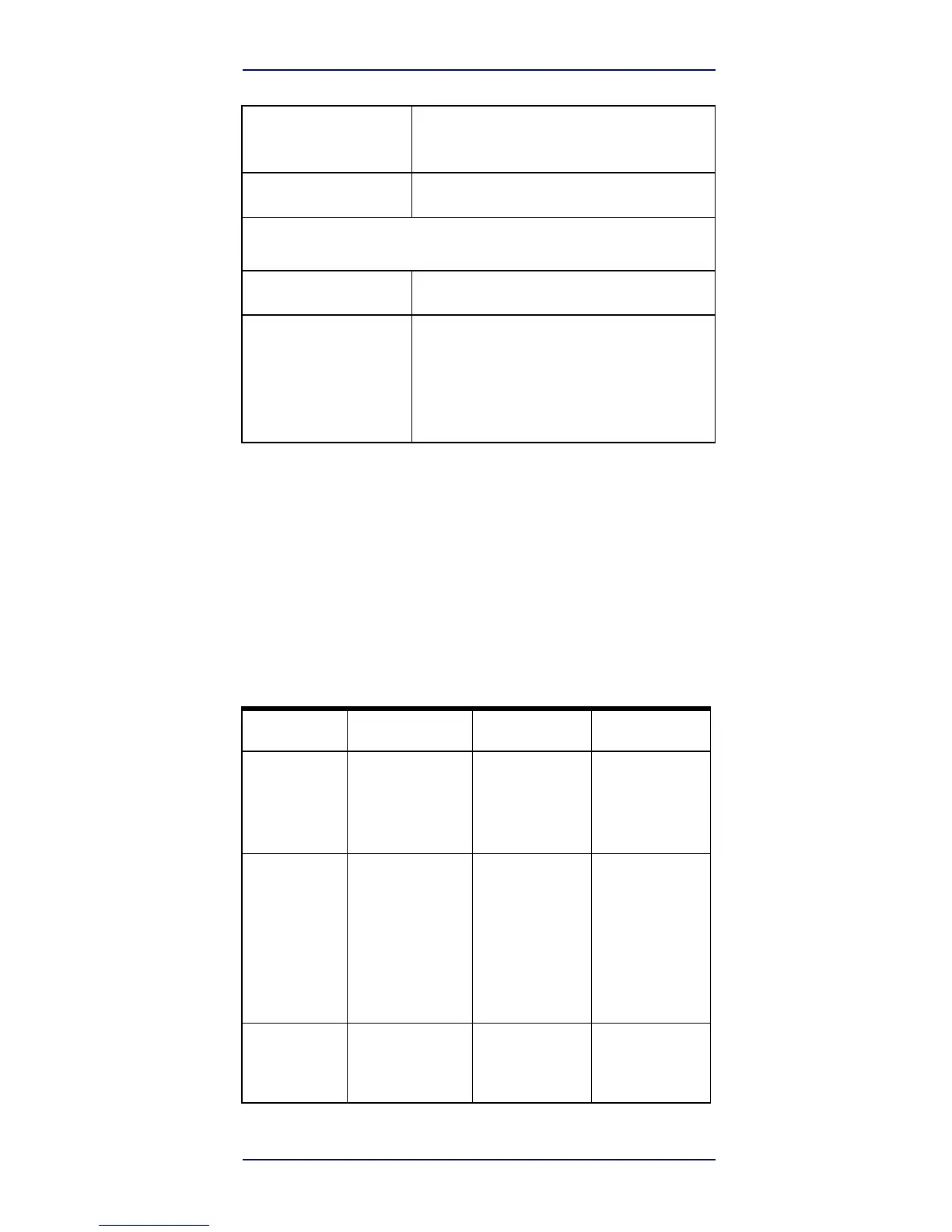
LED and Beeper Indications
The reader’s beeper sounds and its top multicolour LED
illuminates to indicate various functions or errors on the
reader. An optional “Green Spot” also performs useful
functions. The following tables list these indications. One
exception to the behaviors listed in the tables is that the
reader’s functions are programmable, and so may or may
not be turned on. For example, certain indications such as
the power-up beep can be disabled using programming bar
code labels.

Indicator
Description
LED
Beeper
Power-up
Beep
The reader is in the
pro
cess of
powering-
up.
Reader beeps
four
times at highest
fre
quency and
volume
upon
power-up.
Good Read
Beep
A label has been
suc
cessfully scanned
by
the
reader.
LED behavior for
this
indication is
configu
rable via the
feature
“Good Read:
When
to Indicate”
(see the PRG for
infor
mation.)
The reader will
beep
once at current
fre
quency,
volume,
mono/bi-tonal
set
ting
and
duration
upon
a
successful
label
scan.
ROM
Failure
There is an error in
the
reader's
software/pro
gramming
Flashs
Reader sounds
one
error beep at
highest
volume.