4
A-MIP 210 V1.06
Installation
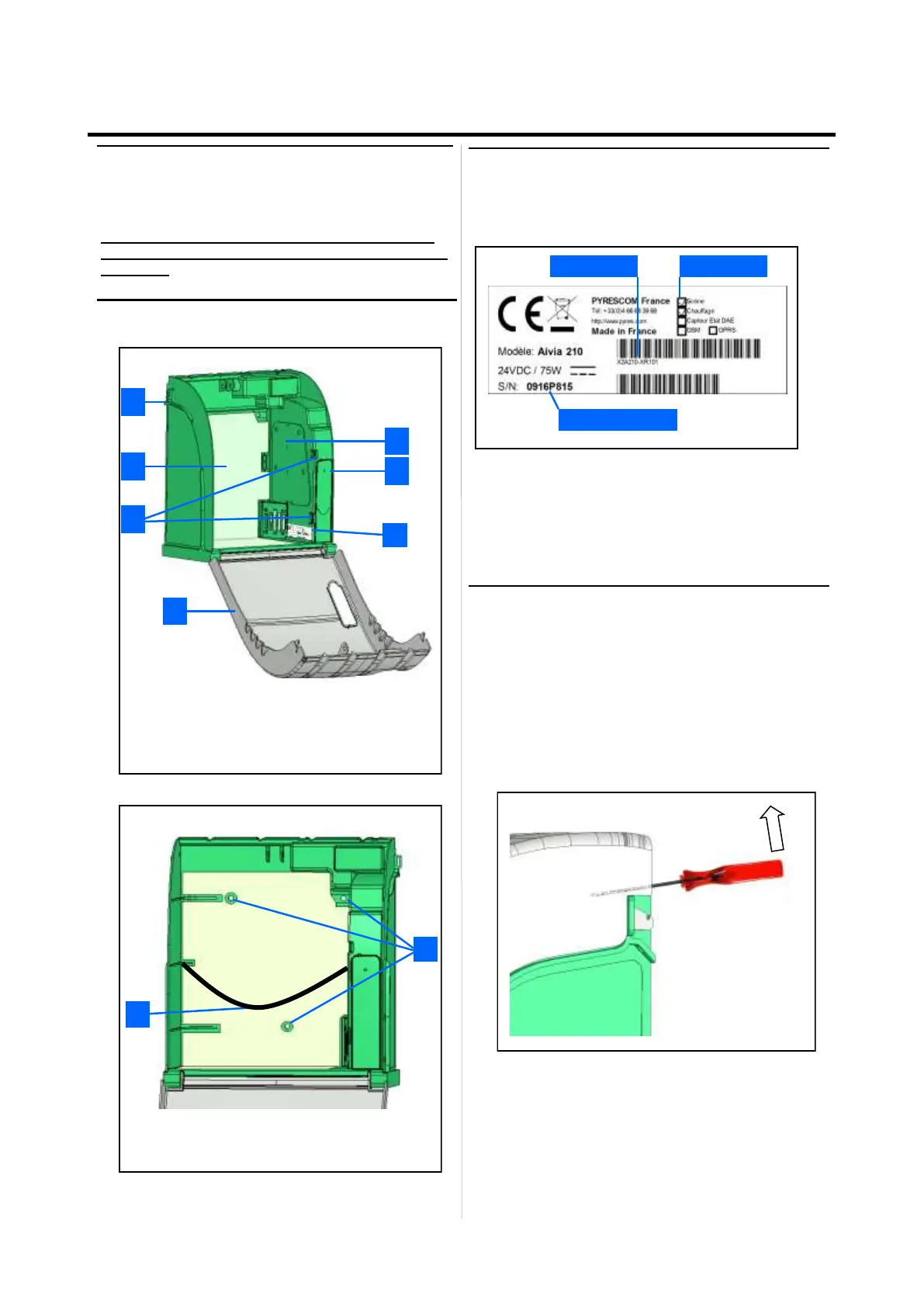
Identification plate
• The identification plate is sticked inside the Aivia
• In the event you need to join the customer service or
your partner, make sure you are able to provide the Aivia
reference and serial number.
First opening
• To open the Aivia door before it is fixed on the wall,
use a small screwdriver.
• Slip the screwdriver between the door and the chassis
of the Aivia.
• Pull up the screwdriver, taking care to not leave marks
on the Aivia.
• Repeat on the other side of the Aivia.
Serial number
Reference Options
Important
Read this manual with caution before setting up and
using the Aivia.
Never install Aivia under direct sunlight exposure.
You risk exposing the defibrillator to excessive tem-
peratures.
Aivia presentation
1 Electronic compartment.
2 Light sensor.
3 Seals passageway
4 Heating film *.
5 Night and alert indicators.
6 Door
7 Identification plate. * Option
1
2
4
3
6
5
7
9
8
8 Fixing holes.
9 AED holding sandow .


 To Next Page