7
A-MIP 210 V1.06
Installation
Installing the AED
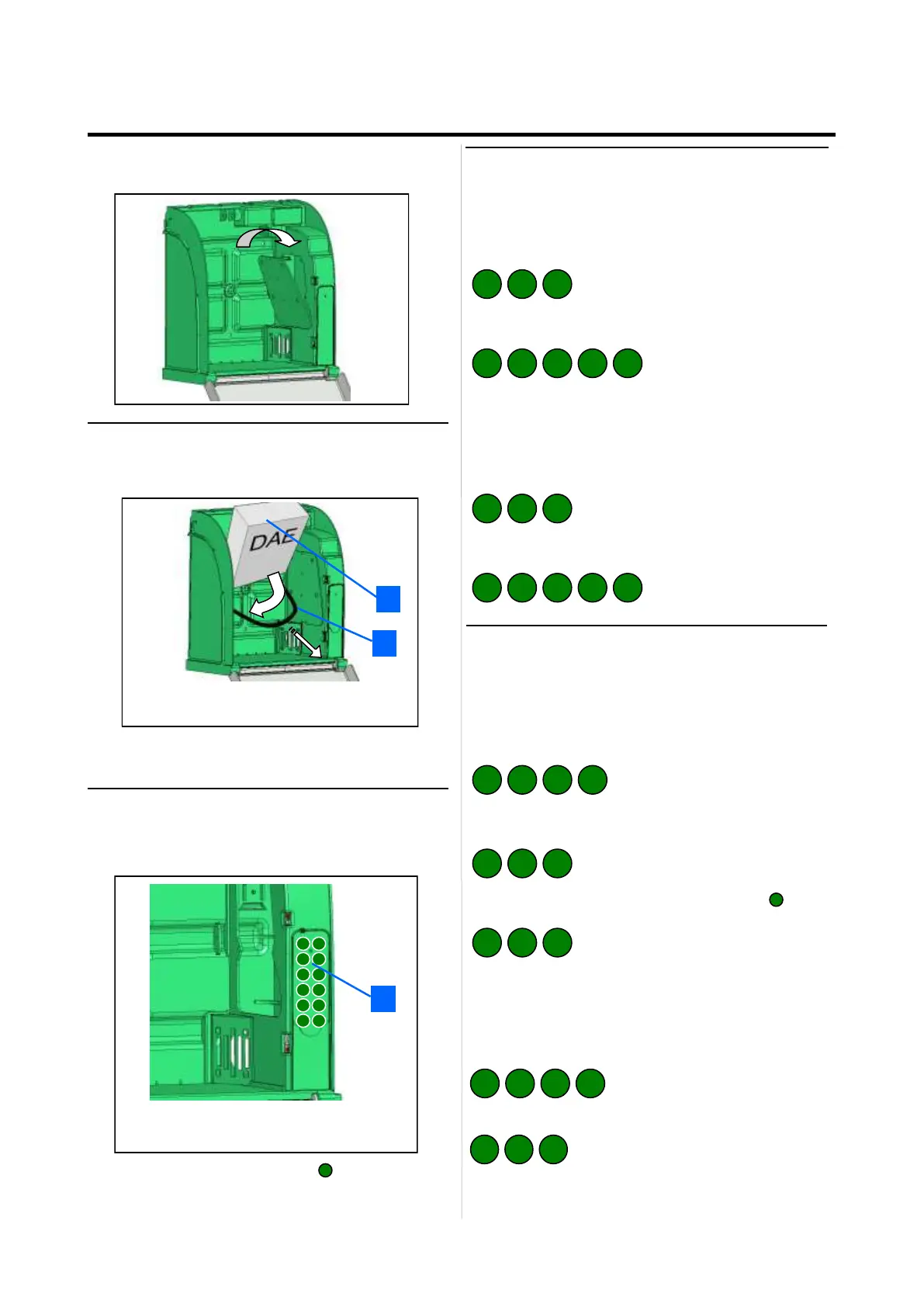
• Pull the holding sandow and insert the AED behind the
sandow.
• The sandow allow for a simple extraction of the AED
while ensuring the holding of the AED.
2
1
1 AED to insert vertically.
2 AED holding sandow.
Setting up the Aivia
• The Aivia is set up in Maintenance mode. For that
matter, energize the Aivia, door opened .
• All the entries are validated by the key .
An acute beep validates the entry whereas a grave beep
signals an invalid entry.
1 Aivia keyboard
1 2
3 4
5 6
7 8
9 0
C
1
1 A
Alert temperatures
• Low temperature alert entry (Heating option) :
If this thresold is matched, The aivia will blink 4 times to
indicate a temperature alert.
Type the menu code 101, then validate :
Enter the low temperature alert thresold( e.g. 10°C)
You can enter a negative temperature using the key
• High temperature alert entry (Heating option) :
If this thresold is matched, The aivia will blink 4 times to
indicate a temperature alert.
Type the menu code 102, then validate :
Enter the high temperature alert thresold( e.g. 35°C)
C
10
1 0
C 2
3 5
1
2 0
1
4 0
3 3 3 3
3 0
2 2 2 2
Door opening codes
• Modifiying the user code :
The user code allows the opening, it is by default set on
0000.
Type the menu code 03, then validate :
Type the new user code on 4 digits, then validate ( e.g.
2222) :
• Modifying the maintenance code :
The maintenance code allows the opening, and once
opened, the Aivia set up. The default value is 1111.
Type the menu code 04, then validate :
Type the new maintenance code on 4 digits, then
validate ( e.g. 3333) :
• Put back the hatch, inserting the lower part first.
• Screw the hatch fixing screw using a cruciform screw-
driver.


 To Next Page