ENGLISH
20
Setting up the remote control unit
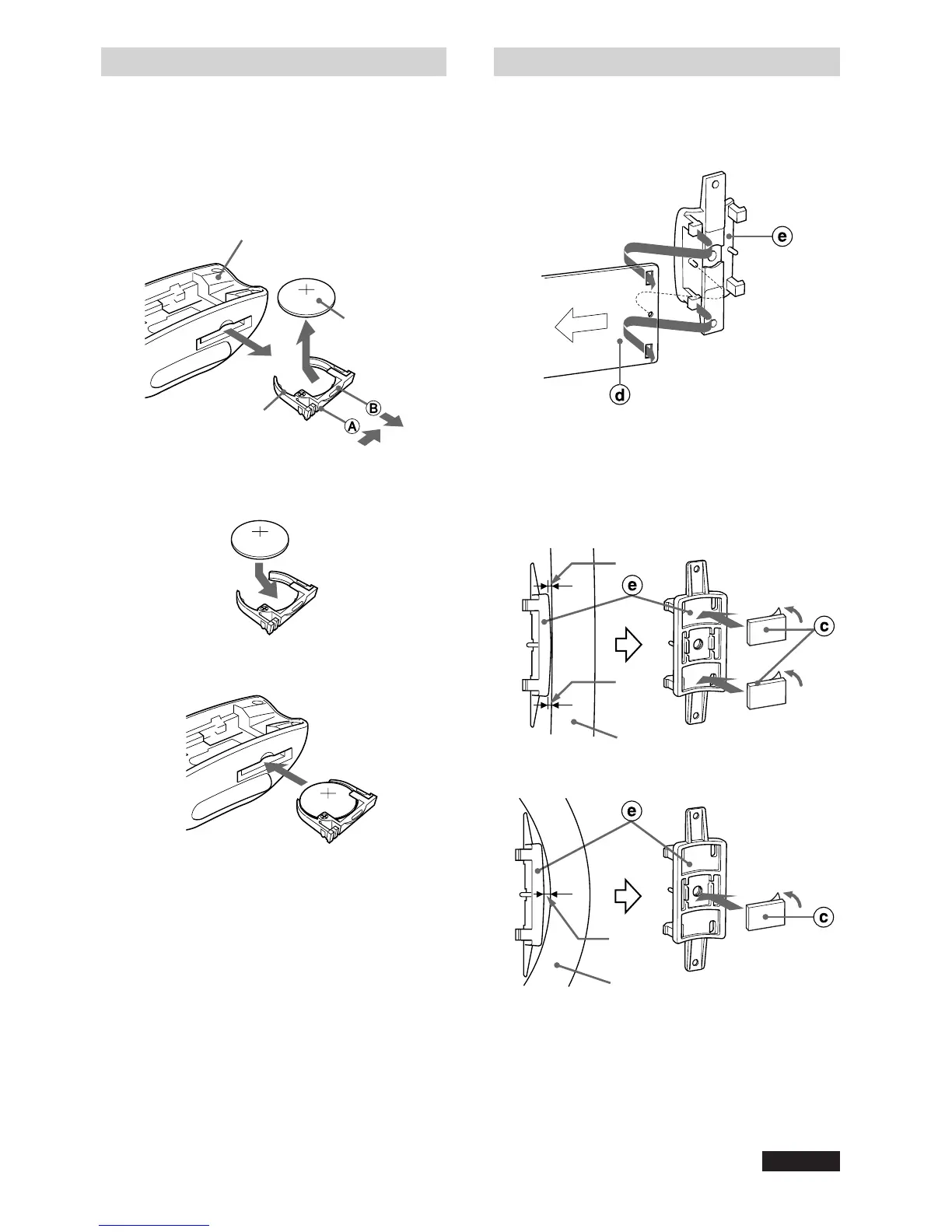
Replacing the battery
1 Pull out the battery holder, gripping the
claw B while pressing the groove A to
the right to remove the lithium battery.
2 Install a new lithium battery with the +
side facing upward in the battery holder.
3 Push the battery holder into the remote
control unit until it clicks.
CAUTION
•Keep the lithium battery out of the reach of
children. If swallowed, consult a physician
immediately.
• To prevent a short circuit, never pinch the battery
with pliers, etc.
Steering-wheel-mounted
remote control unit
Lithium battery
(CR2025)
Battery holder
Gap
Steering wheel
Gap
Steering wheel
Gap
Installing the remote control unit
Installation in a vehicle with left-hand drive
1 Attach the belt d to the inner belt
holder e.
Note
If the inner belt holder e does not fit the
steering wheel, attach the cushion c to the
belt holder as illustrated.
Large steering wheel
Small steering wheel
continued



 To Next Page