EasyManua.ls Logo

Akai AP-Q310 - Page 49

Akai AP-Q310
53 pages
Print Icon
To Next Page IconTo Next Page
To Previous Page IconTo Previous Page
Loading...
No.
8
MODEL
AP-041/C
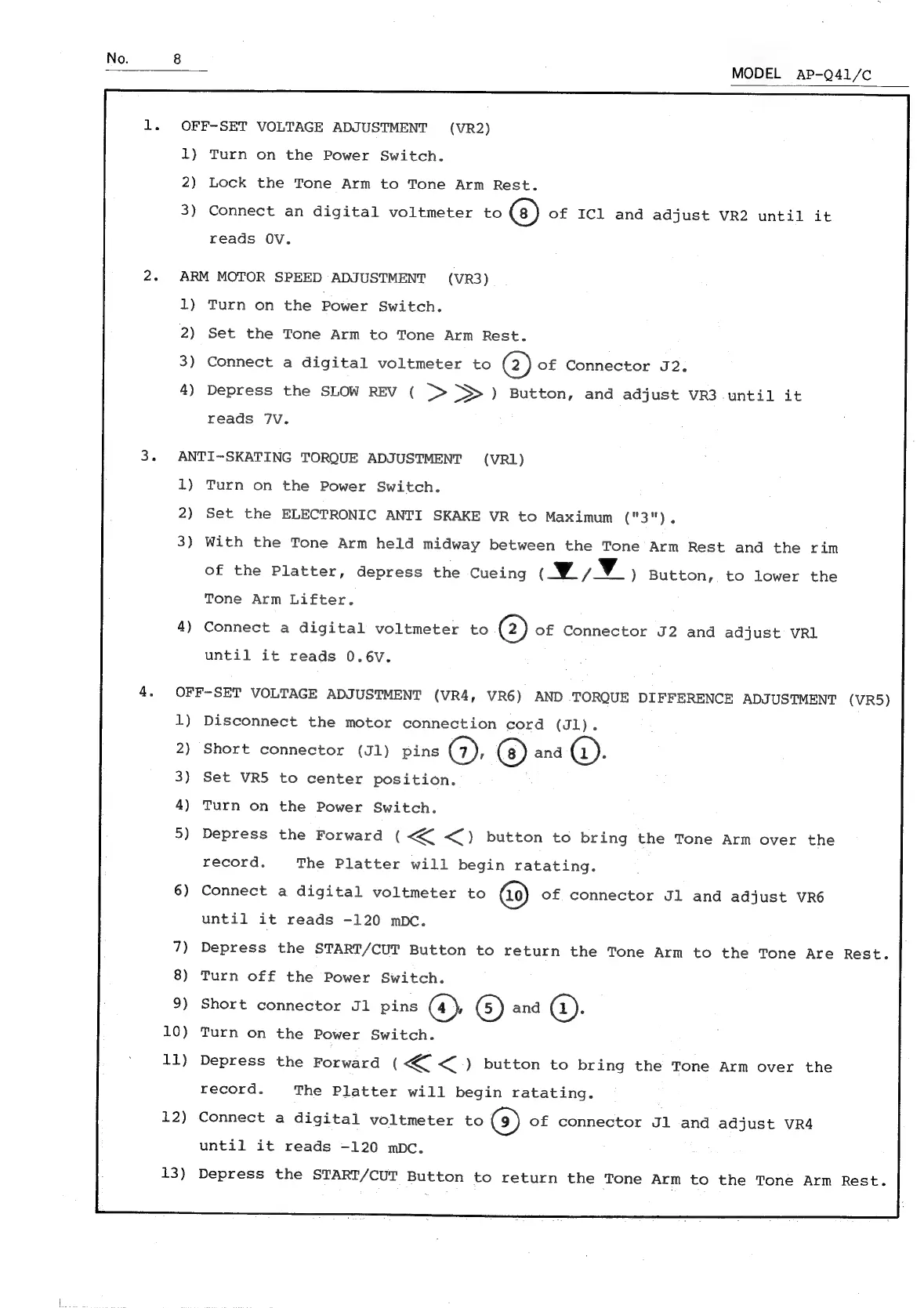
OFF-SET
VOLTAGE
ADJUSTMENT
(VR2)
1)
2)
3)
Connect
an
digital
voltmeter
to
of
ICl
and
adjust
VR2
until
it
Turn
on
the
Power
Switch.
Lock
the
Tone
Arm
to
Tone
Arm
Rest.
reads
OV.
ARM
MOTOR
SPEED
ADJUSTMENT
(VR3)
1)
Turn
on
the
Power
Switch.
2)
Set
the
Tone
Arm
to
Tone
Arm
Rest.
3)
Connect
a
digital
voltmeter
to
@)
of
Connector
J2.
4)
Depress
the
SLOW
REV
(
>>
>>>)
Button,
and
adjust
VR3
until
it
reads
7V.
ANTI-SKATING
TORQUE
ADJUSTMENT
(VR1)
1)
Turn
on
the
Power
Switch.
2)
Set
the
ELECTRONIC
ANTI
SKAKE
VR
to
Maximum
("3"),
3)
With
the
Tone
Arm
held
midway
between
the
Tone
Arm
Rest
and
the
rim
of
the
Platter,
depress
the
Cueing
(w/F¥_)
Button,
to
lower
the
Tone
Arm
Lifter.
4)
Connect
a
digital
voltmeter
to
(2)
of
Connector
J2
and
adjust
VRL
until
it
reads
0.6V.
OFF-SET
VOLTAGE
ADJUSTMENT
(VR4,
VR6)
AND
TORQUE
DIFFERENCE
ADJUSTMENT
1)
Disconnect
the
motor
connection
cord
(Jl).
2)
Short
connector
(J1)
pins
(7),
and
().
3)
Set
VR5
to
center
position.
4)
Turn
on
the
Power
Switch.
5)
Depress
the
Forward
(
<<
<)
button
to
bring
the
Tone
Arm
over
the
record,
The
Platter
will
begin
ratating.
6)
Connect
a
digital
voltmeter
to
of
connector
Jl
and
adjust
VR6
until
it
reads
-120
mpc.
7)
Depress
the
START/CUT
Button
to
return
the
Tone
Arm
to
the
Tone
Are
Rest.
8)
Turn
off
the
Power
Switch.
9)
Short
connector
J1
pins
(4);
G)
and
(a):
10)
Turn
on
the
Power
Switch.
11)
Depress
the
Forward
(<<
<)
button
to
bring
the
Tone
Arm
over
the
record.
The
Platter
will
begin
ratating.
12)
Connect
a
digital
voltmeter
to
(9)
of
connector
Jl
and
adjust
VR4
until
it
reads
-120
mpc.
Depress
the
START/CUT
Button
to
return
the
Tone
Arm
to
the
Tone
Arm
Rest.

Related product manuals